

Exit
  • Global community
    • Language:
      • Deutsch
      • English
      • Español
      • Français
      • Português
  • 日本語コミュニティ
  • 한국 커뮤니티
0

Does InDesign have color palettes like Illustrator does?

New Here ,
Aug 04, 2020 Aug 04, 2020

In Illustrator I can easily choose colors by choosing swatch categories like "Web" or "Print" or even by theme like food, environment,  sky colors, etc. Whatever theme or category I choose, I'll have a wide choice of standard colors to choose from. So where is that in InDesign? Is there a simple swatch setting in InDesign or do I have to manually create every color I need? I just want a palette of standard colors that I can choose by clicking on the swatch color (like in illustrator and photoshop).

Also, the few default colors that were loaded in InDesign have disappeared and none of the solutions that I've researched and tried has reset them.  I've wasted so much time,  I'm about to close InDesign and just lay out my document in Illustrator. 


#indesign #swatches
TOPICS
How to
1.8K
Translate
Report
Community guidelines
Be kind and respectful, give credit to the original source of content, and search for duplicates before posting. Learn more
community guidelines

correct answers 3 Correct answers

Guide , Aug 04, 2020 Aug 04, 2020

Have a look at this link:

https://helpx.adobe.com/indesign/using/swatches.html#import_swatches

If you scroll down to (or search for) .ase files, it will tell you how to get new swatches into your files.

Translate
Community Expert , Aug 04, 2020 Aug 04, 2020

InDesign lets you save and load .ase color files into the Swatches panel, but it also uses .acb files which are color book files Pantone, Toyo, Web etc. The .acb files get installed in Applications/Adobe InDesign 2020/Presets/Swatch Libraries, and you access them from New Swatch>Color Mode in the Swatches panel:


Screen Shot 24.png

Translate
Community Expert , Aug 04, 2020 Aug 04, 2020

Also, the few default colors that were loaded in InDesign have disappeared and none of the solutions that I've researched and tried has reset them.


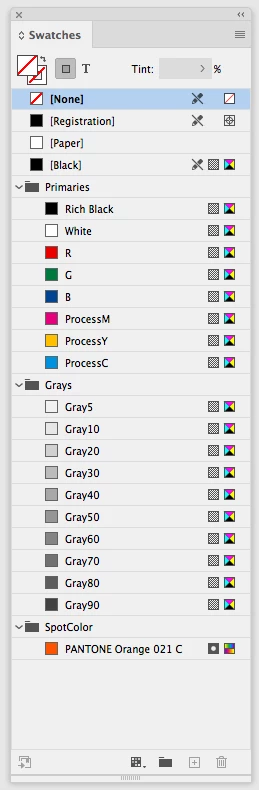
If you trash your preferences you will get the default swatches back, but you can also make your own by closing all docs and creating your swatches. these are my custom defaults:


Screen Shot 25.png


Translate
Guide ,
Aug 04, 2020 Aug 04, 2020

Have a look at this link:

https://helpx.adobe.com/indesign/using/swatches.html#import_swatches

If you scroll down to (or search for) .ase files, it will tell you how to get new swatches into your files.

Translate
Report
Community guidelines
Be kind and respectful, give credit to the original source of content, and search for duplicates before posting. Learn more
community guidelines
Community Expert ,
Aug 04, 2020 Aug 04, 2020

InDesign lets you save and load .ase color files into the Swatches panel, but it also uses .acb files which are color book files Pantone, Toyo, Web etc. The .acb files get installed in Applications/Adobe InDesign 2020/Presets/Swatch Libraries, and you access them from New Swatch>Color Mode in the Swatches panel:


Screen Shot 24.png

Translate
Report
Community guidelines
Be kind and respectful, give credit to the original source of content, and search for duplicates before posting. Learn more
community guidelines
Community Expert ,
Aug 04, 2020 Aug 04, 2020
LATEST

Also, the few default colors that were loaded in InDesign have disappeared and none of the solutions that I've researched and tried has reset them.


If you trash your preferences you will get the default swatches back, but you can also make your own by closing all docs and creating your swatches. these are my custom defaults:


Screen Shot 25.png


Translate
Report
Community guidelines
Be kind and respectful, give credit to the original source of content, and search for duplicates before posting. Learn more
community guidelines