Answered
dot leaders with right tab after title
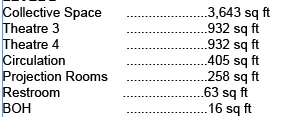
I am trying to add dot leaders preserving the right tab, so that the line ends with "sq ft" as right aligned. I am not sure how to approach this.
Thanks.

I am trying to add dot leaders preserving the right tab, so that the line ends with "sq ft" as right aligned. I am not sure how to approach this.
Thanks.
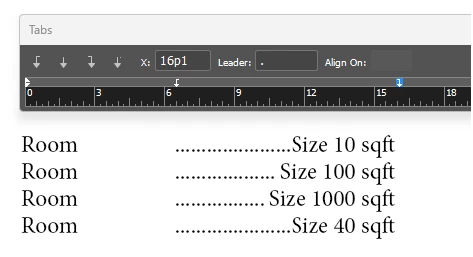
This should be simple: set the right-aligned tab on the right margin, or wherever you want "sq ft" to line up. Specify a dot as the leader character. That will give you a leader from the room description to the start of the size data, aligned neatly to the right.
If you want to preserve the offset start of the leader, use two tabs (ROOM<tab><tab>SIZE). The first can be a conventional left tab with no special characteristics; position it as you like. Apply the leader to the second, right-aligned tab. Adjust all spacing to suit.
Already have an account? Login
Enter your E-mail address. We'll send you an e-mail with instructions to reset your password.
 AdChoices