
caroshka
Inspiring
September 7, 2023
Answered

Drop Cap on right aligned paragraph/title

  • September 7, 2023
  • 4 replies
  • 1011 views

Hi all, 


Need help with figuring out how to get this done:


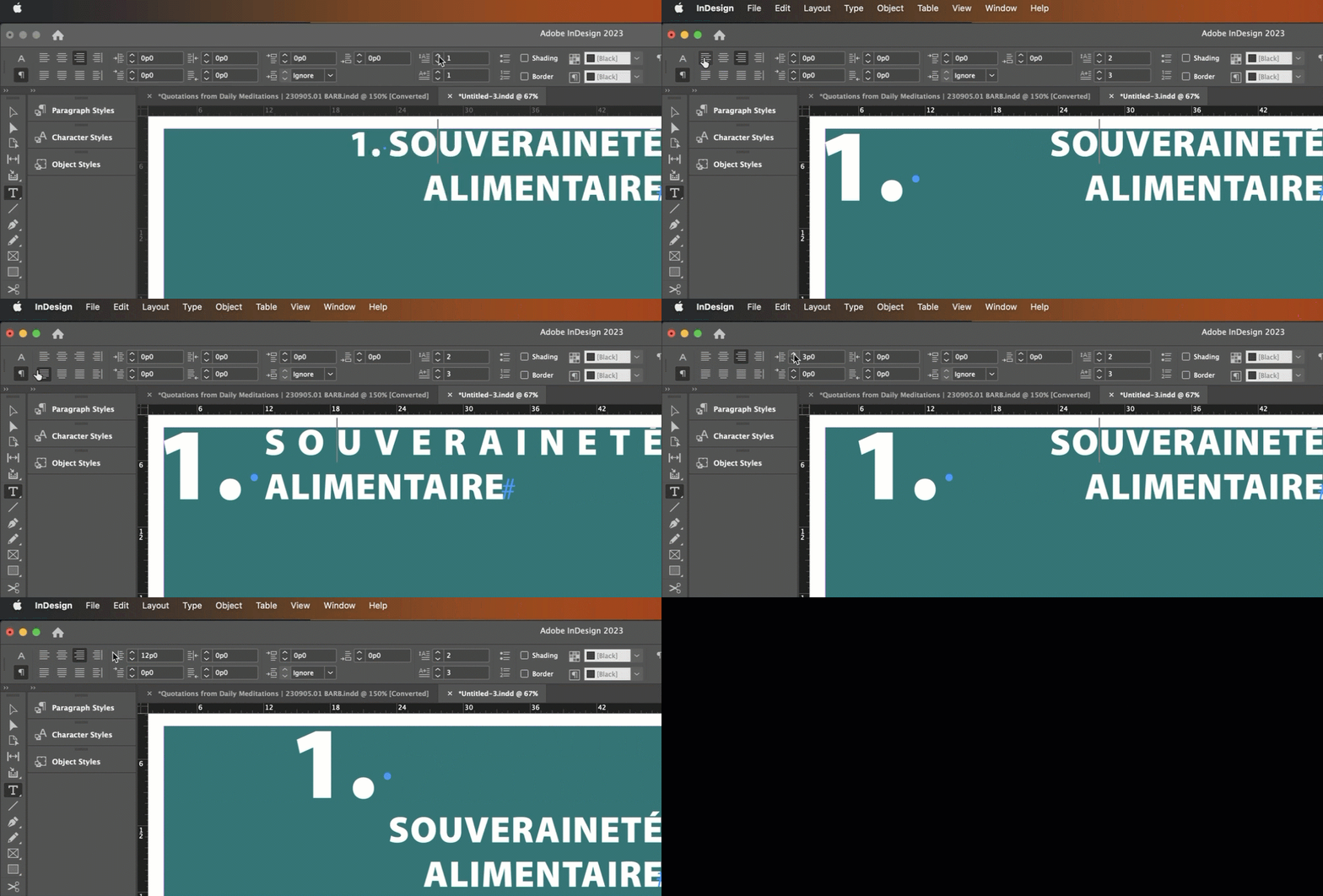
I have a right aligned paragraph style set up, each one is preceeded by chapter number (f.ex. 1. Title).


I want the "1." to be a drop cap, which works fine, but as "side effect" I have this huge gap inbetween my words appear, see screenchot.

  • Left align option is unchecked.
  • There is no other style overriding. 
  • Tried to adjust spacing using with option+arrow keys.
  • Tried removing the space between the dot and next letter.
  • Tried using tracking and kerning, all to no avail...


It only seems to go away when I give up the right side alignment, as soon as I do the text pops back together. 

How do I get rid of it ? What am I not seeing here? 
Hope someone has the answer. 

C
This topic has been closed for replies.
Correct answer Barb Binder

Hi @caroshka:


Drop caps insist on left alignment, no matter what the paragraph alignment is set to. How many chapters will you have? Assuming it's not hundreds, I would go ahead and just manually override this with the left indent.


~Barb

4 replies

Peter Kahrel
Community Expert
Community Expert
September 7, 2023

James's and Barb's suggestions combined produced below script. It simply implements Barb's suggestion to add left indent until it looks good. It could be refined, see how you go.


To use it, first set right-indent in the paragraph style. Then place the cursor in one of the paragraphs that need to be fixed and run the script.


(function () {
  app.scriptPreferences.measurementUnit = MeasurementUnits.POINTS;
  var pstyle = app.selection[0].appliedParagraphStyle;
  var plength;
  var pp = app.selection[0].parentStory.
		paragraphs.everyItem().getElements();
  for (var i = pp.length-1; i >= 0; i--) {
    if (pp[i].appliedParagraphStyle == pstyle) {
      plength = pp[i].lines.length;
      while (pp[i].lines.length === plength) {
        pp[i].leftIndent += 2;
      }
      pp[i].leftIndent -= 2;
    }
  }
}());


Barb Binder
Community Expert
Community Expert
September 7, 2023

Ok, great. Glad you have a working solution. 


~Barb

~Barb at Rocky Mountain Training
Barb Binder
Community Expert
Barb BinderCommunity ExpertCorrect answer
Community Expert
September 7, 2023

Hi @caroshka:


Drop caps insist on left alignment, no matter what the paragraph alignment is set to. How many chapters will you have? Assuming it's not hundreds, I would go ahead and just manually override this with the left indent.


~Barb

~Barb at Rocky Mountain Training
caroshka
caroshkaAuthor
Inspiring
September 7, 2023

Ahhhh, thank you very much. Wish I had known drop caps were that stubborn with th eleft alignement 😉

In fact I was looking for a way to "automate" this as they are recurring title styles and varying lengths, but indenting manually is an option, as luckily there are not hundreds of them. 

Thanks again for your help, much appreciated!

James Gifford—NitroPress
Legend
September 7, 2023

I am not sure drop caps can be used with anything but left alignment. You could simulate it with an anchored text box for the cap, but all application and positioning would have to be manual.


A script or two might be devised to automate some of the work. 

caroshka
caroshkaAuthor
Inspiring
September 7, 2023

Thank you very much! 
Need to deepen my GREP game I think.