Participant
June 28, 2021
Answered

Dull colours when I have RGB on

  • June 28, 2021
  • 2 replies
  • 2533 views

I have RGB transparency setting on in my indesign document. But all the colours seem to be working in CYMK. When I create a new box or anything and I choose a colour, it massively dulls the colour down. I cant figure out why as I have the RGB setting on. Any suggestions?

Correct answer rob day

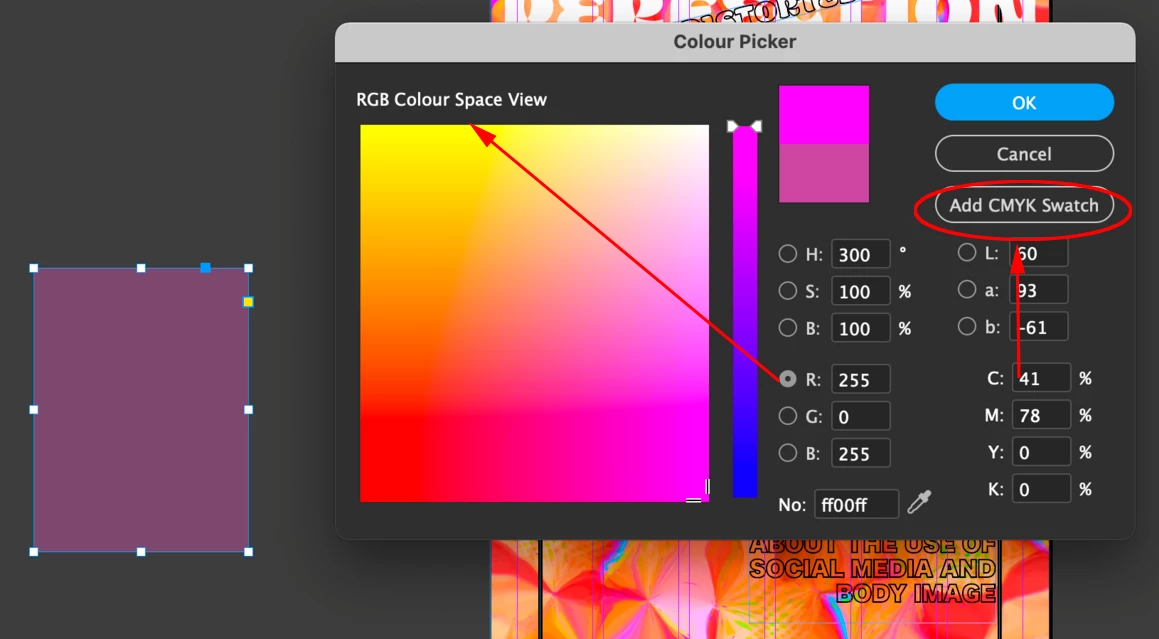
InDesign’s Color Picker is contextual—the color you picked is dependent on where your cursor is in the dialog. If your cursor is in one of the C, M, Y, or K fields the chosen color will be CMYK—note the Add CMYK Swatch button in your capture. If you want the picked color to be RGB, set your cursor in one of the R, G, or B fields. The radio buttons control the picker’s Color Space Views. 
 

2 replies

rob day
Community Expert
rob dayCommunity ExpertCorrect answer
Community Expert
June 28, 2021

InDesign’s Color Picker is contextual—the color you picked is dependent on where your cursor is in the dialog. If your cursor is in one of the C, M, Y, or K fields the chosen color will be CMYK—note the Add CMYK Swatch button in your capture. If you want the picked color to be RGB, set your cursor in one of the R, G, or B fields. The radio buttons control the picker’s Color Space Views. 


J E L
Community Expert
Community Expert
June 28, 2021

@rob day It looks like her color picker is in the RGB space though?

J E L
Community Expert
Community Expert
June 28, 2021

@Mystic_positivity5CBF Here is a video I just made to show picking colors from an image that is CMYK and another that is RGB. The color blocks look the same on my screen. What are you trying that is different?


J E L
Community Expert
Community Expert
June 28, 2021

@Mystic_positivity5CBF A few ideas: have you checked in Bridge (Edit > Color Settings) to see if your Creative Cloud applications are synchronized using the same color settings across all? Did you click an Out of Gamut warning when you created the Swatch (yellow triangle with exclamation point)? Checked your GPU settings?

Participant
June 29, 2021

They arent synced. I am trying to do it in bridge but its not working. Any tips? Also that yellow triangle does come up so how should I change my GPU settings?


J E L
Community Expert
Community Expert
June 29, 2021

@Mystic_positivity5CBF Hmmm, so sorry this isn't fixed for you yet. In InDesign, under Edit > Color Settings, does it show you are Synchronized? If not, what does the warning say? The Out of Gamut warning in the triangle is just telling you that printers can't print the color because it's out of the gamut of CMYK printers. So, if you click on that triangle, the RGB colors will reset values and you'll see the shift in the color, which is something you don't want to do. I thought perhaps that was clicked inadvertently or automatically somehow. For the GPU settings, in InDesign, under Preferences > GPU Performance, if the box is checked, uncheck it. You may need to exit and restart InDesign to see the changes. Please let us know if any of these steps help!
