

dublove
Legend
October 8, 2024
Question

Duplicate Catalogue Issue in InDesign: Caused by Connected Text Boxes?

  • October 8, 2024
  • 2 replies
  • 269 views

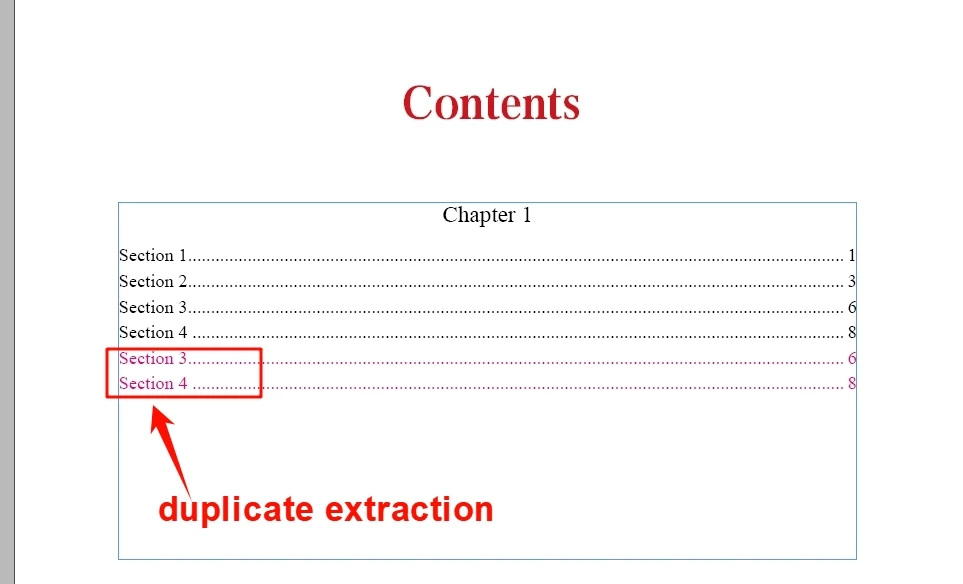
Why are there duplicate catalogues?

There has been a lot of feedback re: the new version of InDesign, running into problems with duplicate extracted catalogues.


My original document was duplicated more than 6 times, this is an example of my simplified version. I've searched for it and suspect that it's the result of multiple text boxes that are connected, with different columns and spans.


It doesn't make sense that a different sub-column should have such a problem


My client provides table that require me to sometimes have to use a two-column layout.


<Title renamed by MOD>


This topic has been closed for replies.

2 replies

Robert at ID-Tasker
Legend
October 8, 2024

@dublove 


I've downloaded your INDD file - updating TOC produces the same error.


After IDMLing your file - have not downloaded your IDML file - updating TOC works correctly:


After downloading your IDML file - TOC updates correctly as well.


Robert at ID-Tasker
Legend
October 8, 2024

I'm still using InDesign 19.3 on Windows 10.


Abhishek Rao
Community Manager
Community Manager
October 8, 2024

Hi @dublove,


Thank you for sharing the details. I'm sorry to hear you're encountering this issue with duplicate catalogues. Could you please let me know the exact version of InDesign you're currently using, along with the details of your operating system? Also, is this happening with only this file, or have you noticed it with other documents as well?


If possible, could you share a screen recording that demonstrates the issue, from when you start working with the file to the point where the problem appears? This would help us better understand the situation and provide a more precise solution.


Looking forward to your response!


Thanks,
Abhishek Rao

dublove
dubloveAuthor
Legend
October 8, 2024

Hi~ Abhishek Rao

My version of InDesign is 19.5 x64  win11.

I provided examples, The catalogue on page 2.
I have made the catalogue style, you can extract it and you can see that Sention3 and senticon4 are duplicated


You can delete a few frames with tables and it works fine again
I am not comfortable sharing my original file as it is related to confidentiality and security.


It was initially determined that there was a problem with the form.
When the table style was set to default, the problem was gone.

When you un-skip the table header rows, it's no problem.


What can I do? I need to skip the table header rows.


I'll summarise:
When you set up a table to skip header rows, but your table ends up on a single page.That's when it goes wrong.
That means you can only set ‘skip header rows’ for tables that span pages.


This is clearly unscientific.
Because who knows the layout will jump later.


Thank you very much.