
Inspiring
February 23, 2019
Answered

Ellipsis (three dots) finding by GREPs issue, can anyone give suggestion?

  • February 23, 2019
  • 3 replies
  • 4515 views

Hi,

I have used below grep to find the ellipsis in my indesign file through script with various condition, such as three dots (...) with before space, after space and without space [my requirement], but greps are highlighted the text which is really not required. I have not included such condition but assigned greps running that also. please advice.

highlight('\\w+.?\\h? . . .\\h?.?\\w+');

highlight('\\w+.?\\h?. . . \\h?.?\\w+');

highlight('\\w+.?\\h?. . .\\h?.?\\w+');

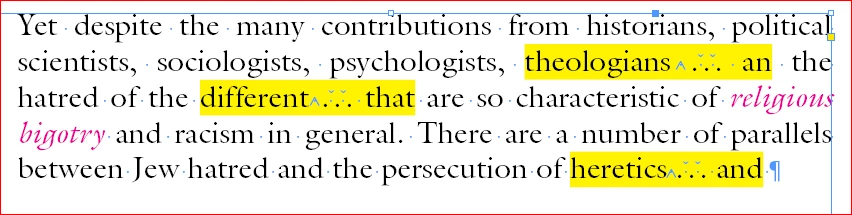
Extra highlighted by script (which is not required):
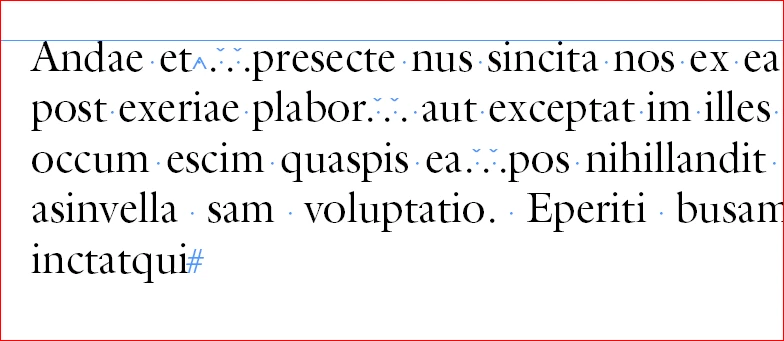
Exact expectation by greps (my requirement):
thanks in advance.

by

hasvi
This topic has been closed for replies.
Correct answer winterm

Hi,

I tested with all above suggested greps but everything find everywhere. But I want to find exactly yellow highlighted condition only.

Thanks in advance for your help.

By

Hasvi


but everything find everywhere

Sure, because it is different logic used there. It fixes errors, but you need just to point to a misspell made, instead of fixing it…

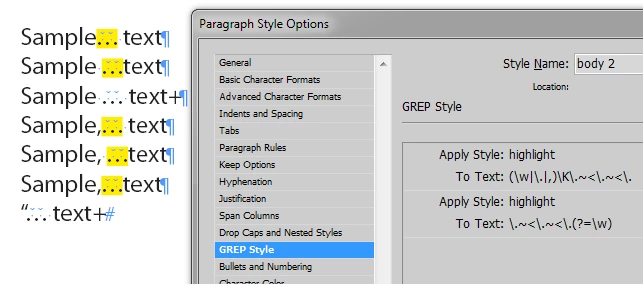
Well, these two regexes may be useful. Works in F/C panel, also can be used as a para style option:

[\w\.,]\K\.~<\.~<\.

\.~<\.~<\.(?=\w)

3 replies

hasviAuthor
Inspiring
February 27, 2019

thanks for your swift reply and it works well.

by

hasvi

Colin Flashman
Community Expert
Community Expert
February 23, 2019

I'd recommend positive lookahead and lookbehind if you don't want to include the words in your search. The following GREP will find the ellipses – as created in your example – if a hard space is present at the front and a regular space is present after the ellipses:

(?<=~S)\.~<\.~<\.(?=\s)

The following will find the ellipses with or without spaces at the front or back, but not include the words:

(?<=\w)\s?\.~< \.~< \.\s?(?=\w+)

If the answer wasn't in my post, perhaps it might be on my blog at colecandoo!
hasviAuthor
Inspiring
February 25, 2019

Hi Colin,

I tried with these two but not find anything:

(?<=~S)\.~<\.~<\.(?=\s)

(?<=\w)\s?\.~< \.~< \.\s?(?=\w+)

by

hasvi

winterm
Legend
February 23, 2019

I'm a bit lost what are you trying to achieve here, actually?

Three dots are just three dots, and ellipsis has its own special glyph. Instead of trying to mimic it inserting spaces between dots, why not just use correct glyph? Start with:

Find what

\h?\.[.\h]{2,}

Change to:

\x{2026}

hasviAuthor
Inspiring
February 25, 2019

Hi, you are right we are using three dots instead of ellipsis. My result should be:

"\h?\.[.\h]{2,}" this grep finding all three dots, but I expect the actual grep should find only the yellow highlighted text.

by

hasvi

winterm
Legend
February 25, 2019

we are using three dots instead of ellipsis

and do you have any good reason to do so?

I still couldn’t get what are you trying to achieve. You want find something and… what? Apply formatting, replace with something else? Or just have a space before and after your triple dots, except position right after opening quote?

This last assumption seems most likely to me, and I’d do this in 3 simple F/C steps:

1. Insert a regular space before/after all triple dots, with Hair Spaces in between:

Find: \.~<\.~<\.

Change to: \x{20}$0\x{20}

2. Replace multiple spaces to singles:

Find: \x{20}+

Change to: \x{20}

3. Remove spaces at the beginning of paragraphs and after opening quotes (be careful to use right quotation mark!):

Find: (^|“)\K\x{20}

Change to: leave blank