


Embedding InDesign graphic

Copy link to clipboard
Copied
I hope this doesn't get too confusing.
Is it possible to embed a graphic created in InDesign so that it will move along with text?
I am working on a media guide for track and field and have created a header for each athlete in which I would need to change the photo and much of the text. I woulkd then like it to "flota" along with the text on each athete that I will create later. During proof reading the text that might change the length of sai text and I would need to adjust the header. Plus, some athletes could be added or deleted requring the header to be adjusted, There may be as many as 50 athletes.
I realize I could create this header in Photoshop, however changing the photo and much of the text within the header would make that very inefficient.


 37
Replies
37
37
Replies
37




Copy link to clipboard
Copied
https://helpx.adobe.com/indesign/using/anchored-objects.html

Copy link to clipboard
Copied
I can understand the confusion here. In the older graphics and layout apps I can recall, "anchored" meant "stay here, you!" (on a particular page/location) and not the more modern/ID concept of "stay with this text."
Copy link to clipboard
Copied
I'm still a little confused Mike.
I created a text box where I want the anchored objects to reside. However, when I try to paste it into that spot nothing happens. I can paste it outside the text box but not inside.
Copy link to clipboard
Copied
Place the graphic either by drag-and-drop or using the File | Place menu. Put the cursor at the end of the paragraph you want it to follow. Scale it to the size you want either by dragging the frame corners or numerically, in the top control bar.
There are advanced aspects to placing stuff, but you often need nothing more than the above.
If the top corner of the object frame has a blue box:
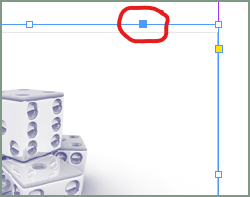
...it's not anchored, it's just stuck on the page in that spot. Sometimes you want that.
To make it move with the text, grab that blue box and drag it to the end of the paragraph you want it to follow. It will turn into an anchor:
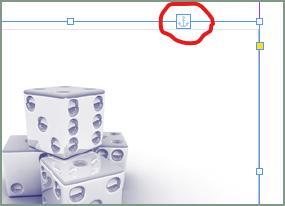
...and now move with that paragraph. You can reposition it and do many other things once it's anchored. If you want to modify or break the anchor, right-click on the anchor icon and select Anchored Object.
Copy link to clipboard
Copied
Still having trouble.
This is a grahic I created in InDesign. I will attach the actaul INDD file here.
Do I need to consolidate this graphic in some way? If so, how would I be able to change the photo and text for each athlete?

Copy link to clipboard
Copied
Attach the .indd file and I will take a look for you.
Copy link to clipboard
Copied
Am I right in thinking that you will have a header for each athlete and then some paragraphs of text below. Then following on to the next athlete, so multiple athletes per page?
Copy link to clipboard
Copied
Yes, that is correct. There may be as many as 50 athletes.
Copy link to clipboard
Copied
There are a number of features you will want to explore here, especially the "keep with" options that will force each entry's paragraphs to stay together. (Generally, you don't want material of this kind breaking across pages, except very selectively.)
Copy link to clipboard
Copied

Copy link to clipboard
Copied
Hi @Mesa316 please find an attached file in which the picture frame is anchored. I also rebuilt it using one single text frame with nested styles, next styles, paragraph rules and paragraph shading. Formatting this text is a one click process.
You could also build this using tables, and have also a look to datamerge feature, to completely automate the process.
https://helpx.adobe.com/indesign/using/data-merge.html
Copy link to clipboard
Copied
Thanks so much.
How woud I go about putting text between the headers? And can the headers be made to move depenting upon the amount of text I might want to insert?
Copy link to clipboard
Copied
Same as the anchored frame picture. Select the header text frame and anchor it in the main text flow. And the anchored picture frame will still be anchored to the header.
Copy link to clipboard
Copied
I'm getting closer. When I attempt to anchor your image in my text it comes in with the photo to the left of the insertion points and the text to the right.
Any thoughts?
Copy link to clipboard
Copied
Unless you are very skilled and do meticulous setup, placing or anchoring an image is only step 1; you have to position it, adjust the anchor characteristics and sometimes adjust the text around it.
It's far from an automated (placement/flow) process.
Copy link to clipboard
Copied
I just reproduced your model: picture on the left and text on the right.

but you can easily change the position by right clicking on the picture > anchored object > options
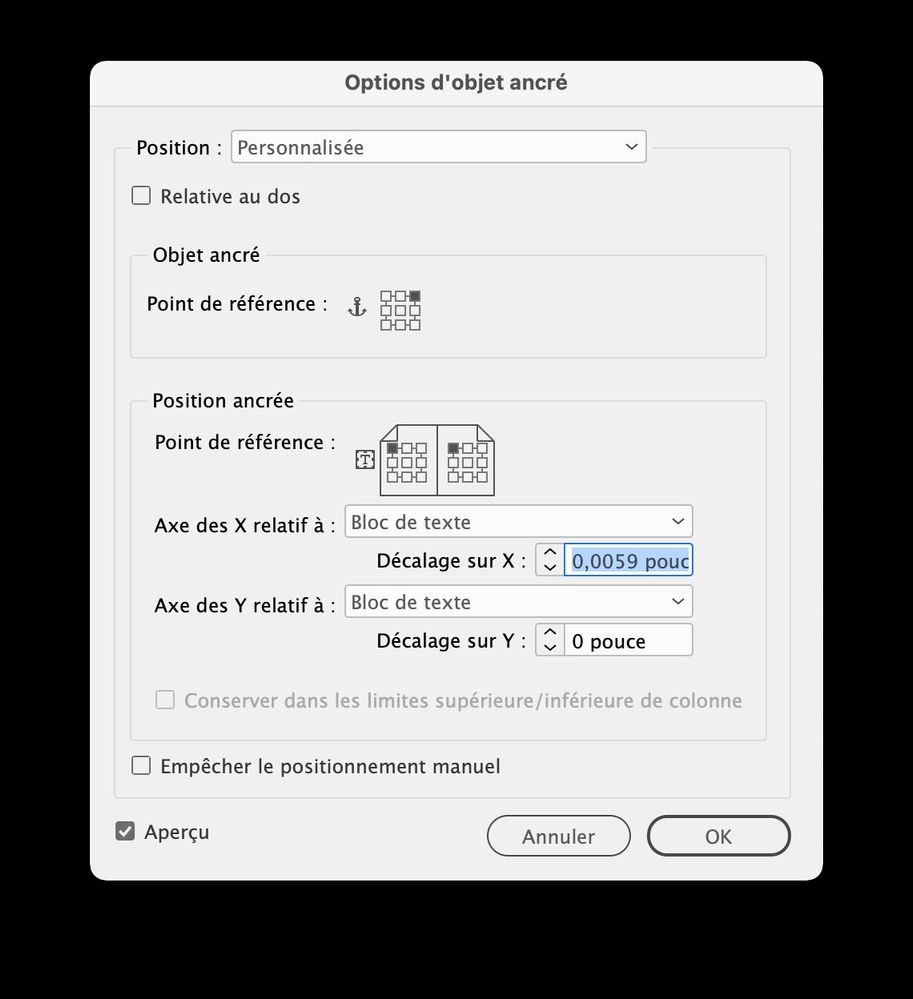
https://helpx.adobe.com/indesign/using/anchored-objects.html
Copy link to clipboard
Copied
I don't see the attachment as you did the first time.
Copy link to clipboard
Copied
I didn't attach any InDesign file, only the screenshots.
Copy link to clipboard
Copied
--
Wayne Block
Coordinator of Athletic Marketing and Public Relations
Mesa Community College
Maricopa County Community College District
1833 West Southern Avenue, Mesa AZ 85202
wayne.block@mesacc.edu
https://www.m <>esatbirdsports.com
(M) - 757-288-1484
*MCCCD Statement of Non-Discrimination*
<>
Copy link to clipboard
Copied
Copy link to clipboard
Copied
I'm sorry. I tought you meant you had redone the file with the photo moved inside.
I really apprecite all your help. I hate to be such a bother.
Copy link to clipboard
Copied
I think that I don't understand where you want the picture to be. Certainly a lack of my English language knowledge…
Copy link to clipboard
Copied
Your English is great. Certainly better than my French, even though I studied it in high school. for two years. Of course that was nearly 60 years ago.
I would like to have the picture on the left side so that it would align flush left with the text.
Copy link to clipboard
Copied
I am really sorry, but it seems to me that the picture is on the left side of the text frame. Could you post a screenshot? Even a hand drawn draft.

-
- 1
- 2

Get ready! An upgraded Adobe Community experience is coming in January.
Learn more
 AdChoices