Known Participant
October 22, 2022
Answered

Empty frames generated when using primary text frames with facing pages and pages reshuffle

  • October 22, 2022
  • 6 replies
  • 2878 views

This is an annoying issue that when I'm using primary text frames on facing pages, whenever the pages reshuffle a new empty frame gets added behind the active text thread on all the verso pages only. For years I've just ignored it, but I'm kind of picky about not having any extra elements that aren't being used. Has anyone else noticed this and found a way to stop it from happening?

This topic has been closed for replies.
Correct answer rob day

Thanks for taking the time. My current project is about 1600 pages total, structured as a book comprising about 20 separate documents. I don't see a way to avoid this "empty frame added" issue in such a case when I need to make a revision to an earlier chapter.

In I've sense it seems like maybe a unique case. I could, for example, design it such that a new chapter always begins on a recto page, but that's not what the client wants. There are other occasions where this issue arises in which I could rethink my approach to avoid ever allowing a recto page with a primary frame get pushed to verso.

I feel this discussion has gotten into the weeds of linked threads and reflow options, which are really irrelevant to the issue at hand: that when a recto page containing a primary text frame gets pushed to verso for ANY reason, a blank frame gets added behind.

If you have not encountered this as frequently as I have, I have to ask what I'm going that is causing me to need to add pages mid-documenr, thus causing the cascading shift from recto to verso.

One cause is certainly the choice to start each chapter in a new story. But I would rather not have to worry about going back to reapply parent pages.


I feel this discussion has gotten into the weeds of linked threads and reflow options, which are really irrelevant to the issue at hand:


Yes I think that’s right, what you are seeing would happen with any overridden Parent/Master page items.


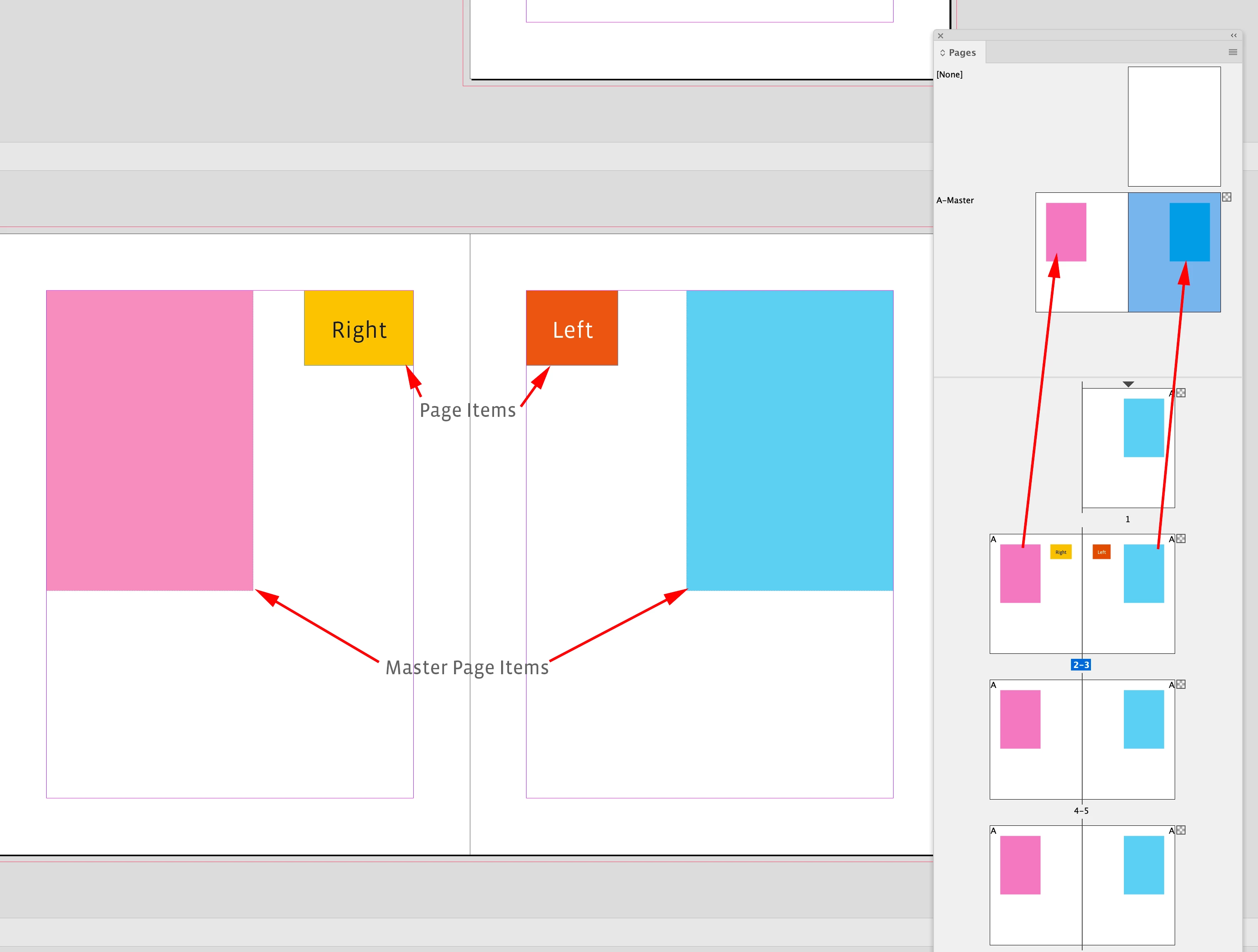
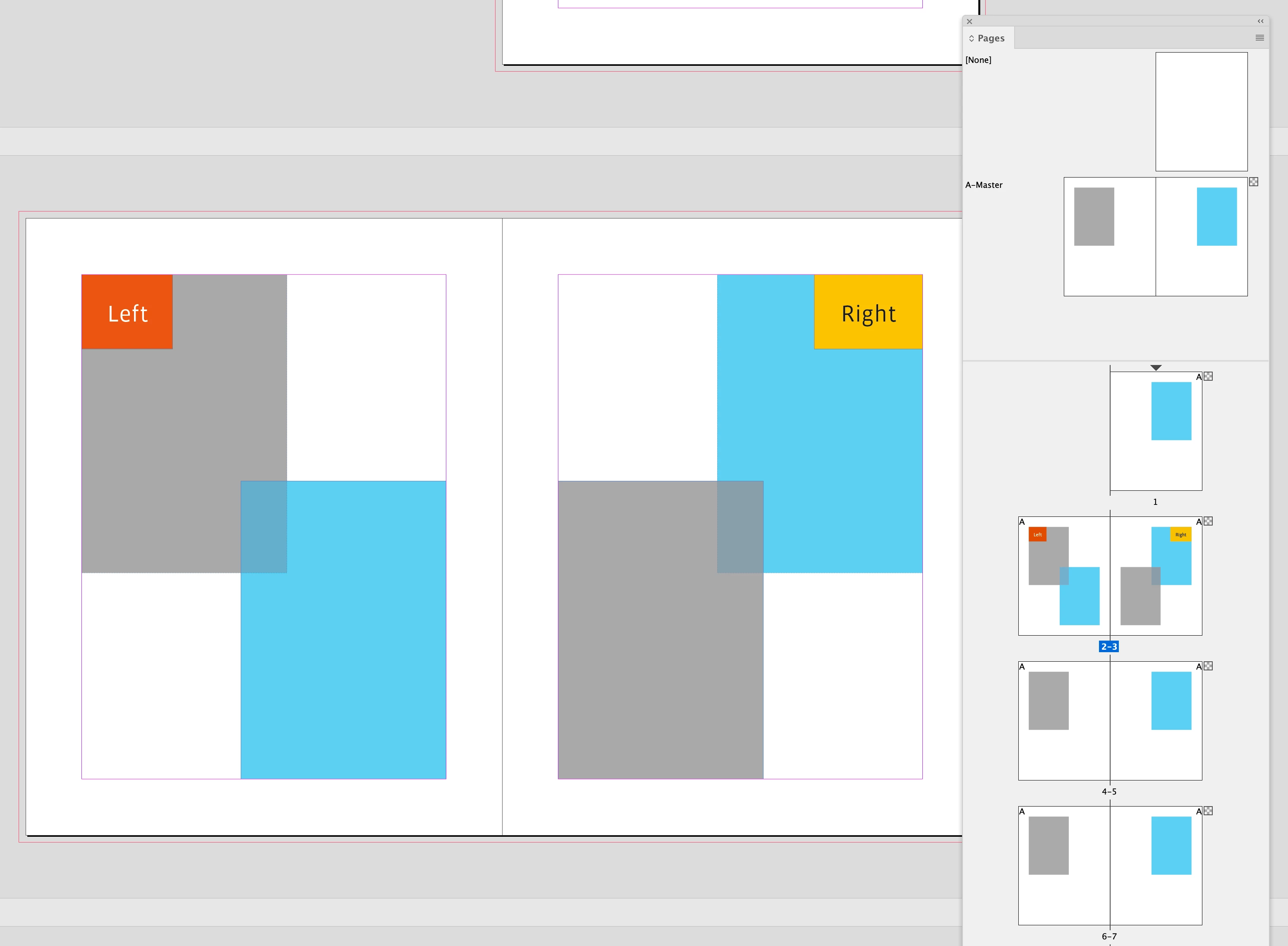
Here I have a Parent/Master Page Item on each page of the spread, and Page Item labels on the 2/3 spread


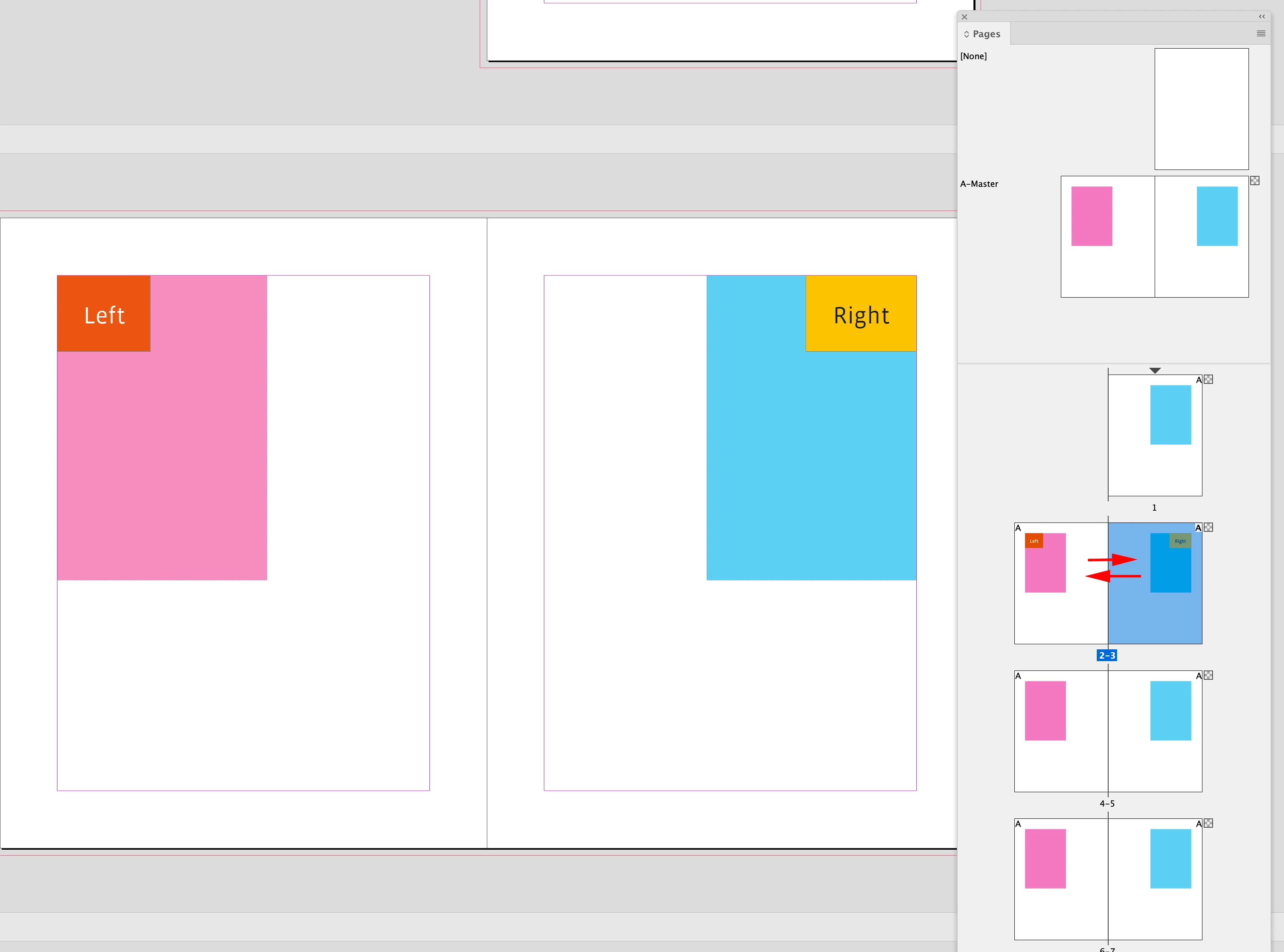
If I swap the spread pages without overriding the parent/master page items I get this:


If I override the parent page items and move them they become page items, but are still associated with the parent item.
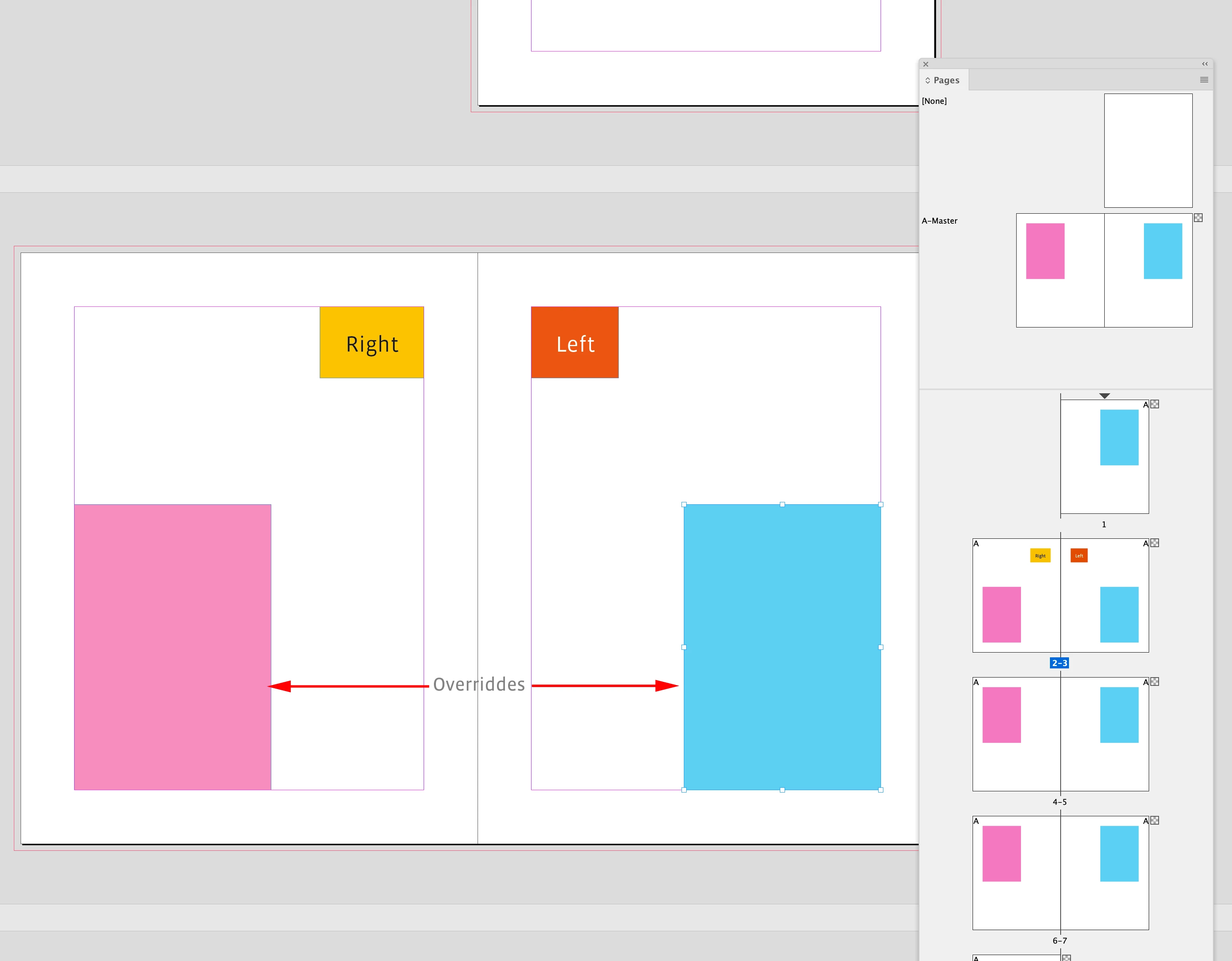


Here the pink frame on the right page is still associated with the pink frame on left parent page;
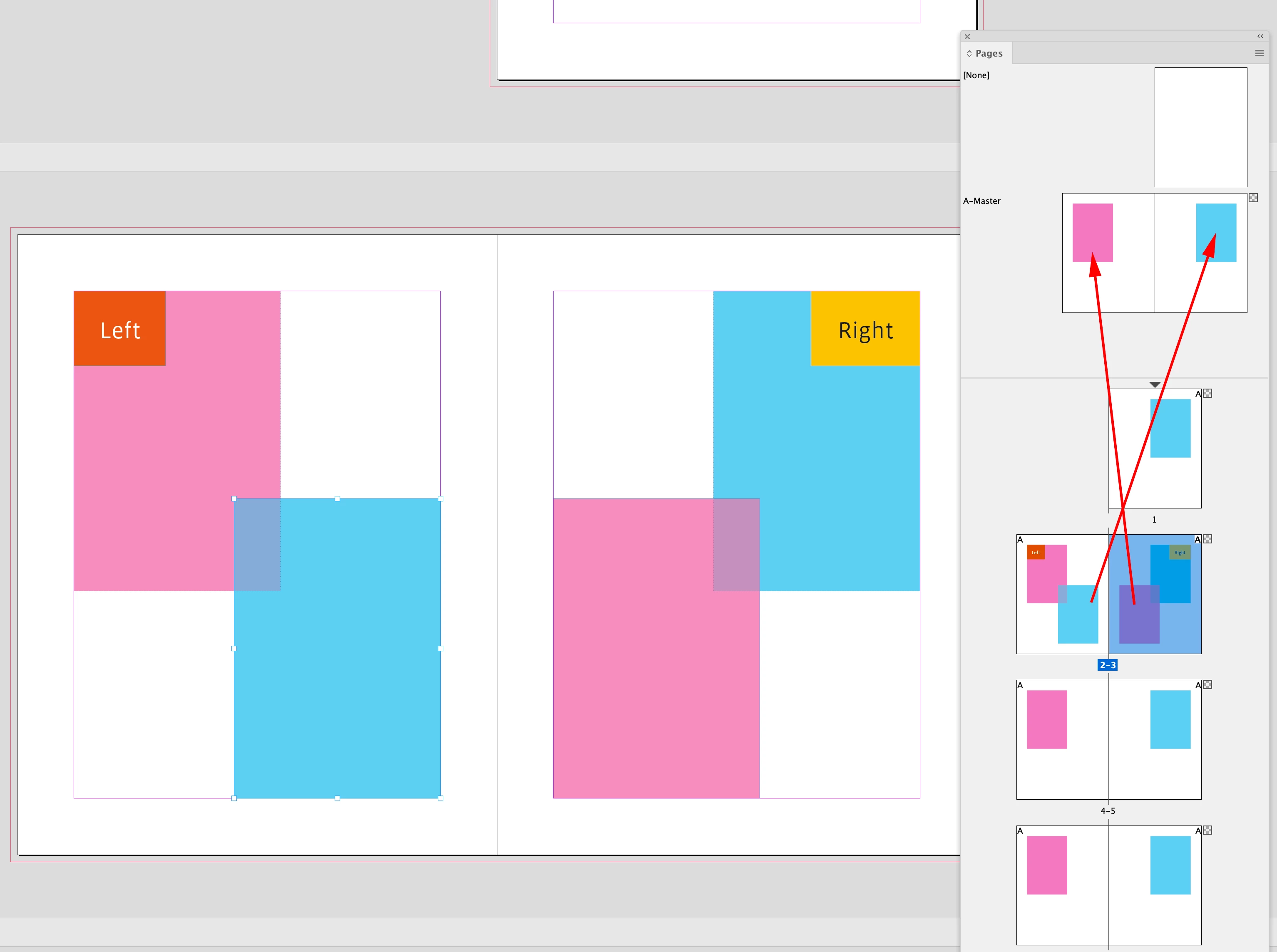


If I change the fill color of the pink frame on the left parent page I can see the association:


6 replies

Barb Binder
Community Expert
Community Expert
October 23, 2022

Smart text reflow with primary frames works best with all of the content in one threaded story. Otherwise, I would disable it, and handle the pagination manually.


~Barb

~Barb at Rocky Mountain Training
Known Participant
October 23, 2022

I'd say it depends. There are many cases in which it seems better to break the thread. Most significant that comes to mind is when you create a Book with separate chapters or sections as individual files.

rob day
Community Expert
rob dayCommunity ExpertCorrect answer
Community Expert
October 23, 2022

Thanks for taking the time. My current project is about 1600 pages total, structured as a book comprising about 20 separate documents. I don't see a way to avoid this "empty frame added" issue in such a case when I need to make a revision to an earlier chapter.

In I've sense it seems like maybe a unique case. I could, for example, design it such that a new chapter always begins on a recto page, but that's not what the client wants. There are other occasions where this issue arises in which I could rethink my approach to avoid ever allowing a recto page with a primary frame get pushed to verso.

I feel this discussion has gotten into the weeds of linked threads and reflow options, which are really irrelevant to the issue at hand: that when a recto page containing a primary text frame gets pushed to verso for ANY reason, a blank frame gets added behind.

If you have not encountered this as frequently as I have, I have to ask what I'm going that is causing me to need to add pages mid-documenr, thus causing the cascading shift from recto to verso.

One cause is certainly the choice to start each chapter in a new story. But I would rather not have to worry about going back to reapply parent pages.


I feel this discussion has gotten into the weeds of linked threads and reflow options, which are really irrelevant to the issue at hand:


Yes I think that’s right, what you are seeing would happen with any overridden Parent/Master page items.


Here I have a Parent/Master Page Item on each page of the spread, and Page Item labels on the 2/3 spread


If I swap the spread pages without overriding the parent/master page items I get this:


If I override the parent page items and move them they become page items, but are still associated with the parent item.


Here the pink frame on the right page is still associated with the pink frame on left parent page;


If I change the fill color of the pink frame on the left parent page I can see the association:



Barb Binder
Community Expert
Community Expert
October 23, 2022

I've looked at it. What exactly causes the new frame?  Nevermind, I see it. 


~Barb

~Barb at Rocky Mountain Training
Known Participant
October 23, 2022

Here is a sample document to demonstrate. Try adding text to the first story to force it to reflow and add a new page. Then check page 4. There will be a new, blank text frame added behind the main thread.

Community Expert
October 23, 2022

Your text frames are not threaded correctly


You have


It should be


To fix this - 

delete page 2-4 

And the text will autoflow correctly as based on the Parent Page setup. 


For some reason you've broken the thread between the left and right pages.


Known Participant
October 23, 2022

I've done that intentionally to demonstrate the issue.

Barb Binder
Community Expert
Community Expert
October 23, 2022

Or at least tell us about your layout/share screen shots. We normally use primary frames for long document layout. Have you tried cutting the text and pasting it elsewhere, instead of moving the pages around?


~Barb

~Barb at Rocky Mountain Training
rob day
Community Expert
Community Expert
October 23, 2022

Hi @defaultu0e43kqloi6n , Could you attach a sample ID file where that is happening?

Known Participant
October 23, 2022

Attached to my latest reply.

Community Expert
October 23, 2022

Have you toyed with these settings in preferences?


Known Participant
October 23, 2022

Yes, my preferences match your screenshot. I attached a sample file to my latest reply.