
Participant
November 10, 2020
Answered

Enabling Background Tasks

  • November 10, 2020
  • 3 replies
  • 2678 views

There used to be a preference to enable and disable background tasks. I historically keep this on. Now when I save, I can't move on to export until the save is complete and vice versa. I'm stuck waiting. Has something changed? I've searched for an answer and have only found something about disabling Background Export in the File menu, but I don't have that in my menu.


Mac OS 10.13.6

InDesign 2020
This topic has been closed for replies.
Correct answer Laubender

@Marketing1918 said: "Is there an extension that disables background exports? If so, could you please share? DisableAsyncExports.txt no longer works in InDesign 2025."


Hi @Marketing1918 ,

just tested DisableAsyncExports.txt with InDesign 2025 on macOS with a MacBook Pro from 2021.

It worked as expected.


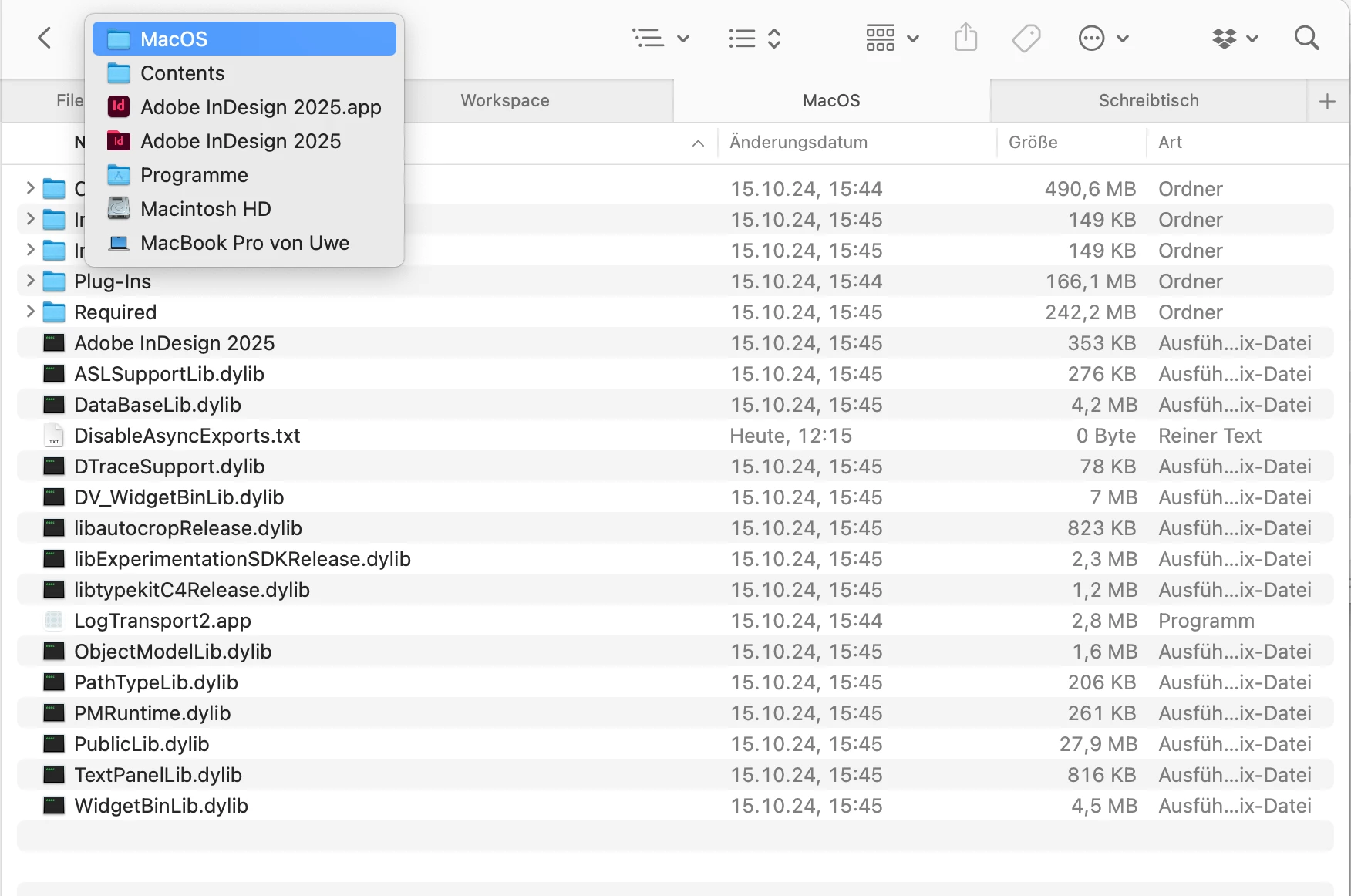
When on macOS make sure that the text file named DisableAsyncExports.txt is in the right place.

From my German macOS:


Regards,
Uwe Laubender
( Adobe Community Expert )


3 replies

LaubenderCommunity ExpertCorrect answer
Community Expert
October 29, 2024

@Marketing1918 said: "Is there an extension that disables background exports? If so, could you please share? DisableAsyncExports.txt no longer works in InDesign 2025."


Hi @Marketing1918 ,

just tested DisableAsyncExports.txt with InDesign 2025 on macOS with a MacBook Pro from 2021.

It worked as expected.


When on macOS make sure that the text file named DisableAsyncExports.txt is in the right place.

From my German macOS:


Regards,
Uwe Laubender
( Adobe Community Expert )


Frans v.d. Geest
Community Expert
Community Expert
October 29, 2024

Confirmed, DisableAsyncExports.txt still works in 2025, so make sure it is in the correct directory...

DemShades
Participating Frequently
November 28, 2024

Hi! Unfortunately this workaround doesn't work as expected (at least for me). DisableAsyncExports.txt works occasionally, but when I restart my Macbook Pro (2021, MacOS Sequoia 15.1.1) I just get a beachball when exporting a pdf. Then I have to
1. close InDesign 2025, delete the 'DisableAsyncExports.txt'
2. restart InDesign 
3. close Indesign, place the .txt-file back in the 'MacOS'-folder
4. restart InDesign again.
Very annoying.... Is there any other solution to this problem? Or a workaround to get it running as expected again? I don't know why Adobe doesn't give us a built-in option to enable/disable the pdf export-progress bar.

Community Expert
November 11, 2020

Hi acox,

even with InDesign 2020 using a text file named DisableAsyncExports.txt should work to disable all exports that work as background tasks and work with a "foreground" task approach that blocks all other things while exporting. Mike showed you an article where the specifics are discussed by Bob Levine. Note: This text was transferred from InDesign Secrets to Creative Pro, because both websites were merged recently. Could be that something went wrong and a question mark was added to the text here and there.


To make it clear; the mentioned text file's name must be exactly:

DisableAsyncExports.txt


So you may have "installed" this file in the past if all your exports are done in the "foreground". After reading Bob's article you should know where to look after it in the InDesign app package.


Other reason: You once installed an extension by Marijan Tompa [tomaxxi] that also forces InDesign to use export in "foreground" where possible. You may uninstall that extension to go back to the default behavior of InDesign.


Regards,
Uwe Laubender

( ACP )

yllinor
Participant
January 13, 2023

Hi,


I'm looking for a solution to enable background tasks in Indesign 2023. Thank you!

Community Expert
January 13, 2023

Hi @yllinor ,

when did you disable it and how did you do it?

If by using an extension you have to uninstall the extension.


Regards,
Uwe Laubender
( Adobe Community Expert )

Legend
November 10, 2020

Hi Acox,

It seems to be working fine on my Mac Book Pro running InDesign 2020, check out the blog post below to see if it helps resolve your issue.

https://creativepro.com/a-new-workaround-for-that-pesky-background-export-issue/


Regards,

Mike