Known Participant
February 26, 2020
Answered

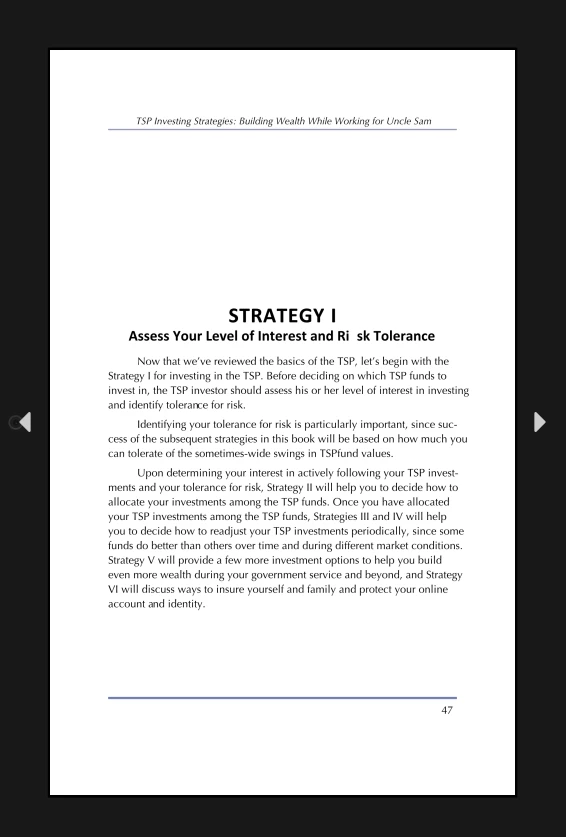
epub export creating extra space on some words

  • February 26, 2020
  • 3 replies
  • 3643 views

I've changed the font and it didn't make any difference.

Saved the file as an .idml, and did a new export didn't help.

At my wit's end on this.

 

This topic has been closed for replies.
Correct answer AnneMarie Concepcion

Ah, okay. Now I see what you mean by the extra space.

Well when ID converts to fixed layout, it does crazy manipulations to text size and scaling and space between words and parts of words to try to exactly match the text in InDesign/PDF.  My new educated guess 😉 is that there's something funky going on with the markup InDesign is creating for this one line. 


To cut to the chase: If the problem is only happening in these subheads, no matter which Open Type fonts you use, then there is probably something finicky in the formatting (the styling) that InDesign is choking on. Use a test one-page doc that you've copied/pasted the bad boy text to, and experiment exporting to FXL that test doc. I would try applying [Basic Paragraph] and for Char Style, [None] to one of them, then if that exports okay, change the font to Calibri Bold and export that, and if that's okay change the paragraphs to centered, etc. 


You may have applied some sort of tracking of non-standard letter/word spacing, for example, that ID is having trouble with.

-------


I made a test file with just your title and subhead set in Calibri Bold, centered.  Look at this mess of html markup that InDesign created with just this 2-line bit of text when exporting to FXL. ("Live" tet is colored black)
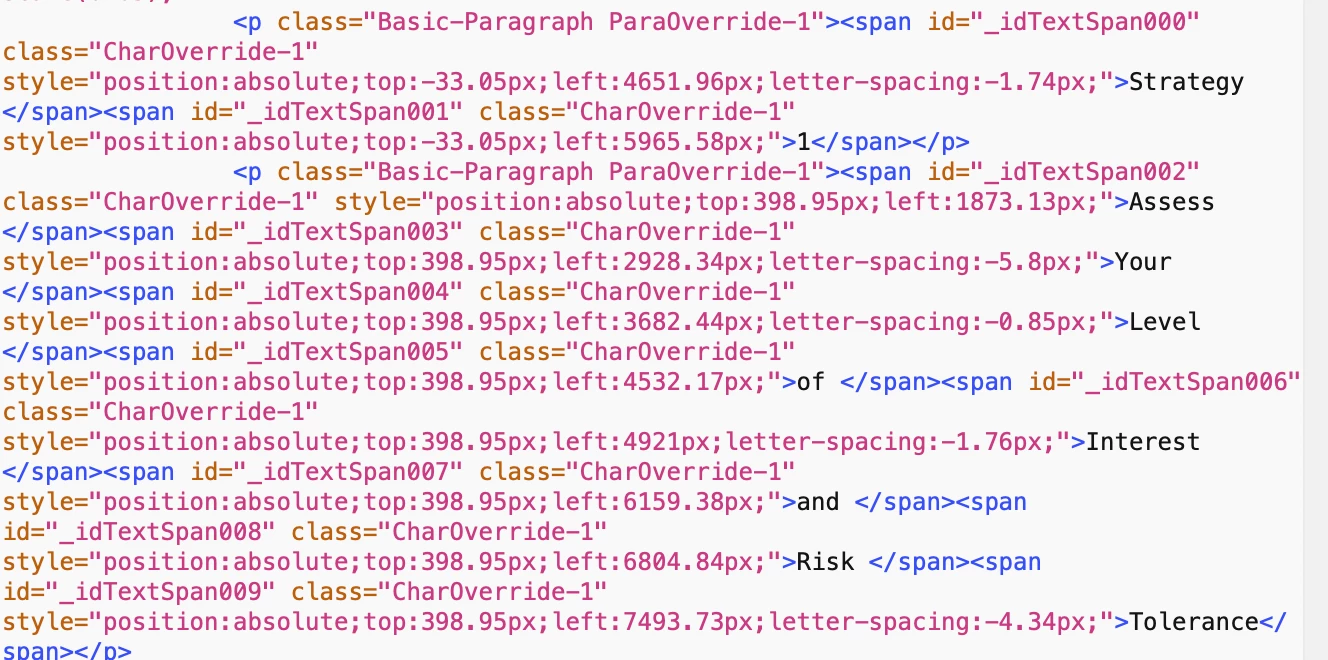


This is one of the reasons to avoid using FXL export with text-heavy books. If you're having trouble with images in your reflowable, then learn more about getting them to do what you want. Many many ebooks have lots of images, I've created reflowable epubs with 500+ screenshots (a how-to book on Excel) and 1000+ hi res images and colored sidebars (a photo tour of Tuscany). 


AM

3 replies

AnneMarie Concepcion
Community Expert
AnneMarie ConcepcionCommunity ExpertCorrect answer
Community Expert
February 27, 2020

Ah, okay. Now I see what you mean by the extra space.

Well when ID converts to fixed layout, it does crazy manipulations to text size and scaling and space between words and parts of words to try to exactly match the text in InDesign/PDF.  My new educated guess 😉 is that there's something funky going on with the markup InDesign is creating for this one line. 


To cut to the chase: If the problem is only happening in these subheads, no matter which Open Type fonts you use, then there is probably something finicky in the formatting (the styling) that InDesign is choking on. Use a test one-page doc that you've copied/pasted the bad boy text to, and experiment exporting to FXL that test doc. I would try applying [Basic Paragraph] and for Char Style, [None] to one of them, then if that exports okay, change the font to Calibri Bold and export that, and if that's okay change the paragraphs to centered, etc. 


You may have applied some sort of tracking of non-standard letter/word spacing, for example, that ID is having trouble with.

-------


I made a test file with just your title and subhead set in Calibri Bold, centered.  Look at this mess of html markup that InDesign created with just this 2-line bit of text when exporting to FXL. ("Live" tet is colored black)


This is one of the reasons to avoid using FXL export with text-heavy books. If you're having trouble with images in your reflowable, then learn more about getting them to do what you want. Many many ebooks have lots of images, I've created reflowable epubs with 500+ screenshots (a how-to book on Excel) and 1000+ hi res images and colored sidebars (a photo tour of Tuscany). 


AM

Derek Cross
Community Expert
Community Expert
February 27, 2020

A brilliantly response from Her Geekness!

Known Participant
February 28, 2020

One last question, does anyone know why it's adding strokes around my tables, which I don't want to look like tables?

AnneMarie Concepcion
Community Expert
Community Expert
February 26, 2020

The first screenshot is from InDesign and the 2nd on the black background is from your epub reader, right? Which epub reader are you using?


I don't think this is fixed layout, because the InDesign text is fully-justified (left and right) but the epub version is not. When you export to Fixed Layout, InDesign will do its level best to match the justification. So, I think this is reflowable, and the ereader you're proofing on doesn't support justified or its preference is turned off. To make sure this is reflowable or not, are you able to change the type size in your ereader?


Could any of that be right? I'm mostly guessing.


All that aside, I don't see the extra space between some words that you're mentioning. At least nothing that jumps out at me.


FWIW, books this text heavy should never be exported as fixed layout. The FXL format is meant for picture books and kids books, mostly. 


AM


BobLevine
Community Expert
Community Expert
February 26, 2020

Reflowable wouldn't have a matching page number (unless everything is overriden) but if this is being viewed in ADE or some other non-Books (Mac or iOS) that could explain it.

Derek Cross
Community Expert
Community Expert
February 26, 2020

Is this a Reflowable ePub or FXL ePub?

Known Participant
February 26, 2020

It's a fixed layout.

Derek Cross
Community Expert
Community Expert
February 26, 2020

I don't really do FXL ePub, but does the issue occur if you change the word Risk to another different  word?
