
ABkc4here
Inspiring
September 30, 2022
Question

Equal gaps between text items. Tabs

  • September 30, 2022
  • 8 replies
  • 1371 views

I have a list of items thing 1, thing 2, thing 3, thing 4, and thing 5. I want to make those 5 things have an equal space bewtween them without having to do it manually. 

     thing 1     thing 2     thing 3     thing 4     thing 5

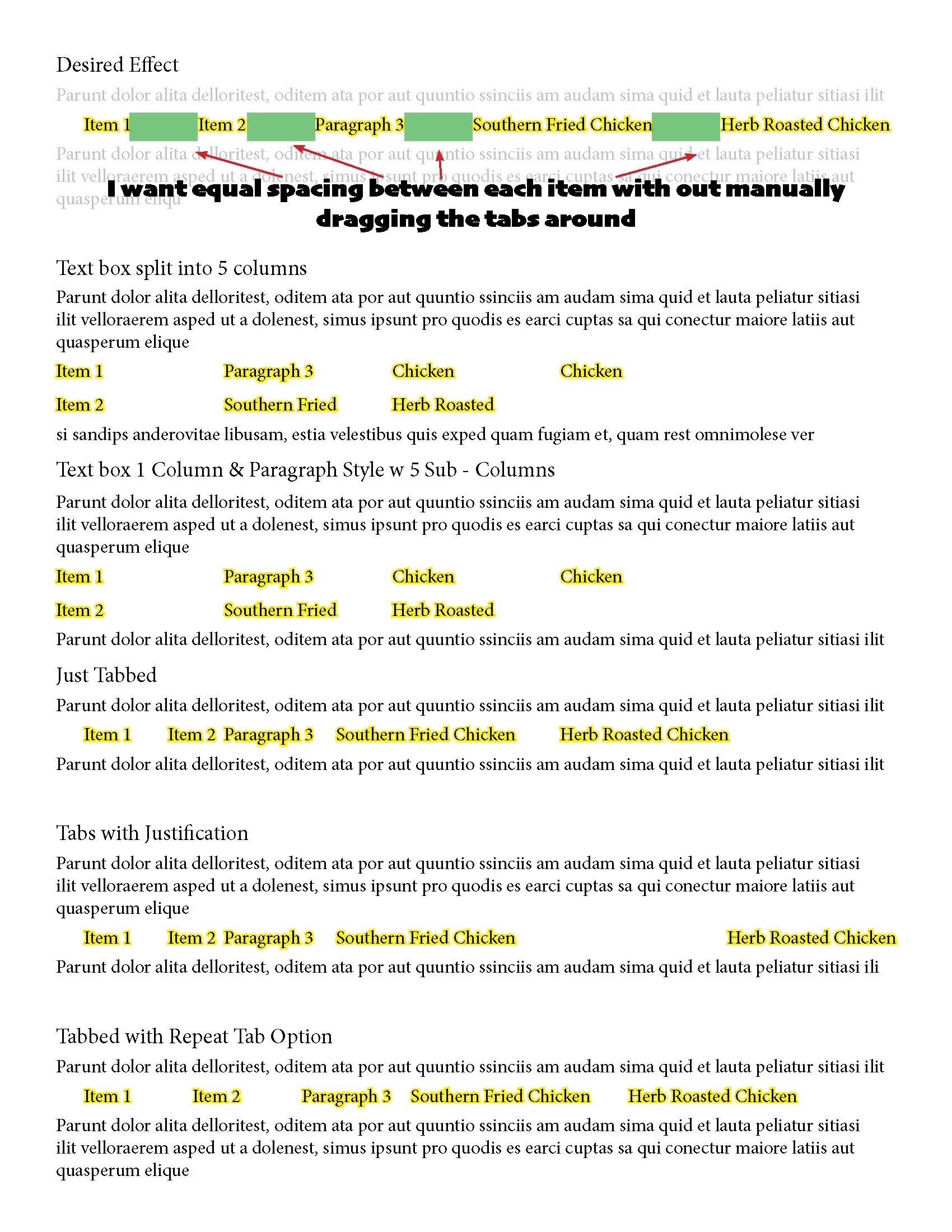
It would look like the above. Better is the image below. You can see, I've tried to columns, sub-colums, tabs, and repeating tabs. None do the above. 

I'll be sad, but you can tell me there isn't an easy button. I really hope there is an easy button. 
 Thanks

This topic has been closed for replies.

8 replies

James Gifford—NitroPress
Legend
October 2, 2022

I've put in a feature request to simply rename 'flush space' to something more intuitive and representative — flex space, flexible space, expanding space, etc. Vote here.


I understand why it was named 'flush space' when justification did not offer the full last line expansion, but that option seems to supersede (almost) any need for special spaces. Giving it a more descriptive name would have led both the OP and me to it, and I'm sure many users will be happy to discover it as well. But 'flush space' is too opaque and niche-use.


Scott Falkner
Community Expert
Community Expert
October 1, 2022

If you want equal space between the items then I would just type the space I need. There are many options here, You could type a new n-spaces or m-spaces. You could type one m-space and give it a character style to make it the size you want, then apply a GREP Style or Nested Style to automatically format the m-space to use a character style. You could draw a rectangluar frame or a line of a fixed size then paste it as an anchored object. Use an Object Style to size the frame or line and give it no fill and no stroke.

James Gifford—NitroPress
Legend
October 1, 2022

Um...


Using more than one white space, or any combination, is very poor practice.


Using a character style is clever, but it would not give any flexibility as the OP needs. Yes, there are many ways to get the result he wants, using completely manual formatting, but he was seeking a more automated method. And Willi reminded all of us me and the OP that flush spaces do exactly this "flexible" job. An overlooked/misnamed feature, IMVHO.


Willi Adelberger
Community Expert
Community Expert
October 1, 2022
  1. Use Paragraph Alignment Justify (both sides justified)
  2. Instead of inserting a tabulator or space between Words or Word Groups insert a Flush Space
    (Type > Insert White Space > Flush Space)
ABkc4here
ABkc4hereAuthor
Inspiring
October 1, 2022

Thanks for this option! I gave both the nonbreaking space and this one a try. Here are the results.


Black uses normal spacing and  Nonbreaking Space (fixed width), and orange uses normal spacing and flush space.

Both are full justified with single word justifcation left.

They basically do the same thing, but it looks like you can have some extra flexablity with the flush space by adding some extra spaces 


Thank you, both!

ABkc4here
ABkc4hereAuthor
Inspiring
October 1, 2022

Just realized the image didn't show the markup


Barb Binder
Community Expert
Community Expert
October 1, 2022

We are always happy to help!


~Barb

~Barb at Rocky Mountain Training
Barb Binder
Community Expert
Community Expert
September 30, 2022

I would just use tabs, but it's Friday after a long week and I was challenged by the idea of an "easy button". 😉


~Barb

~Barb at Rocky Mountain Training
ABkc4here
ABkc4hereAuthor
Inspiring
October 1, 2022

It's not an easy button, but it's an easier button! 

Thank you for your help

Barb Binder
Community Expert
Community Expert
September 30, 2022

An easy button? How about changing the word spaces to non-breaking fixed spaces—leaving the gaps alone—and enabling full justify? Could save it as a paragraph style. Easier than messing with table. 


~Barb


~Barb at Rocky Mountain Training
James Gifford—NitroPress
Legend
September 30, 2022

That would work line by line, but would vary between lines in a group; it would also have fixed margin spacing (0 to some small value), which may not give a balanced look without adjustment. Or would a space on each margin be flexible? Have to go try.


This thread made me realize I miss spring tabs. I can't remember which apps had them — at least two of the vintage "tech writing" tools like Sprint and Manuscript.


James Gifford—NitroPress
Legend
September 30, 2022

I'd use the borderless table David suggested. A little bit of a hassle to manage at a content level, but endless adjustment and once done, a Table Style and maybe a Cell Style will allow it to be replicated easily.


There are only three ways to organize text horizontally: tabs, tables and the somewhat complex use of columns. (And text boxes, but that's a last-ditch hack, in most cases.) If tabs aren't serving your need — and since ID doesn't have the "springy tabs" that some apps do — a table is probably your best approach.


I am not sure how much this will ease "equal gaps" without manual adjustment, though. No really good solution for that, sans said "spring tabs," comes to mind.


Dave Creamer of IDEAS
Community Expert
Community Expert
September 30, 2022

Have you tried the Span Columns setting in Paragraph styles? Specifically, the Split Columns setting. Another option would be a table without borders.

David Creamer: Community Expert (ACI and ACE 1995-2023)
ABkc4here
ABkc4hereAuthor
Inspiring
October 1, 2022

What specifically in the Split Columns Settings? As that is the second example I give in the image that doesn't work. In the example the paragraph is split into 5 columns with both the inside and outside gutters set to 0, and beacuse the columns are equal the longer words won't fit on one line.

As for tables, I'm trying to make this a flowing text. Meaning, if an item changes or I have to add new items it's a simple edit/paste, then apply paragraph setting. In that way, I don't think tables will work. Unless there's a table setting I'm unaware of, and in that case, would love to know about. 


Thanks for replying!