
Participant
December 28, 2020
Question

Error code 5

  • December 28, 2020
  • 2 replies
  • 833 views

Hi,


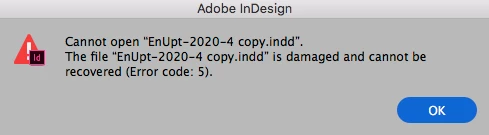
Indesign doesn't give any errors while saving the document, but the next time the file is opened the error message 'Cannot open "FileName.indd". The file "FileName.indd" is damaged and cannot be recovered (Error code: 5).'


How can I recover this file?


This topic has been closed for replies.

2 replies

Community Expert
December 29, 2020

Hi default7unxt7sx868j,

I also see no chance to open this file. It might be damaged beyond repair.

About 230 kb of its file size are missing. At least that was the result after I ran the document against Werner Perplies' script WpsIndFileIdentifier:


Hm. Seems that this document is saved last time with a very early version of InDesign CC 2018. A version that had no bug fixes at all. Maybe that contributed to the issue?


Regards,
Uwe Laubender

( ACP )

Community Expert
June 4, 2022

Good news, but more than one year too late perhaps.

Opened the posted InDesign document with InDesign 2022 on my Windows 10 machine.

A message came up, that the document was damaged with an option to repair the document through an Adobe service.


This worked very well ( in my opinion ). Here the download link to the repaired InDesign document:

https://www.dropbox.com/s/94f46mv9zc7c9a0/EnUpt-2020-4_recovered.indd?dl=1


Regards,
Uwe Laubender
( Adobe Community Professional )

Steve Werner
Community Expert
Community Expert
December 28, 2020

We need more information:


Please tell us what operating system (exactly) you're running. Please tell us (exactly) what InDesign version you're using. 


Do you have a backup of the file (Time Machine? Dropbox? Another backup method?)

Participant
December 28, 2020


Thank you very much for your answer.


My operating system:

iMac (24-inch, Early 2009)

3,06 GHz Intel Core 2 Duo

4 GB 1333 MHz DDR3

NVIDIA GeForce GT 130 512 MB


InDesign version: 2018 CC • V.13.0


There is no backup of the file. 😞


Thanks.


Steve Werner
Community Expert
Community Expert
December 28, 2020

I'm afraid that I don't have good news. It appears your file is damaged and you cannot open it.


If you were using the latest version of InDesign (16.0, which came out October 2020), there would be feature which would offer to try to detect errors and correct the file:


https://helpx.adobe.com/indesign/user-guide.html/indesign/using/recovery-undo.ug.html#recovery-as-service


If you had a backup, you could use it to recover the file. It always highly recommended that you have a plan to backup your files to use in such a case.


Lacking that, you'll have to re-create the file, I'm afraid.