


Participant
March 26, 2025
Answered

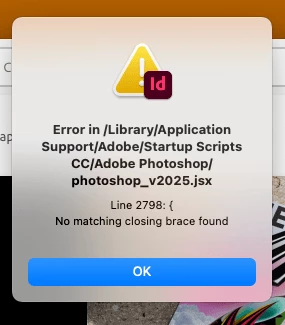
P: Error message (Script line 2798) with InDesign & Illustrator after update
  • March 26, 2025
  • 31 replies
  • 32920 views

I just installed updates for Photoshop and Photoshop beta and received this error on opening Indesign. Any ideas? [I am on a Mac Mini M4] - there is no error opening Photoshop or Photoshop Beta.


<Title renamed by MOD>

Correct answer SanyamTalwar

Hi,

As confirmed by the user, the issue is due to the latest Photoshop update, and the workaround below will resolve the issue.

  • Workaround 1:
    • Uninstall Photoshop 26.5 (make sure to remove preferences).
    • Reinstall Photoshop 26.5. This will install the correct “photoshop_v2025.jsx”.
  • Workaround 2:
    • Open jsx, which is available at "/Library/application support/Adobe/Startup Scripts CC/Adobe Photoshop/" mentioned in the alert in the Text Editor 
    • Add } in the last line

Reference UserVoice Thread - Error message is seen while opening InDesign after Photoshop 26.5 update 

Sanyam Talwar

31 replies

Participant
April 18, 2025

Open jsx, which is available at "/Library/application support/Adobe/Startup Scripts CC/Adobe

 
Original Code (very end of the file)
{
// Debugging
// alert (e + ": line " + e.line


Corrected Code that fixed the issue

{
// Debugging
// alert (e + ": line " + e.line);
}
 
It fixed the error for me.
Participant
April 11, 2025

ME APARECE EL MISMO MENSAJE TAMBIÉN EN ILUSTRATOR.


ALGUIEN TIENE LA SOLUCIÓN????


SALUDOS

FERNANDO

Mike Witherell
Community Expert
Community Expert
April 11, 2025

It is the same solution that has been stated many times over and over in this thread.

Mike Witherell
Participant
April 8, 2025

Ton Frederiks
Community Expert
Community Expert
April 8, 2025

Did you try the options in the correct answer?

Like:

  • Workaround 1:
    • Uninstall Photoshop 26.5 (make sure to remove preferences).
    • Reinstall Photoshop 26.5. This will install the correct “photoshop_v2025.jsx”.
Known Participant
April 8, 2025

I uninstalled and reinstalled it without removing preferences or anything else and it worked fine. I have also seen other user wrote the same.

Gudygg
Inspiring
April 7, 2025

Buen día.

Quisiera saber que es este error que sale cuando ingreso a Indesing y a Ilustrador.

Y como solucionarlo.

Gracias

Dave Creamer of IDEAS
Community Expert
Community Expert
April 7, 2025

Uninstall Photoshop including preferences, then reinstall it through the Creative Cloud app.

If you still have problems, use the Adobe CC Cleaner app to remove Photoshop before reinstalling it.


David Creamer: Community Expert (ACI and ACE 1995-2023)
Gudygg
Inspiring
April 7, 2025

Desintalo photoshop, aunque las aplicaciones que me salen los errores es en Indesing e Ilustrador?

Participating Frequently
April 7, 2025

I just uninstalled Photoshop 26.5, but did not delete preferences and then re-installed.   It worked.

Participant
April 3, 2025

So the problem is not that a closing curly bracket is missing, but rather that an opening curly bracket was left behind with a few comments a the end of the code. I just removed it and the error went away.

FlashInPan11531769
Inspiring
April 5, 2025

It's funny, I definitely  added a bracket and the problem was fixed.


You removed one and the problem was fixed. 


So maybe you just need to do "something" to the file?

Robert at ID-Tasker
Legend
April 5, 2025
quote

It's funny, I definitely  added a bracket and the problem was fixed.


You removed one and the problem was fixed. 


So maybe you just need to do "something" to the file?


By @FlashInPan11531769


Not "something" - you either need to ADD at the end - or REMOVE the one in the line mentioned in the error message.


FlashInPan11531769
Inspiring
April 3, 2025

Typing the } in the last line of ,"photoshop_v2025.jsx" took me like 20 seconds and it fixed this entire problem.


I'd recommend doing that as SanyamTalwar says.

Inspiring
April 3, 2025

Attempted to open an InDesign file originally created 12 months ago. The placed images will not appear on the screen. Moreover, when I updated InDesign I get an error that a startup script in Photoshop seems to be the culprit. Have restarted InDesign and also tried to update links but no diifference. Anyone any ideas?

See attached window.

Ton Frederiks
Community Expert
Community Expert
April 3, 2025

Did you try the solutions in the correct answer above?

Inspiring
April 3, 2025

Thanks have reinstalled both InDesign and Photoshop and this seems to have done the trick! Now back to work after three hours of unproductive time wasting... Computers eh?

Participant
April 3, 2025

Adobe is a joke

Participant
April 3, 2025


Me sale esta ventana de error al abrir Illustrator 2025 (29.3.1) en MacOs Sequoia 15.3.2

c.pfaffenbichler
Community Expert
Community Expert
April 3, 2025

https://community.adobe.com/t5/indesign-discussions/p-error-message-script-line-2798-with-indesign-amp-illustrator-after-update/m-p/15231798


Edit: It’s the same file for Illustrator and Indesign, so the correct answer in the linked thread applies even though it is located on the Indesign Forum.