Hello
j'ai 16giga de ram.
Merci
By @MastaP
Might be not enough for InDesign to finish the export - can you try to export HALF of the file?
@MastaP
OK, your file is MAJORLY corrupted - it crashed my InDesign without any warnings.
IDMLing doesn't work.
I won't post your file here - just tell you what to do to fix it:
1) please create a new document - with any page size - but with just ONE page,
2) go back to your document and open Pages panel, then hamburger menu, then select MOVE PAGES:
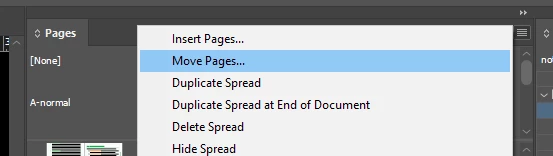
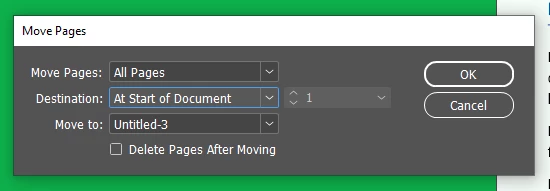
Select ALL PAGES, AT START OF DOCUMENT and in Move To - select your new, blank document,
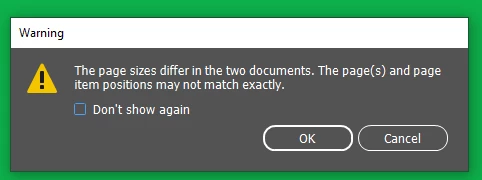
You'll probably get a warning - just click OK:
3) go to the new document and delete LAST pages - it's the initial one that you no longer need,
4) save your new file with a NEW name - DO NOT overwrite your original file.
Here is the size difference:

Some more info - it looks like your file has been created on 10 January 2014, 11:05, using InDesign v 8.0.0
In order to avoid similar problems again - please do SAVE AS with a new name - daily or weekly - depends on how many changes you'll make - then next time - work on this new file.
Why? When you just do SAVE, in order to make the process quick, InDesign just saves info about last changes = preserves all the Undo History, which remains part of the file, but there is no access to it once you close your file.
Next time, when you open your document - InDesign needs to analyse all this Undo history - in order to build the last version of the file - and in your case - it has to analyse 15 years of changes 😉
Soner or later this processing may lead to corruption - what just happened.



 AdChoices