Inspiring
July 24, 2018
Answered

[ESTK] Merge Two tables

  • July 24, 2018
  • 3 replies
  • 5298 views

Hi all,

Initially i have two tables in indesign, like below

Table 1:
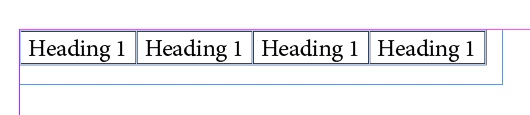
Table 2:
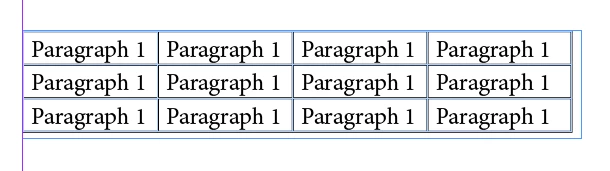
I need to merge above tables the output is,
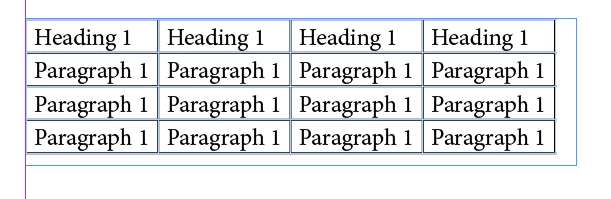
Please give any helps!!

thanks,

John.

This topic has been closed for replies.
Correct answer Peter Kahrel

Found this ancient one:

function merge_tables () {

  var t = app.selection[0].parentStory.tables.everyItem().getElements();

  var rows_to_move = 0;

  for (var i = 1; i < t.length; i++)

    rows_to_move += t.bodyRowCount;

  var moved = 1;

  var rows_length, cells_length, j, k;

  for (var i = 1; i < t.length; i++)

    {

    rows_length = t.bodyRowCount;

    for (j = 0; j < rows_length; j++)

      {

      pb.value = moved++;

      t[0].rows.add ();

      cells_length = t.rows.cells.length;

      for (k = 0; k < cells_length; k++)

        t.rows.cells.texts[0].move (

          LocationOptions.after, t[0].rows[-1].cells.insertionPoints[0]);

      }

    }

  for (var i = t.length-1; i > 0; i--)

    t.remove();

}

if (app.documents.length == 0 || app.selection.length == 0 || app.selection[0].tables.length == 0) {

alert ("Select a story or some text containing more than one table.")

exit()

}

merge_tables();

Peter

3 replies

Colin Flashman
Community Expert
Community Expert
August 15, 2018

I hate being late to the party

Worth mentioning this "off the shelf" script that Harbs wrote: Merge Tables Script | in-tools.com

If the answer wasn't in my post, perhaps it might be on my blog at colecandoo!
Inspiring
August 9, 2018

Thank you Uwe,

I have tried as per your suggestion but there is error showing as below.

Please suggest.

Thanks,

Amit

Peter Kahrel
Community Expert
Community Expert
August 9, 2018

Amit -- Just delete that line 13. There must have been a progress bar in that script at some stage.

P.

Inspiring
August 9, 2018

Thanks Peter for this wonderful script.

My problem is resolved now.

Regards,

Amit

Peter Kahrel
Community Expert
Peter KahrelCommunity ExpertCorrect answer
Community Expert
July 24, 2018

Found this ancient one:

function merge_tables () {

  var t = app.selection[0].parentStory.tables.everyItem().getElements();

  var rows_to_move = 0;

  for (var i = 1; i < t.length; i++)

    rows_to_move += t.bodyRowCount;

  var moved = 1;

  var rows_length, cells_length, j, k;

  for (var i = 1; i < t.length; i++)

    {

    rows_length = t.bodyRowCount;

    for (j = 0; j < rows_length; j++)

      {

      pb.value = moved++;

      t[0].rows.add ();

      cells_length = t.rows.cells.length;

      for (k = 0; k < cells_length; k++)

        t.rows.cells.texts[0].move (

          LocationOptions.after, t[0].rows[-1].cells.insertionPoints[0]);

      }

    }

  for (var i = t.length-1; i > 0; i--)

    t.remove();

}

if (app.documents.length == 0 || app.selection.length == 0 || app.selection[0].tables.length == 0) {

alert ("Select a story or some text containing more than one table.")

exit()

}

merge_tables();

Peter

AD4003Author
Inspiring
July 24, 2018

Thank you Peter!!

It is working. Sometimes an error encountered while undo these process again in InDesign..

An error is shown below,

The requested action could not be completed because the object no longer exists.

Community Expert
July 25, 2018

Hi John,

you might call the function merge_tables() from a doScript() statement like that:

app.doScript

(

    mergeTables,

    ScriptLanguage.JAVASCRIPT,

    [],

    UndoModes.ENTIRE_SCRIPT,

    "Merge Tables | SCRIPT"

);

// Comment out or remove this line:

// mergeTables()

You then could undo the whole action in one go.

Regards,
Uwe