Hi all,
After a few months I decided to answer my own question in hope it may come in handy to the future generations.
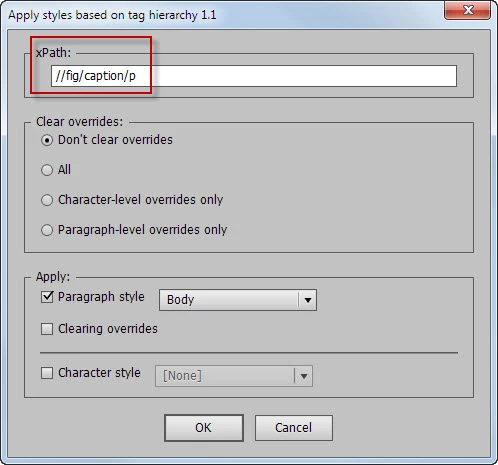
Here’s a screenshot of the script’s dialog box I’m talking about:
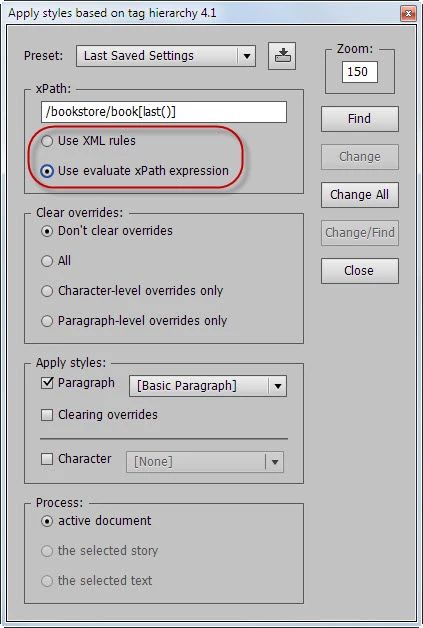
I added a couple of radio buttons so the user could choose either xml-rules or evaluateXPathExpression option.
After some testing I came to conclusion that the latter is much better because it allows overcoming xPath limitations (not all, of course).
Here’s a quote from the XML rules chapter (page 200-201):
|
Due to the one-pass nature of this implementation, the following XPath expressions are specifically
excluded:
- No ancestor or preceding-sibling axes, including .., ancestor::, preceding-sibling::.
- No path specifications in predicates; for example, foo[bar/c].
- No last() function.
- No text() function or text comparisons; however, you can use InDesign scripting to examine the text
- content of an XML element matched by a given XML rule.
- No compound Boolean predicates; for example, foo[@bar=font or @c=size].
- No relational predicates; for example, foo[@bar < font or @c > 3].
- No relative paths; for example, doc/chapter.
|
Frankly speaking, I’m not an xPath-man and don’t quite understand what it means. But my client wanted the script to work with the last() function.
When I tried to use it with xml-rules, the script wrote the following error to console: “Adobe InDesign cannot process^1XPath expression '^2', line: 43”.
But with evaluateXPathExpression it worked as expected.
Since I know almost nothing about xPath, I used the information found on these two pages – XML and XPath and XPath Syntax – because it’s given in an easy-to-understand manner for me. (I know some coding gurus here on the scripting forum will be angry at me for mentioning the http://www.w3schools.com but please have mercy on me – a mere mortal retoucher.) I created a couple of documents for testing -- copied the xml-structure and imported it to InDesign – and tested them against the path expressions posted as examples on the pages. Here’s an archive with the InDesign documents (CC 2014) – their IDML versions are also included – and the scripts I used for testing.
Here are the examples that work with evaluateXPathExpression, but don’t work with xml-rules producing an error:
/bookstore/book[last()] Selects the last book element that is the child of the bookstore element
/bookstore/book[last()-1] Selects the last but one book element that is the child of the bookstore element
/bookstore/book[position()<3] Selects the first two book elements that are children of the bookstore element
/bookstore/book[price>35.00] Selects all the book elements of the bookstore element that have a price element with a value greater than 35.00
/bookstore/book[price>35.00]/title Selects all the title elements of the book elements of the bookstore element that have a price element with a value greater than 35.00
//book/title | //book/price Selects all the title AND price elements of all book elements
//title | //price Selects all the title AND price elements in the document
/bookstore/book/title | //price Selects all the title elements of the book element of the bookstore element AND all the price elements in the document
. (a dot) Selects the current node
This one doesn’t work with xml-rules silently producing no error:
bookstore//book Selects all book elements that are descendant of the bookstore element, no matter where they are under the bookstore element
This doesn’t work with both -- xml-rules (producing an error) and evaluateXPathExpression (no error):
//@lang Selects all attributes that are named lang
The following doesn’t work with both silently:
bookstore/book Selects all book elements that are children of bookstore
bookstore//book Selects all book elements that are descendant of the bookstore element, no matter where they are under the bookstore element
Here are the simple scripts I used for testing (I just copied-pasted xPath expressions into the relative lines):
evaluateXPathExpression
var scriptName = "evaluateXPathExpression test",
doc;
Main();
//===================================== FUNCTIONS  ======================================
function Main() {
    var xmlElement;

    if (app.documents.length == 0) ErrorExit("Please open a document and try again.", true);
    doc = app.activeDocument;

    var xmlRoot = doc.xmlElements[0];
    var xmlElements = xmlRoot.evaluateXPathExpression("/bookstore/book[last()]");

    if (xmlElements.length > 0) {
        $.writeln("==================\r");
    }
    else {
        $.writeln("No elements were found");
    }

    for (var i = 0; i < xmlElements.length; i++) {
        xmlElement = xmlElements;
        $.writeln((i + 1) + " - " + xmlElement.contents.substring(0, 30).replace(/\s+/g, " ") + "...");
    }
}
//--------------------------------------------------------------------------------------------------------------------------------------------------------
function ErrorExit(error, icon) {
    alert(error, scriptName, icon);
    exit();
}
XML-rules
var scriptName = "XML-rules test",
doc,
glueFile = new File(app.filePath + "/Scripts/xml rules/glue code.jsx"),
count = 0;

PreCheck();
app.doScript(glueFile, ScriptLanguage.JAVASCRIPT);
Main();

//===================================== FUNCTIONS  ======================================
function Main() {
    $.writeln("==================\r");
    var ruleSet = [new ProcessTag];
    with (doc) {
        var elements = xmlElements;
        try {
            __processRuleSet(elements[0], ruleSet);
        }
        catch(err) {
            $.writeln(err.message + ", line: " + err.line);
        }
    }
}
//--------------------------------------------------------------------------------------------------------------------------------------------------------
function ProcessTag() {
    this.name = "ProcessTag";
    this.xpath = "/bookstore/book[last()]";
    this.apply = function(xmlElement, ruleProcessor) {
        ProcessAttributes(xmlElement);
        return true;
    }
}
//--------------------------------------------------------------------------------------------------------------------------------------------------------
function ProcessAttributes(xmlElement) {
    count++;
    $.writeln(count + " - " + xmlElement.contents.substring(0, 30).replace(/\s+/g, " ") + "...");
}
//--------------------------------------------------------------------------------------------------------------------------------------------------------
function PreCheck() {
    if (app.documents.length == 0) ErrorExit("Please open a document and try again.", true);
    doc = app.activeDocument;
    if (!app.activeDocument.saved) ErrorExit("The current document has not been saved since it was created. Please save the document and try again.", true);
    if (!glueFile.exists) ErrorExit("\"glue code.jsx\" should be located in the \"Scripts > xml rules\" folder for this script to work.", true);
}
//--------------------------------------------------------------------------------------------------------------------------------------------------------
function ErrorExit(error, icon) {
    alert(error, scriptName, icon);
    exit();
}
Now a very important note: when I tested xPath expressions using evaluateXPathExpression, it worked well with my simple test files, but when my client gave me his “real” document with a complex xml-structure, it stopped working for some reason.
A couple of years ago (or more) I found out that it was somehow associated with namespaces: no namespaces – no problem.
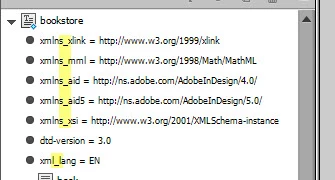
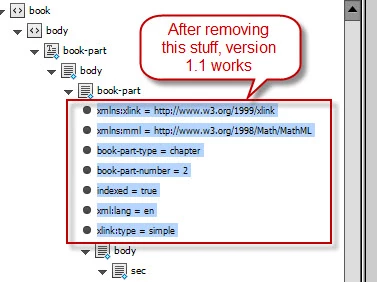
Now, after a more careful investigation I’ve discovered that it depends on the attributes in all the parent xml-elements starting from the element we’re looking for and up to the root. The problem occurs because of the elements whose names contain colons.
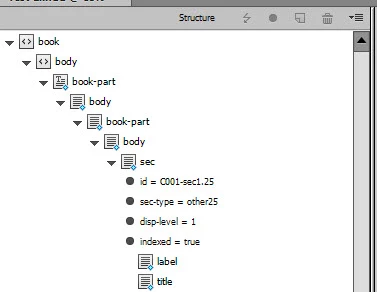
For example, we’re looking for //sec/p[last()] (the last p element in every sec element). In the screenshot below, it’s marked in green.
The elements marked in red prevent the script from working properly.
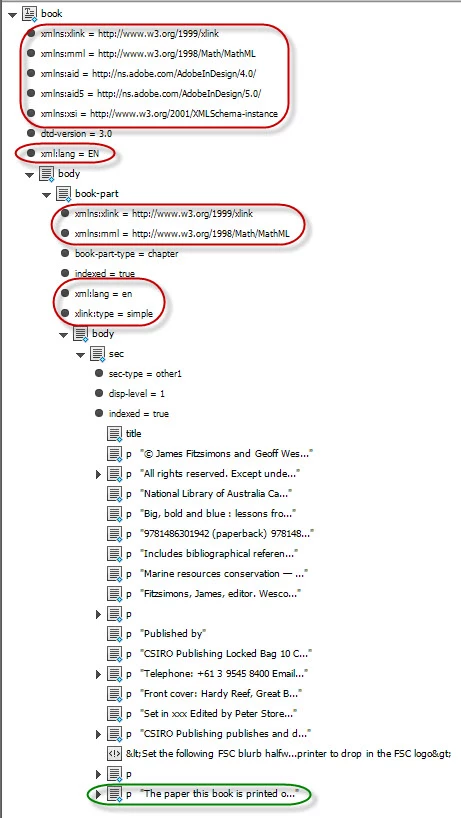
My idea was to temporarily replace colons, say, with underscores -- or any other valid character, in case underscores are used in attribute names – so I came up with the following script:
/* Copyright 2015, Kasyan Servetsky
December 21, 2015
Written by Kasyan Servetsky
http://www.kasyan.ho.com.ua
e-mail: askoldich@yahoo.com */
//======================================================================================
var scriptName = "Prepare xml-attributes",
glueFile = new File(app.filePath + "/Scripts/xml rules/glue code.jsx"),
txt,
count = 0;

PreCheck();
app.doScript(glueFile, ScriptLanguage.JAVASCRIPT);
CreateDialog();

//===================================== FUNCTIONS  ======================================
function Main() {
    var w = new Window("window", scriptName);
    txt = w.add("statictext", undefined,  "Processing xml-attribute #0000. Please be patient. It may take a while.");
    w.show();

    var ruleSet = [new ProcessTag];
    with (doc) {
        var elements = xmlElements;
        __processRuleSet(elements[0], ruleSet);
    }

    w.close();

    var report = count + " item" + ((count == 1) ? " was" : "s were") + " processed.";
    alert("Finished. " + report, scriptName);
}
//--------------------------------------------------------------------------------------------------------------------------------------------------------
function ProcessTag() {
    this.name = "ProcessTag";
    this.xpath = "//*";
    this.apply = function(xmlElement, ruleProcessor) {
        ProcessAttributes(xmlElement);
        return true;
    }
}
//--------------------------------------------------------------------------------------------------------------------------------------------------------
function ProcessAttributes(xmlElement) {
    var xmlAttribute;

    if (xmlElement.xmlAttributes.length > 0) {
        for (var i = xmlElement.xmlAttributes.length - 1; i >= 0; i--) {
            xmlAttribute = xmlElement.xmlAttributes;
            if (set.rbSel == 0) {
                if (xmlAttribute.name.match(/:/) != null) {
                    xmlAttribute.name = xmlAttribute.name.replace(/:/g, "_");
                }
            }
            else {
                if (xmlAttribute.name.match(/_/) != null) {
                    xmlAttribute.name = xmlAttribute.name.replace(/_/g, ":");
                }
            }
        }
        count++;
        txt.text = "Processing xml-attribute #" + count + ". Please be patient. It may take a while.";
    }
}
//--------------------------------------------------------------------------------------------------------------------------------------------------------
function CreateDialog() {
    GetDialogSettings();
    var w = new Window("dialog", scriptName);

    w.p = w.add("panel", undefined, "");
    w.p.orientation = "column";
    w.p.alignChildren = "left";

    w.p.rb0 = w.p.add("radiobutton", undefined, "Prepare xml-attributes");
    w.p.rb1 = w.p.add("radiobutton", undefined, "Restore original xml-attributes");

    if (set.rbSel == 0) {
        w.p.rb0.value = true;
    }
    else if (set.rbSel == 1) {
        w.p.rb1.value = true;
    }

    w.buttons = w.add("group");
    w.buttons.orientation = "row";
    w.buttons.alignment = "center";
    w.buttons.ok = w.buttons.add("button", undefined, "OK", {name:"ok" });
    w.buttons.cancel = w.buttons.add("button", undefined, "Cancel", {name:"cancel"});
    var showDialog = w.show();

    if (showDialog == 1) {
        if (w.p.rb0.value == true) {
            set.rbSel = 0;
        }
        else if (w.p.rb1.value == true) {
            set.rbSel = 1;
        }

        app.insertLabel("Kas_" + scriptName, set.toSource());
        Main();
    }
}
//--------------------------------------------------------------------------------------------------------------------------------------------------------
function GetDialogSettings() {
    set = eval(app.extractLabel("Kas_" + scriptName));

    if (set == undefined) {
        set = { rbSel: 0 };
    }
}
//--------------------------------------------------------------------------------------------------------------------------------------------------------
function PreCheck() {
    if (app.documents.length == 0) ErrorExit("Please open a document and try again.", true);
    doc = app.activeDocument;
    if (!app.activeDocument.saved) ErrorExit("The current document has not been saved since it was created. Please save the document and try again.", true);
    if (!glueFile.exists) ErrorExit("\"glue code.jsx\" should be located in the \"Scripts > xml rules\" folder for this script to work.", true);
}
//--------------------------------------------------------------------------------------------------------------------------------------------------------
function ErrorExit(error, icon) {
    alert(error, scriptName, icon);
    exit();
}
You can test it against the xPath test-2-with namespaces.indd which is included in the archive.
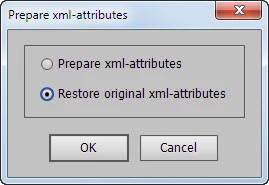
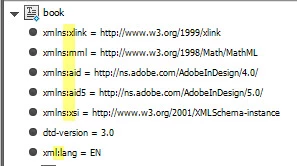
First I use the 1-st button -- "Prepare xml-attributes" -- to replace colons with underscores:
Before
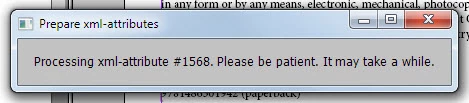
Progress bar
After
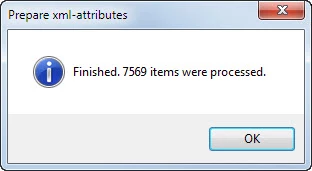
Final report
Finally, after making changes to the document using evaluateXPathExpression -- applying styles, clearing overrides, etc. -- I restore colons with the 2-nd button so the original xml-structure remains intact.
In my opinion, using evaluateXPathExpression provides huge possibilities. My client told me that the script saved him hundreds of working hours. I'd be glad to get feedback on this topic: new problems and their solutions, new xPath examples with comments -- what they should do, if they work, or not ... why they don't work, etc.
I can't promise I would reply to every question because I have to do my regular work and care about my family, but I'll read it with great interest and look into it if time permits.
P.S. Sorry for the lengthy post -- the forum software crashed a three four times as I wrote it.




 AdChoices