
Inspiring
February 13, 2023
Answered

Every time I paste text It has a gradient not just black...

  • February 13, 2023
  • 2 replies
  • 609 views

So, it just started happening a while back. Everytime I past in new text the text has a gradient on it. When I draw the text box, the swatch autos to a gradient? How do I get that to just be black? I know there must be something I'm just missing somewhere... help...


This is going to be a stupidly simple fix isn't it!


Thanks


This topic has been closed for replies.
Correct answer jmlevy

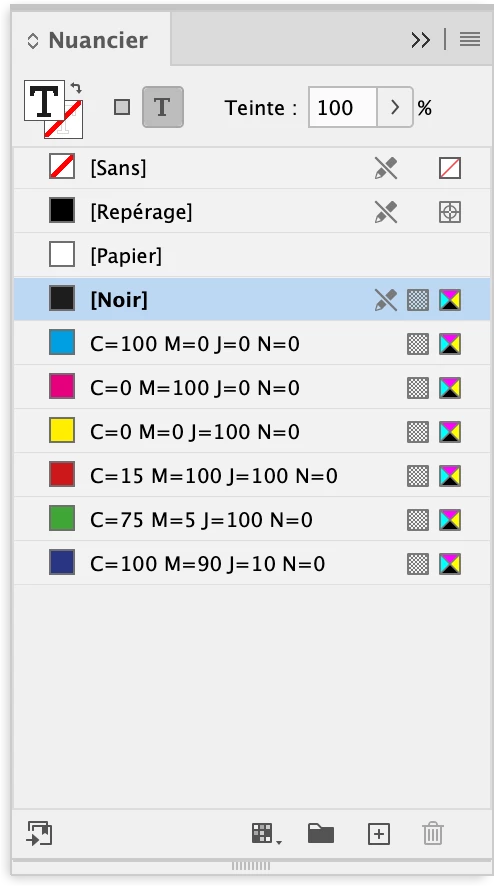
To get black by default, select the type tool but do not create any text frame. First, you need to go to the swatch panel, select the T, then the Black swatch.

2 replies

Derek Cross
Community Expert
Community Expert
February 13, 2023

Best to Place text generally.

Inspiring
February 22, 2023

Could you expand on that a bit to explain why that's an advantage? 


Cheers


Jeff


Derek Cross
Community Expert
Community Expert
February 22, 2023

Placing is far more reliable than Copying and Pasting. You may find, for example, with the latter, it causes problems with text files that are formatted or with foreign or special characters.

jmlevy
Community Expert
jmlevyCommunity ExpertCorrect answer
Community Expert
February 13, 2023

To get black by default, select the type tool but do not create any text frame. First, you need to go to the swatch panel, select the T, then the Black swatch.

Inspiring
February 13, 2023

I knew it would be a simple fix. Thank you Sir, that's brilliant. It was driving me insane! 🙂


Much appreciated.