Answered
Export PDF with Adobe Fonts
Hey,
I'm trying to export my design as a PDF to print it. However, I'm using Adobe Fonts that aren't being packaged (they are a plain font when viewing the PDF). How can I make sure the font will be exported?

Hey,
I'm trying to export my design as a PDF to print it. However, I'm using Adobe Fonts that aren't being packaged (they are a plain font when viewing the PDF). How can I make sure the font will be exported?
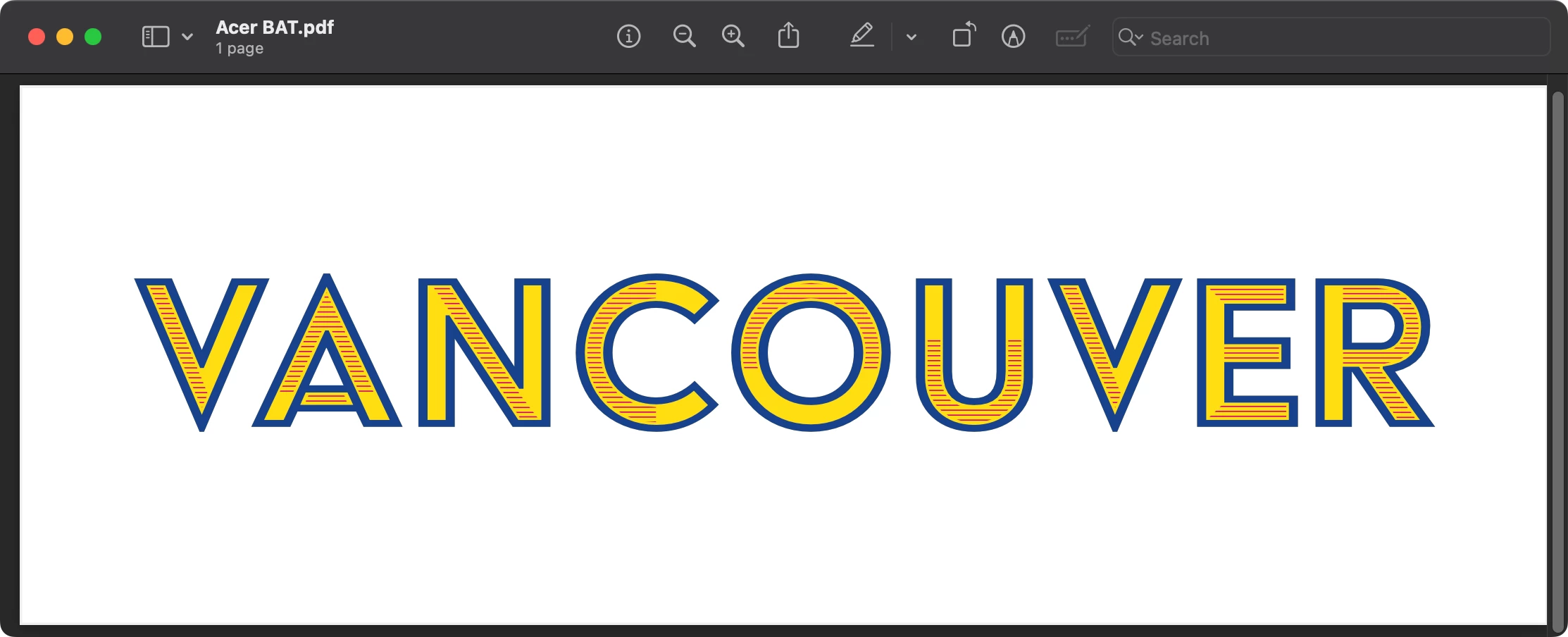
You will be fine. The font will be embedded in the PDF. It will not be packaged without fonts, but that is not a problem as anyone with a CC license will ahve access to Adobe fonts. Test it yourself: save a PDF and open it in a non-Adobe program. Only Adobe Creative Cloud apps have access to Adobe fonts. Preview, Chrome, Safari, or another PDF reader will not. The font should appear normally, meaning it is in the PDF.
Here is a screen grab from Preview of a PDF I saved from InDesign. After saving the PDF I deactivated Acier BAT.
Only Adobe Creative Cloud apps have access to Adobe fonts.
By @Scott Falkner
Any font activated through Adobe Fonts should be available to any application on your system. They are not restricted to Adobe apps.
Already have an account? Login
Enter your E-mail address. We'll send you an e-mail with instructions to reset your password.

 AdChoices