


- Home
- InDesign
- Discussions
- Re: Export to PDF with photos in RGB and text in C...
- Re: Export to PDF with photos in RGB and text in C...
Export to PDF with photos in RGB and text in CMYK

Copy link to clipboard
Copied
I need some assistance on how to export to PDF with images in RGB and text in CMYK.
Is this possible?
When I set the export settings to convert to Adobe RGB, the text is also converted to RGB. Is there a way to separate the colour space for images and text?
Thanks in advance for any assistance
Geoff


 26
Replies
26
26
Replies
26


Copy link to clipboard
Copied
Hi Geoff,
do no conversion with an export to PDF/X-4 and RGB stays RGB and CMYK stays CMYK.
Regards,
Uwe Laubender
( ACP )
Copy link to clipboard
Copied
thanks Uwe
There is one other ingredient that may make this approach not suitable...
We specialise in photo printing, which is why we insist on photos being exported in RGB. Further to this, we have to allow for photographers who will import their photos in a variety of RGB profiles - mostly (but not always) sRGB and Adobe RGB. We therefore have to enforce RGB colour conversion at export time.
How does this additional info affect your suggestion? I've never dealt with PDF/X
Regards
Geoff
Copy link to clipboard
Copied
Hi Geoff,
you could do the conversion of a placed RGB image to e.g. Adobe RGB with:
Edit > Convert To Profile
To get an overview what's going on in a particular document with color and placed images, also if you want to do batch conversions I'd recommend Roland Dreger's Color Script for InDesign; when installing on an English version of InDesign you should see an English UI:
https://www.rolanddreger.net/de/1/farbmanagement-in-adobe-indesign/#
Regards,
Uwe Laubender
( ACP )
Copy link to clipboard
Copied
so it sounds like it can't be done as a global export setting.
Unfortunately I can't ask my clients to all go through their projects and convert all images to Adobe RGB. For the same reason I'd prefer not to force them to only import Adobe RGB images.
thanks for your suggestions though

Copy link to clipboard
Copied
Thanks Uwe, what an awesome script. You made my day 🙂

Copy link to clipboard
Copied
we have to allow for photographers who will import their photos in a variety of RGB profiles - mostly (but not always) sRGB and Adobe RGB. We therefore have to enforce RGB colour conversion at export time.
The PDF/X-4 would export all RGB images with an embedded profile—images with no profile would get the InDesign document’s assigned RGB profile. AdobeRGB and sRGB are display, not output, class profiles, so if the output device is correctly color managing there would have to be a conversion of the AdobeRGB or sRGB images into the chosen output profile—you shouldn’t need the RGB images to be in the same RGB space.
Also, you are allowing native CMYK color—the default PDF/X-4 exports document CMYK color with no profile, but includes the document CMYK profile as the Output Intent, which is usually an offset press profile (ie, US Web SWOP). Will your output device handle a color managed conversion from a CMYK offset press Output Intent to its output color space? Why do the images have to be RGB, but it’s ok for the native colors to be CMYK if the output isn’t to separations for an offset press?
Copy link to clipboard
Copied
Here's some more background info which may (or may not) help explain my situation...
All inbound files to our business need to have images in Adobe RGB - this is courtesy of a legacy decision some 10 years back.
We don't accept any CMYK images. We output to a range of presses & printers (Indigo, Epson Inkjet, HP Latex) on a range of papers, and each printer/paper combo has it's own ICC profile. We need to make a single conversion to the relevant output profile on the rip only, and that's why we never convert to CMYK in ID.
Our customers create native RGB InDesign files and any non-AdobeRGB images are converted to AdobeRGB.
All of the above works well and has for years.
The only change I'm trying to add is the allowance for K-only text to remain in CMYK, so we can reap the benefits of printing text from RGB. I can see that the PDF spec allows for a mixture of colour spaces, so I'm trying to the way to achieve this via Javascript in InDesign.
Does that info help?
I appreciate the insights
Copy link to clipboard
Copied
We output to a range of presses & printers (Indigo, Epson Inkjet, HP Latex) on a range of papers, and each printer/paper combo has it's own ICC profile. We need to make a single conversion to the relevant output profile on the rip only
The RIP is going to make the conversion from the images’ embedded source space into the output profile—there should be no need to make the source RGB spaces uniform. For RGB driven composite printing, the PDF/X presets leave CMYK as DeviceCMYK—no profile—so it is unlikely document CMYK colors would be correctly color managed when a PDF/X file is output to a composite, RGB driven device.
If you are looking for the flexibility of converting source RGB to different output profiles, why not convert the document CMYK colors except for black into the document RGB space? PDF/X-4 would export those colors with the document RGB profile embedded. That conversion could be easily scripted.
Copy link to clipboard
Copied
Unfortunately the conversion of all RGB images to Adobe RGB is a requirement (the reasons are irrelevant).
If I understand your comments correctly, I can use PDF/X-4 to convert all images (CMYK and all flavours of RGB) to Adobe RGB. If so, is that possible via the Export settings dialog, only by scripting it?
RGB profiles don't appear in the Destination profile list when the Colour Conversion setting is set to 'Convert to destination'.
Copy link to clipboard
Copied
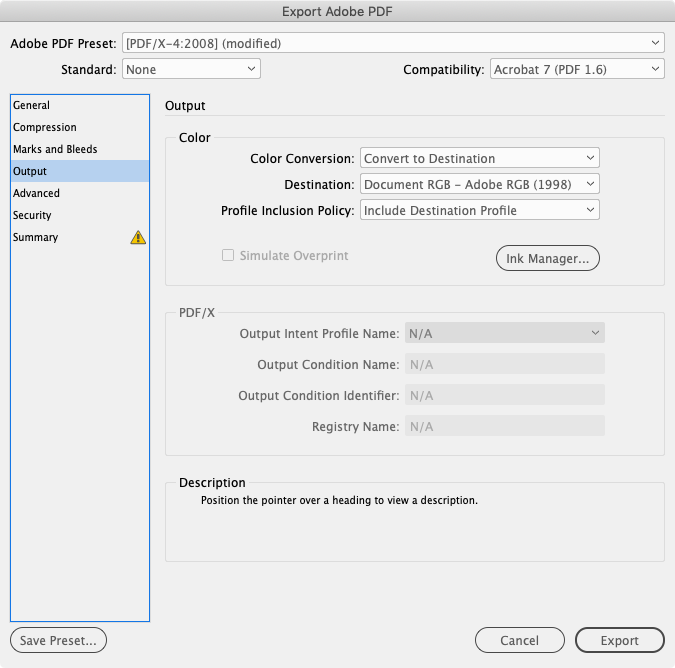
PDF/X-4 doesn’t allow conversions into an RGB space.
The default setting leaves all color unchanged and includes a CMYK Output Intent Profile (the document’s CMYK profile). All RGB color gets an embedded profile—if a placed RGB image has no profile embedded, it gets the InDesign document’s RGB profile assigned. Document CMYK colors and images with an embedded profile that match the document CMYK profile export as Device CMYK (no profile is embedded). You can convert all color into a CMYK space, and meet the PDF/X standard.
You can convert all color into a single profiled RGB space by setting the Standard to None and including the profile, but that will also convert CMYK colors you might not want to color manage like black only or percentages of black.
Copy link to clipboard
Copied
We've ended up back at the start 🙂 The RGB settings you describe is exactly what we do now and it works well, except for the ability to keep the K-only text in CMYK. It appears that what I'm trying to achieve isn't possible.
Thanks for your time on this
Copy link to clipboard
Copied
You can make specific conversions in AcrobatPro via Print Tools>Convert Colors
Here are 2 images with the same color appearance, but with different embedded profiles along with a fill of 100% [Black]:


After an export to PDF/X-4, I can convert all images to AdobeRGB and keep the PDF/X-4 standard::
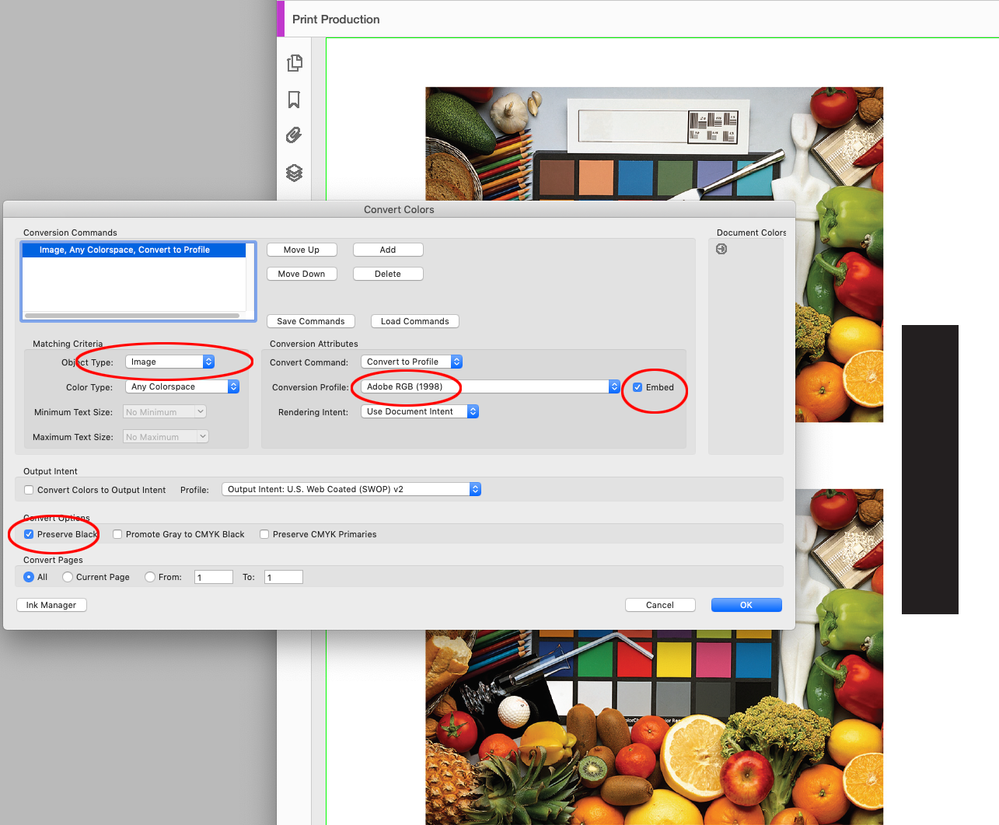
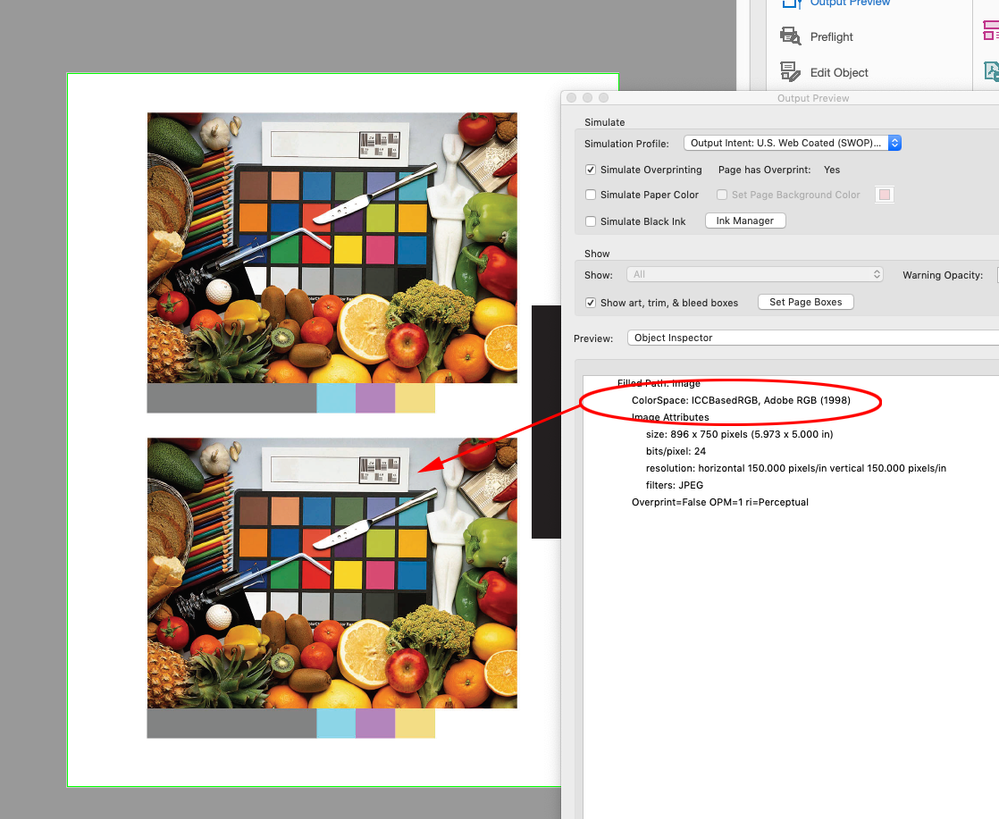
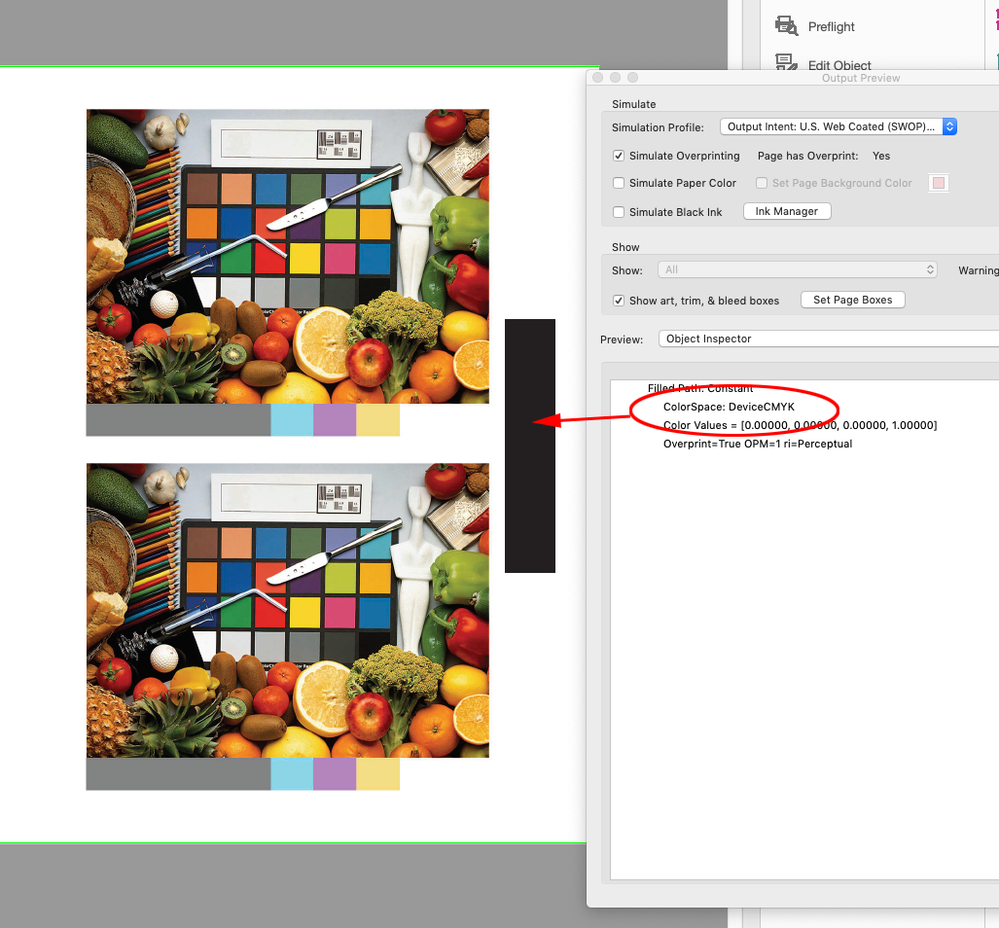
The sRGB image is converted to AdobeRGB and the [Black] fill remains as DeviceCMYK

Copy link to clipboard
Copied
"PDF/X-4 doesn’t allow conversions into an RGB space."
It does. But its uncommon. You only need as an output intent a "prtr" (output) kind of ICC colour profile. As the majority of RGB profiles in use are the "mntr" (display) type, they do not appear as usable and, if you force a PDF to accept one, it does not validate as a PDF/X. But it is because of the kind of profile, not because of the colour space. If you install a RGB ICC profile of prtr kind (digital printing, I guess), you'll see this.
It's a pedantic sidenote, I know, but it may be of interest in some cases.
Copy link to clipboard
Copied
Hi @Gusgsm .Yes you are right, but @ozdefy12345678 is looking for image conversions to the display class AdobeRGB with an embedded profile, but with document CMYK black protected.
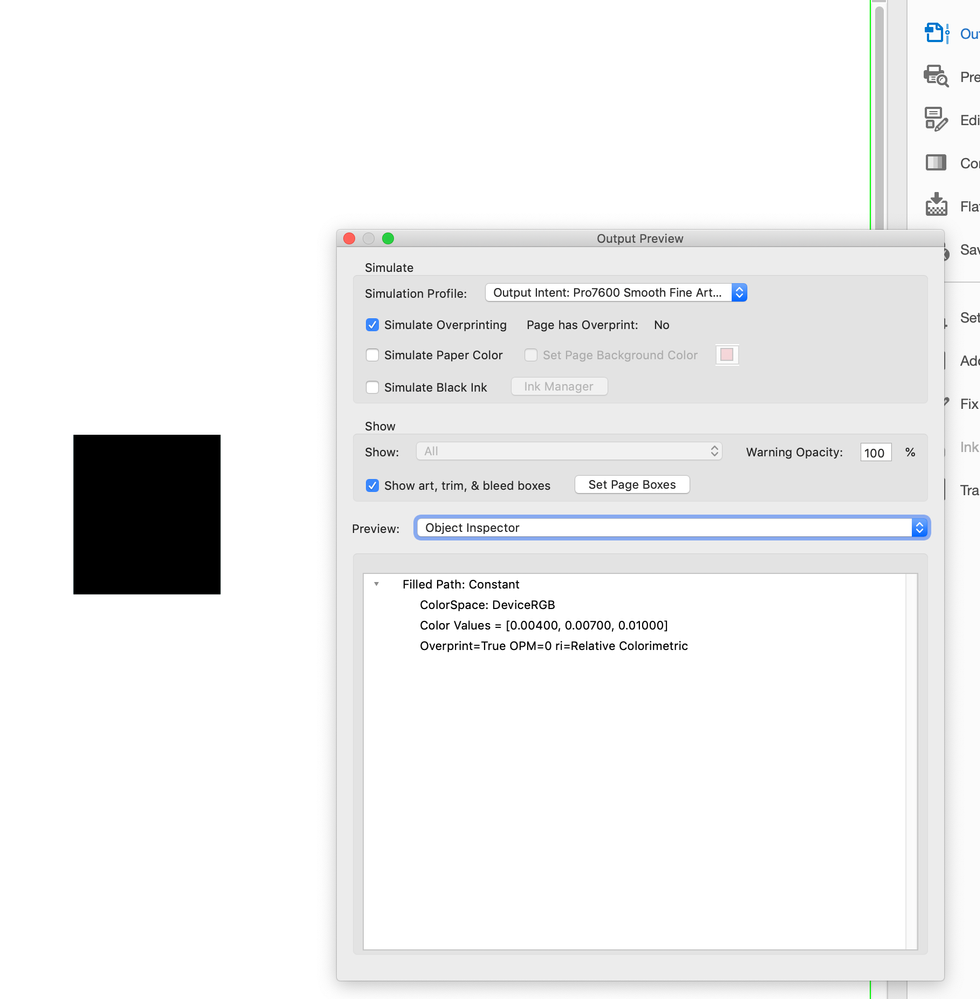
Exporting a PDF/X-4 with the Destination set as an output class RGB output intent would convert everything to DeviceRGB (no embedded profile) . A document CMYK 0|0|0|100 black object exports as this:

Copy link to clipboard
Copied
I'm going to suggest an alternative: Create a special spot colour called Text Black (spec'd as 0C 0M 0Y 100K, of course) and assign it accordingly.
This spot colour will carry through to the PDF along with your RGB images, and then each individual RIP can deal with that and convert it to process. Of coourse, you have to inform them that's what you're doing.
Copy link to clipboard
Copied
I’m not sure why, but @ozdefy12345678 wants all of the placed images to export in the same RGB space. Also the InDesign files are provided, so the text is already set.

Copy link to clipboard
Copied
Any thoughts on the effect of setting the Appearance Of Black preference setting to Output All Blacks as Rich Black in this case?
Copy link to clipboard
Copied
Hi Peter, the Appearance of Black setting only affects PDF exports when the destination is RGB—it has no affect on a PDF/X-4 export where the destination is CMYK.
If the conversion is to RGB and the preference is set to Rich Black, the exported RGB black will be absolute— RGB 0|0|0. If it’s set to Accurate, the exported RGB value will depend on the ID document’s CMYK profile, in most cases the RGB black would be less than absolute black—something like 13|13|13 dark gray. In either case the RGB black is going to convert to 4-color at output.
I assume the reason Geoff wants to get all of the RGB color into AdobeRGB is that AdobeRGB has a wider gamut and doesn’t clip a significant part of the CMYK color space the way sRGB does. But, the only way to take advantage of the larger gamut is to edit in AdobeRGB. A simple conversion from an sRGB image to AdobeRGB doesn’t change the output. The conversion by itself doesn’t expand the image’s gamut, you would have to edit the image’s saturation in order to get access to the wider AdobeRGB gamut.
Copy link to clipboard
Copied
Hi Rob, you're right about maintining the gamut.
We print for some of the worlds top photographers and they almost always shoot raw and export to Adobe RGB. Because we print to a range of different printers, we like to maintain the gamut of the images until the relevant printer and paper is chosen, and only then convert to the the relevant output profile for that printer/paper combo.
The reason we "force" Adobe RGB is two-fold: it's partly a historical decision that will take some unwinding, but it's also because some photographers choose to work in the really large gamut of ProPhoto, which is unneccisarily large for printing, so it's essential that we convert those to AdobeRGB at export time so they can see the impact of the conversion before sending us the file. As you say, converting from sRGB to Adobe RGB has almost no impact an image.
We also have many thousands of customers, so I can't foist upon them extra techniques like creating spot colours. They need to be able to arrive at our site, download our plugin, get designing, export upload and order without having to talk any technical print language.
I have written a set of Javascript functions that are designed to take all the print-related tasks off their plate. We setup the InDesign document to our specs and we take full control of the export so they can't make any mistakes - most of these customers are experts in photography, but experts in print and PDFs they are not.
We don't do any prepress either - we are a 100% web-to-print business and the 1st time we see a file is when it's on paper.
Our plugin works really well and has been a boon for our business. This thread has been about finessing the export a little by trying to maintain the K-only text.
It was worth a shot 🙂
Geoff
Copy link to clipboard
Copied
This thread has been about finessing the export a little by trying to maintain the K-only text.
It seems like an Acrobat conversion would be the easiest—it probably could be scripted. You would also be able to convert any DeviceCMYK colors to AdobeRGB and still protect 100% black.
because some photographers choose to work in the really large gamut of ProPhoto, which is unneccisarily large for printing
If the extra color conversion has a benefit it should showup in the output numbers, but I don’t see that.
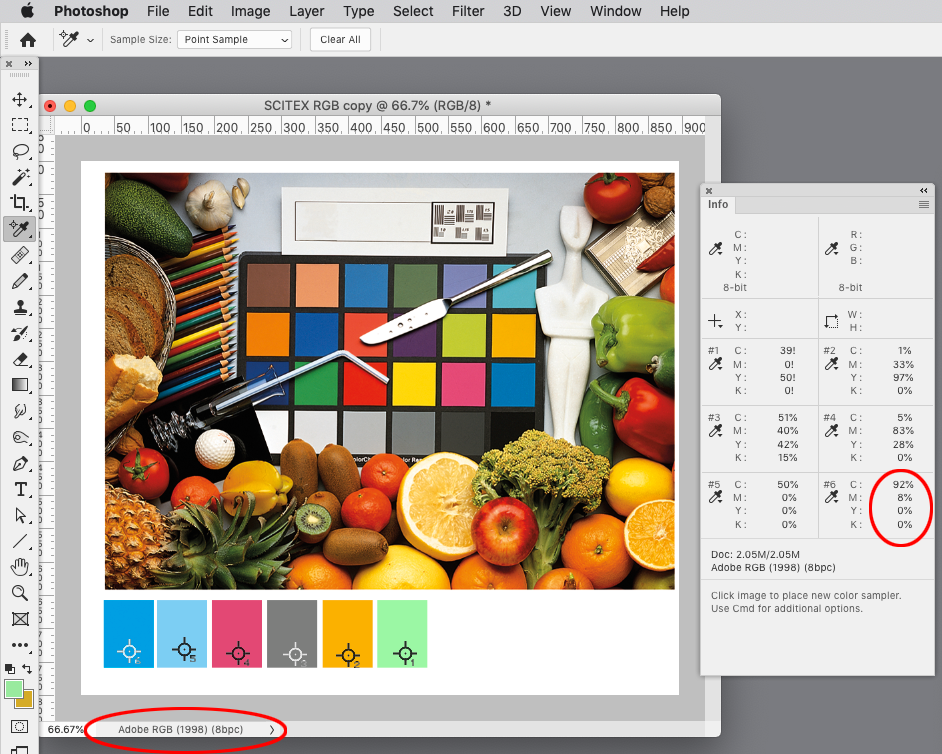
Here’s a ProPhoto image with Working CMYK (Coated GRACol) color samplers along with the same file converted to AdobeRGB. The conversion Intent is Relative Colorimetric with BPC. The CMYK output numbers are identical except for the cyan patch—that’s because AdobeRGB clips 100% cyan, but ProPhoto doesn’t.

Copy link to clipboard
Copied
For that image, the clipping may be limited, but the difference between ProPhoto and Adobe RGB extends much further than just cyan. The gamut comparison is below.
While it's rare that much of the extra gamut ProPhoto is used to any great extent, it's still essential that our customer sees the impact at their end. These kinds of protographers usually order Epson Inkjet prints on cotton rag, so image quality is important.
The photos that send a shiver up our spines are those of an Antarctic trip shot on Phase1 and exported to ProPhoto and then ordered as Indigo print.
I'll try your suggestion of the Acrobat scripted conversion
Copy link to clipboard
Copied
it's still essential that our customer sees the impact at their end.
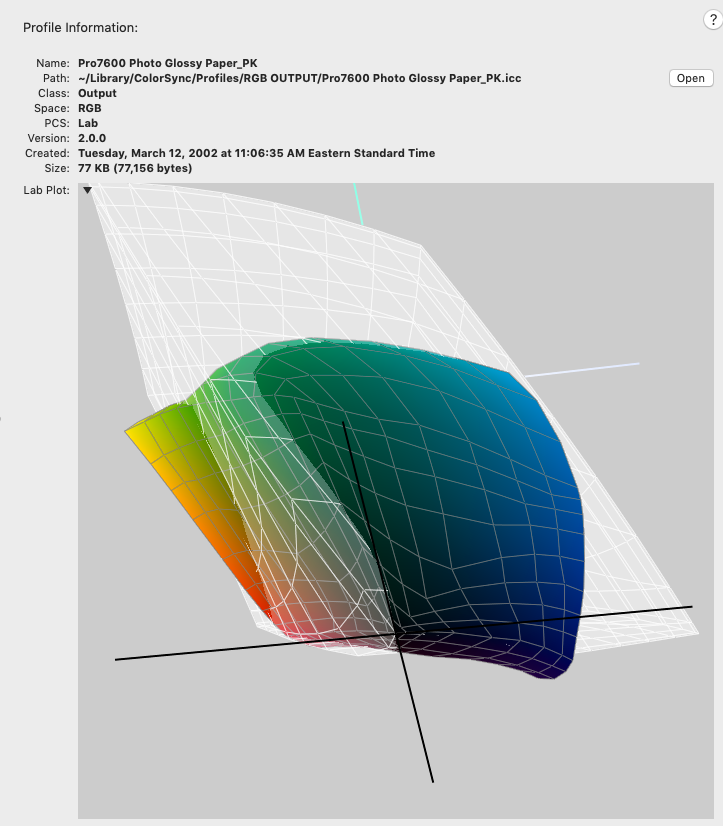
AdobeRGB or ProPhotRGB are display class profiles, so comparing their gamuts doesn’t tell you anything about the final output color, so a more useful gamut comparison would be to the output profile.
An inkjet profile can have a larger gamut than a press profile, so while the conversion to AdobeRGB has no affect on in-gamut color values (as I’m showing above) it would prevent access to the larger inkjet blue gamut.
Here’s AdobeRGB compared to an Epson fine art paper profile

And it gets considerably worse with a coated profile:
Copy link to clipboard
Copied
Also, if the print driver breaks color management and ignores source RGB profiles, ProPhoto would be a problem, and that certainly would be a case for converting into a uniform source space.
The test would be to copy an AdobeRGB image, convert the copy to ProPhoto, place both on a page, and Export with no color conversion including profiles. If the driver or RIP is ignoring the PDF object profiles you would get different color. If the driver CM is correct you would get matching color.
Copy link to clipboard
Copied
"text already set"
Yes, I know, but if they are getting working files, they could just do a simple S&R for text in 100K and switch to the "new" spot colour. In any case, this whole workflow seem unnecessarily complex just to support an outdated idea that it needs to be the same color space. You and I both know it's the OUTPUT profile that is the loose cannon in all of this.

-
- 1
- 2

Find more inspiration, events, and resources on the new Adobe Community
Explore Now
 AdChoices
