


Copy link to clipboard
Copied
Hello everyone,
I'm in urgent need of help. I have asked numerous people incl. so called InDesign experts but even they can't help me.
I have created a file in InDesign for a flyer/brochure based on a template I bought online.
I tried to export the file as a PDF for printing numerous times now, but each time the exported PDF file is EMPTY.
I have already tried changing the settings of the pages, however even then the export is empty.
I really don't know what I should do...
Can anyone help me?
Thank you in advance.


 1 Correct answer


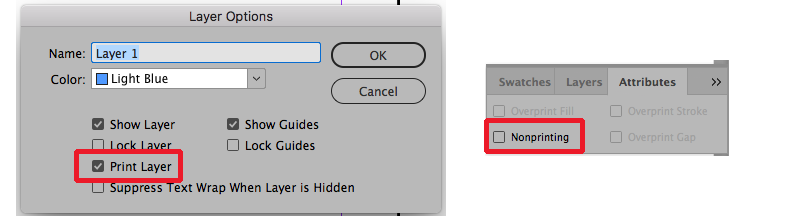
You can check a couple of places within the file. First double-click on each layer in the layers panel (Window>Layers) and make sure that "Print Layer" is checked for each layer. Then you can also check the Attributes Panel (Window>Output>Attributes). To use that panel select all items on the page and make sure that "Nonprinting" is unchecked in that panel.

 7
Replies
7
7
Replies
7

Copy link to clipboard
Copied
You can check a couple of places within the file. First double-click on each layer in the layers panel (Window>Layers) and make sure that "Print Layer" is checked for each layer. Then you can also check the Attributes Panel (Window>Output>Attributes). To use that panel select all items on the page and make sure that "Nonprinting" is unchecked in that panel.

Copy link to clipboard
Copied
Hi Jess,
What happens when you try to print to a printer? The same thing, or does that work?
~ Jane
Copy link to clipboard
Copied
Thank you very much, Bill!!! That's exactly what I had to do. 
Copy link to clipboard
Copied
Happy to help.

Copy link to clipboard
Copied
Hi Bill, I am having the exact same issue however your solution didnt work for me. There are no existing errors on the files and all layers and attributes are the same as your posting... wondering why the pdf still comes out blank.

Copy link to clipboard
Copied
Hi Jorja5EE7, I was having the same problem (which is how I ended up here) until I discovered I was trying to open up the PDF file before Indesign had actually finished exporting it. I have an older Mac so it was taking a little time to do so.

Copy link to clipboard
Copied
Hi Jorja5EE7,
would you see contents on your document pages if you switch the view to Preview with Overprint Preview enabled?
Regards,
Uwe Laubender
( ACP )


Get ready! An upgraded Adobe Community experience is coming in January.
Learn more
 AdChoices