Participant
March 14, 2017
Answered

Exported PDF page dimensions become too large

  • March 14, 2017
  • 1 reply
  • 4540 views

When I export my InDesign file to a PDF the page dimensions come out too large. The InDesign page dimensions (in Document setup) are W:210mm H:297 (A4) with a 3mm bleed all around. The exported PDF comes out with dimensions of W:230.8mm H:317.8mm? Earlier drafts of my work exported with the correct page dimensions (210mmx297mm)?

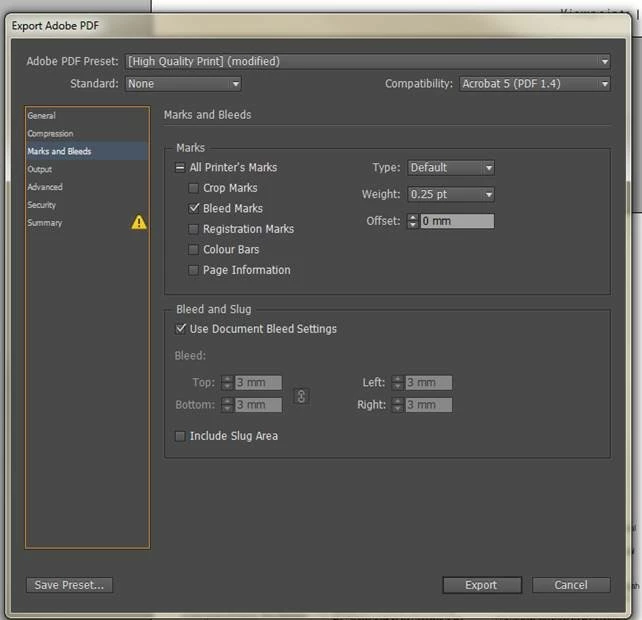
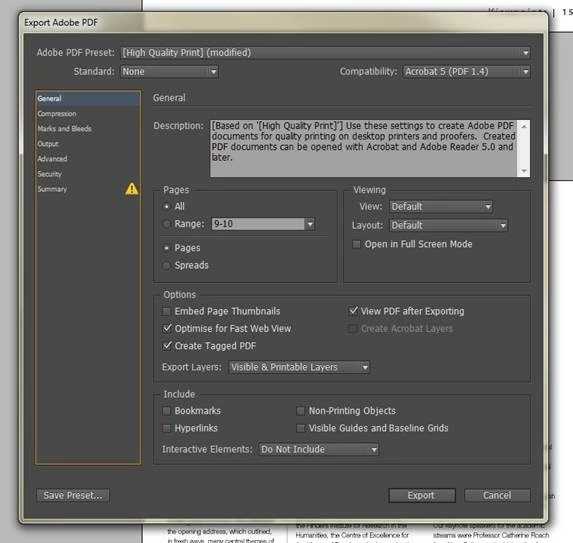
Please see my PDF export "General" and "Marks and Bleeds" settings in screen shot below.

Please help me!? What am I doing wrong?
This topic has been closed for replies.
Correct answer vinny38

As I said before, uncheck Bleed Marks (useless), check at least Crop marks AND set bleed to 3mm.

Registration Marks and Page Information can be turned on too, optional but your printer might find them helpful.

I advice using PDF/X-4 profile and, of course, export as Pages, not Spreads.

You didn't mess anything up, your printer will trim at crop marks, regardless of PDF size.

1 reply

vinny38
Legend
March 14, 2017

Hi

this is normal. As you can see, you ticked "Bleed Marks". So INDD adds hairline rules that define the amount of extra area to image outside the defined page size. This obviously increases the output size.

If you want to export full size, untick any printer's mark and set Bleed and Slug Values to zero.

Besides, you may want to ask yourself why you need Bleed marks. They're usually not so useful. If you want to prepare file for pro printing, you need Crop marks AND bleed set to 3.

Participant
March 14, 2017

Thanks for answering so quickly!

The document is going to be an A4 booklet to be printed by a professional printer so I have added the 3mm all around to be trimmed off by the printer (I have some images that I want to print right to the edge of the page). However, the document is still to large even when the printer trims off the 3mm all around? With the 3mm bleed all around it should only add 6mm to both the width and height. In which case, shouldn't the dimensions be w:216mm x h:303mm?  I'm still at a loss as to what Adobe PDR export preference I have messed up?

vinny38
vinny38Correct answer
Legend
March 14, 2017

As I said before, uncheck Bleed Marks (useless), check at least Crop marks AND set bleed to 3mm.

Registration Marks and Page Information can be turned on too, optional but your printer might find them helpful.

I advice using PDF/X-4 profile and, of course, export as Pages, not Spreads.

You didn't mess anything up, your printer will trim at crop marks, regardless of PDF size.