

Exit
  • Global community
    • Language:
      • Deutsch
      • English
      • Español
      • Français
      • Português
  • 日本語コミュニティ
  • 한국 커뮤니티
0

Exported PDF showing only lines

New Here ,
Mar 31, 2022 Mar 31, 2022

Hi there, I have a large format file (4150x1200mm) with one tiff image as background and some text and graphical elements. When I export it to PDF it only shows lines, the background image is missing. I've tried different settings, but same result. Hope you can help 🙂

Schermafbeelding 2022-03-31 om 12.05.21.png

TOPICS
Import and export
853
Translate
Report
Community guidelines
Be kind and respectful, give credit to the original source of content, and search for duplicates before posting. Learn more
community guidelines

correct answers 1 Correct answer

Community Expert , Apr 04, 2022 Apr 04, 2022

The resolution of that graphic is ridiculously high for something with those dimensions. You could probably get away with an effective resolution of 50 ppi and you're at 300.


I strongly suggest a phone call to the printer because I would think an RGB image would also be in order here.

Translate
Mentor ,
Mar 31, 2022 Mar 31, 2022

Try to save this tif as psd and re-place background as new psd file. 


Remember, never say you can't do something in InDesign, it's always just a question of finding the right workaround to get the job done. © David Blatner
Translate
Report
Community guidelines
Be kind and respectful, give credit to the original source of content, and search for duplicates before posting. Learn more
community guidelines
New Here ,
Apr 04, 2022 Apr 04, 2022

Hi George, That's not possible, the Photoshop file is too large. I can only choose PSB or TIFF

Translate
Report
Community guidelines
Be kind and respectful, give credit to the original source of content, and search for duplicates before posting. Learn more
community guidelines
Mentor ,
Apr 04, 2022 Apr 04, 2022

Choose psb and re-try

Remember, never say you can't do something in InDesign, it's always just a question of finding the right workaround to get the job done. © David Blatner
Translate
Report
Community guidelines
Be kind and respectful, give credit to the original source of content, and search for duplicates before posting. Learn more
community guidelines
New Here ,
Apr 04, 2022 Apr 04, 2022

As far as I'm aware you can't place a PDB to InDesign?

 

Translate
Report
Community guidelines
Be kind and respectful, give credit to the original source of content, and search for duplicates before posting. Learn more
community guidelines
Community Expert ,
Mar 31, 2022 Mar 31, 2022

What happens if you export as PDF/X-4?

You wrote about the background image. What are its properties? Text, vectors, photo, image? How are the attributes in InDesign? What color has the TIF image? Greyscale, white, spot color?

Translate
Report
Community guidelines
Be kind and respectful, give credit to the original source of content, and search for duplicates before posting. Learn more
community guidelines
New Here ,
Apr 04, 2022 Apr 04, 2022

Seems to make it worse. I've completely flattened the file, to prevent errors caused by transparency. It's just one large image, CMYK file. In InDesign it looks as it should, I've also attached a screenshot of that.
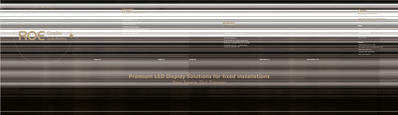
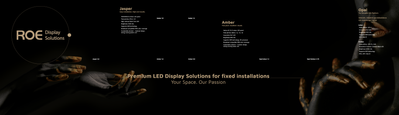
 

Schermafbeelding 2022-04-04 om 10.09.48.png

Schermafbeelding 2022-04-04 om 10.12.35.png


Translate
Report
Community guidelines
Be kind and respectful, give credit to the original source of content, and search for duplicates before posting. Learn more
community guidelines
Community Expert ,
Mar 31, 2022 Mar 31, 2022

How are you viewing your pdf? If Acrobat or Reader, the page display preference to show large images should be on. If it is on, try opening the image and resaving from Photoshop.
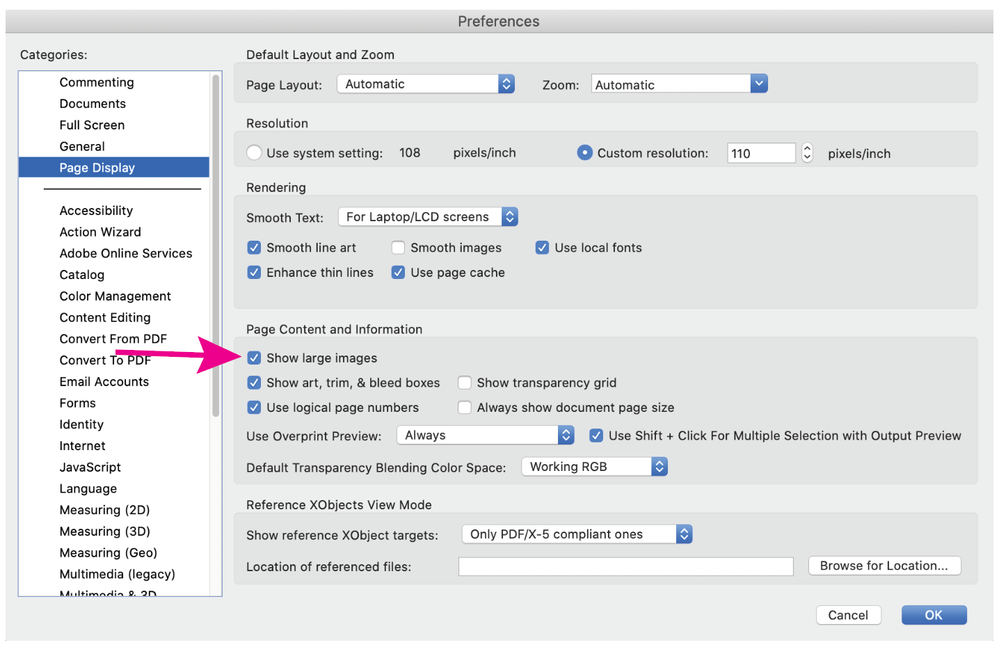
Show large images.png

Translate
Report
Community guidelines
Be kind and respectful, give credit to the original source of content, and search for duplicates before posting. Learn more
community guidelines
New Here ,
Apr 04, 2022 Apr 04, 2022

Yes in Adobe Acrobat, the option is checked - but thanks for thinking along!

Translate
Report
Community guidelines
Be kind and respectful, give credit to the original source of content, and search for duplicates before posting. Learn more
community guidelines
Mentor ,
Mar 31, 2022 Mar 31, 2022

Give the package of your publication and this pdf here through some dropbox/yadisk service. Let's some of us look in it!


Remember, never say you can't do something in InDesign, it's always just a question of finding the right workaround to get the job done. © David Blatner
Translate
Report
Community guidelines
Be kind and respectful, give credit to the original source of content, and search for duplicates before posting. Learn more
community guidelines
New Here ,
Apr 04, 2022 Apr 04, 2022

Thanks for the offer, you can download the package here: https://we.tl/t-UzTbiBEqYn

The problem is probably the PSD file, but all help is welcome.

Translate
Report
Community guidelines
Be kind and respectful, give credit to the original source of content, and search for duplicates before posting. Learn more
community guidelines
Community Expert ,
Apr 04, 2022 Apr 04, 2022

The resolution of that graphic is ridiculously high for something with those dimensions. You could probably get away with an effective resolution of 50 ppi and you're at 300.


I strongly suggest a phone call to the printer because I would think an RGB image would also be in order here.

Translate
Report
Community guidelines
Be kind and respectful, give credit to the original source of content, and search for duplicates before posting. Learn more
community guidelines
New Here ,
Apr 05, 2022 Apr 05, 2022

The resolution is that high because the Indesign file is at 50% of the real size. The printer will enlarge it. I've changed it to RGB and changed the resolution to 80ppi, that did the trick. Thanks for the help.

Translate
Report
Community guidelines
Be kind and respectful, give credit to the original source of content, and search for duplicates before posting. Learn more
community guidelines
Community Expert ,
Apr 05, 2022 Apr 05, 2022
LATEST

So the image, after enlargement would have been 150 ppi which is still really high for something that size. I'm sure 80 will be fine but again, talking to the printer is the best thing you can do.

Translate
Report
Community guidelines
Be kind and respectful, give credit to the original source of content, and search for duplicates before posting. Learn more
community guidelines



