Participant
December 3, 2018
Answered

exporting html with italics

  • December 3, 2018
  • 4 replies
  • 945 views

Hi there,

I'm laying out a book and when I try to export an HTML version the italics are gone in the HTML document. Does anyone know how to resolve this?

This topic has been closed for replies.
Correct answer hammer0909

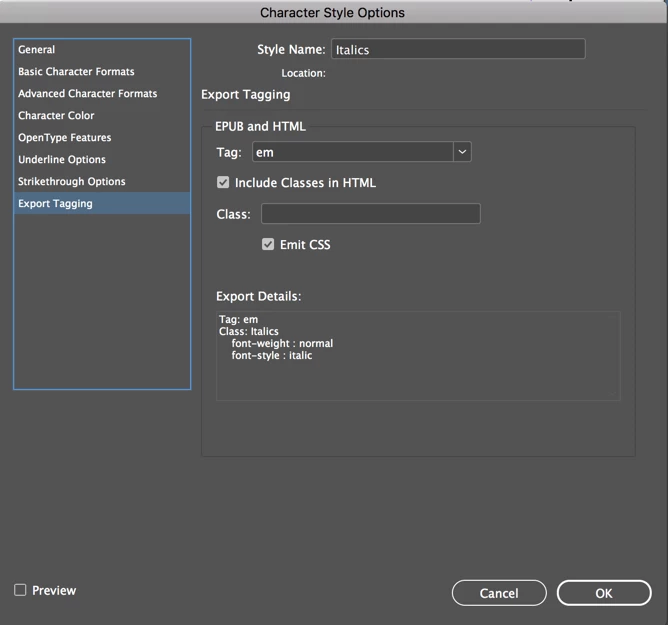
In your book, wherever you use italics, make sure that you apply an italic character style to each instance. Open the italic character style and click on Export Tagging on the left hand side. Choose em from the Tag drop-down menu. Now when you export to HTML, the italics should be retained.
4 replies

hammer0909
Community Expert
hammer0909Community ExpertCorrect answer
Community Expert
December 3, 2018

In your book, wherever you use italics, make sure that you apply an italic character style to each instance. Open the italic character style and click on Export Tagging on the left hand side. Choose em from the Tag drop-down menu. Now when you export to HTML, the italics should be retained.

Srishti Bali
Community Manager
Community Manager
December 6, 2018

Hi there,

I would like to know if the steps suggested above worked for you, or the issue still persists.

Kindly update the discussion if you need further assistance with it.

Thanks,

Srishti

TᴀW
Legend
December 3, 2018

If you just need to preserve the italics, do a GREP find change: Search for .+ with your italics applied, and replace with <span class="italics">$0</span>.

Then copy and paste the text directly into a text editor such as notepad, and from there to your website.

(Obviously, use whatever your preferred html markup you like for the italics. The span thing with class="italics" is just by way of an example.)

Ariel

Derek Cross
Community Expert
Community Expert
December 3, 2018

If you want to do some easy testing export to InDesign's Publish Online, which is a form of FXL ePub (HTML5)

BobLevine
Community Expert
Community Expert
December 3, 2018

Not without some details. Are you expecting an HTML export of InDesign maintain all styling or are you exporting an EPUB?

What version of InDesign and operating system? How are looking at this file?

Participant
December 3, 2018

Yes I was hoping that an HTML export from InDesign would maintain styling. Not exporting an EPUB.

InDesign CC 2019

I don't know what you mean by how are looking at this file... but it's for a book. We've finalized the print version with an exported .pdf and now I just need to export the HTML for the digital forms of the book. When I do that I don't see italics in the exported HTML file.

Derek Cross
Community Expert
Community Expert
December 3, 2018

It's not as easy as that.

Do you want to produce a FXL ePub or a Reflowable ePub or another format?