Participant
November 5, 2020
Answered

Exporting part of InDesign book as Adobe PDF

  • November 5, 2020
  • 3 replies
  • 363 views

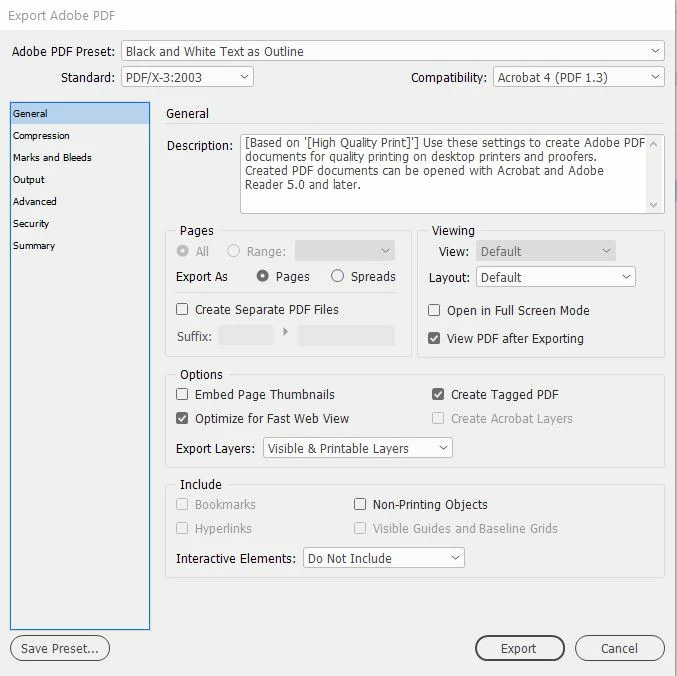
Should I be able to export selected pages of my InDesign book to Adobe? In the dialog, the option to select All or Pages is greyed out

 

This topic has been closed for replies.
Correct answer Laubender

Hi J5FC1,

with the help of a script by Peter Kahrel you could also export a selection of documents of an InDesign book file:


Export book documents to individual PDF files

Peter Kahrel | Last update: 21 June 2020: Added support for interactive PDF export.

https://creativepro.com/files/kahrel/indesign/pdf_individuals.html


Regards,
Uwe Laubender

( ACP )


3 replies

J5FC1Author
Participant
November 5, 2020

Thanks to both of you. I now know that (a) this is normal, and (b) there are workarounds.

LaubenderCommunity ExpertCorrect answer
Community Expert
November 5, 2020

Hi J5FC1,

with the help of a script by Peter Kahrel you could also export a selection of documents of an InDesign book file:


Export book documents to individual PDF files

Peter Kahrel | Last update: 21 June 2020: Added support for interactive PDF export.

https://creativepro.com/files/kahrel/indesign/pdf_individuals.html


Regards,
Uwe Laubender

( ACP )


Barb Binder
Community Expert
Community Expert
November 5, 2020

Hi @J5FC1:


The two options in the book window panel menu are Export Book to PDF and Export Selected Documents to PDF. You cannot specify page ranges with those commands. Instead, open a chapter within a book to export a range of pages, or export the entire book to PDF and then Extract only the pages that you need from the PDF in Acrobat and delete the original PDF with all of the pages.


~Barb 

~Barb at Rocky Mountain Training