
Participant
January 19, 2023
Question

Exporting print ready files PDF

  • January 19, 2023
  • 4 replies
  • 498 views

I have exported a 60pg Indesign doc to PDF, but the printers have come back and said they are unable to convert 1 page to cmyk satisfactorily. Below are the output options I have chosen but don't seem to be working. 

I'm not clued up on Indesign exporting, so if someone has a simple solution that'd be great. 

All other 59 pages the printers are happy with - so it seems strange that 1 is causing issues!
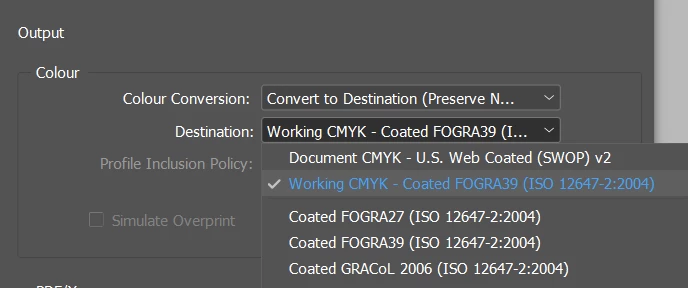
This topic has been closed for replies.

4 replies

Peter Spier
Community Expert
Community Expert
January 19, 2023

A screen capture of rthe problem page, the links panel showing the links on that page, and the ink manager would help. We really can only guess at the problem right now

Willi Adelberger
Community Expert
Community Expert
January 19, 2023

Did you use spot colors on the problematic page?

Look into the ink manager, tick them to convert.


Participant
January 19, 2023

Hello, is this what you mean - I've just ticked the 'all spots to process'

Legend
January 19, 2023

Meanwhile... you used three spot colours. Designers often do this, without thinking of the consequences in printing, and it causes no end of hair-tearing at printers. Did you use these colours on the problem page?

Legend
January 19, 2023

And what colour space did you design that page in?

Participant
January 19, 2023

They don't know what output I need, but the rest of the file seems to work fine for them, just this page they said they can't use.

Is this what you mean by colour space?


Legend
January 19, 2023

If you use this option it is going to be CMYK. But is it the right CMYK? Did you ask them for an output profile?