
Participant
March 1, 2017
Answered

Extra space appears after number in paragraph

  • March 1, 2017
  • 2 replies
  • 2976 views

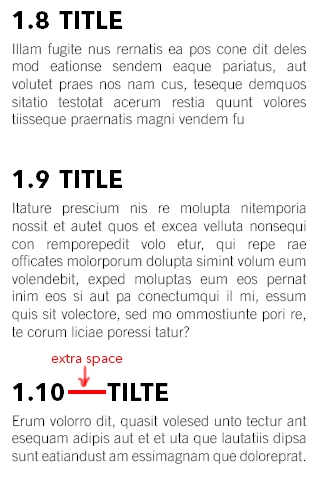
I have a problem with a paragraph style that I have created in InDesign. The style I’ve created is a numbered level 2 paragraph, it works fine for numbers from 1.1, 1.2…,1.9 but as soon as the numbers becomes double digit (like 1.10) an extra space/tab is added. In the picture below you can see the problem. Does anyone know why this is happening and how to solve it?
    This topic has been closed for replies.
    Correct answer Barb Binder

    I suspect you are using the default tab added to the end of the Number in the Bullets and Numbering dialog box.

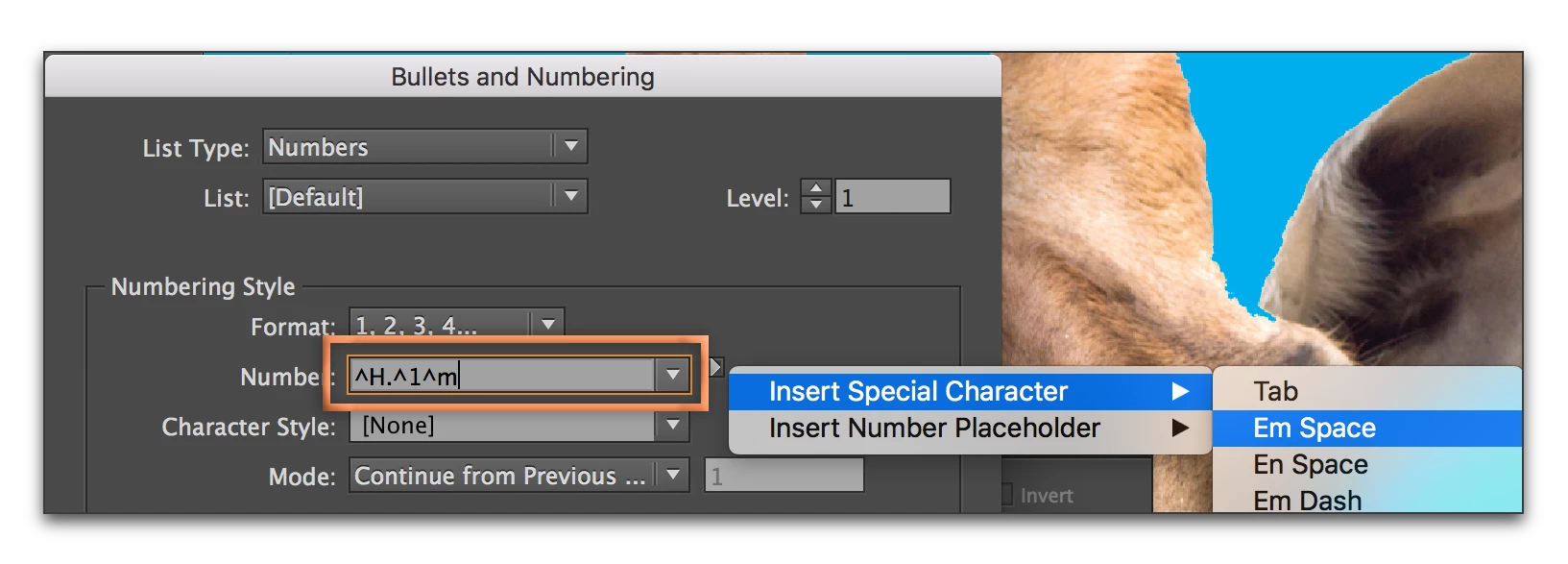
    Are you just looking for even space after the number, no matter what the length? In that case, change the number format from ^H.^#^t to ^H.^#^m. (^t is a tab, ^m is an em space. You can type it in or add it from the menu shown below. If that is to wide, try an en space.)

    2 replies

    douglass74235594
    Participant
    November 14, 2020

    Thank you this was a lifesaver!

    Barb Binder
    Community Expert
    Barb BinderCommunity ExpertCorrect answer
    Community Expert
    March 1, 2017

    I suspect you are using the default tab added to the end of the Number in the Bullets and Numbering dialog box.

    Are you just looking for even space after the number, no matter what the length? In that case, change the number format from ^H.^#^t to ^H.^#^m. (^t is a tab, ^m is an em space. You can type it in or add it from the menu shown below. If that is to wide, try an en space.)

    ~Barb at Rocky Mountain Training