


Known Participant
August 16, 2023
Answered

Failure to launch | InDesign

  • August 16, 2023
  • 3 replies
  • 1468 views

I have been using InDesign for many years. Never any problems. Today at approx. 1pm Australian EST InDesign simply stopped launching. I click the launch icon and it bounces one, the intro screen flashes up for a moment. Then that's it. No launch. I have relogged into Creative Cloud. I have uninstalled InDesign and reinstalled. Nothing.


I am on a Mac Studio M1 Max 32GB running 13.2.1.


Any ideas? Thanks in advance.


Cheers

Tiff
This topic has been closed for replies.
Correct answer leo.r

If you're running InDesign 18.5, then it appears that many users experience the same issue (judging by the amount of similar posts on the forum).


First, update to macOS 13.5. It solved the issue for some users.


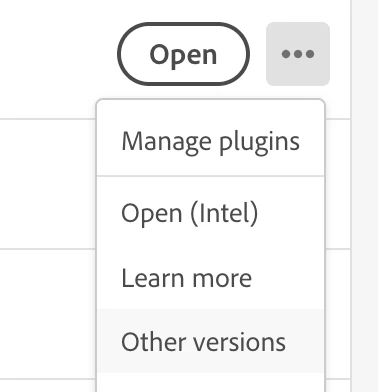
If it doesn't help, then users recommend to install an earlier version - preferably 18.3. You can do it from the Creative Cloud app:


3 replies

Geоrge
Legend
August 16, 2023

Did you try InDesign factory reset? 


  1. Windows: Start InDesign, and then press immediately Shift+Ctrl+Alt. Click Yes when asked if you want to delete preference files.
  2. macOS: While pressing Shift+Option+Command+Control, start InDesign. Click Yes when asked if you want to delete preference files.
 
Remember, never say you can't do something in InDesign, it's always just a question of finding the right workaround to get the job done. © David Blatner
tiff_meekAuthor
Known Participant
August 16, 2023

George that worked! Thank you so much! Have a great day!  🙂

Community Expert
August 16, 2023

If you decide to install a previous versionas suggested by @leo.r  then you can refer to the following article on how to do it

https://helpx.adobe.com/in/download-install/using/install-previous-version.html

-Manan

-Manan
tiff_meekAuthor
Known Participant
August 16, 2023

Thank you so much for your response. I tried George's solution (see below) and it the app launched! If I have any further issues I will try your solution. Have a great day  🙂

tiff_meekAuthor
Known Participant
August 16, 2023

Update: George's solution didn't work once I quit out of InDesign and restarted it again. So I will try your solution now. Thanks!

tiff_meekAuthor
Known Participant
August 16, 2023

Adobe InDesign 2023, latest version.

leo.r
Community Expert
leo.rCommunity ExpertCorrect answer
Community Expert
August 16, 2023

If you're running InDesign 18.5, then it appears that many users experience the same issue (judging by the amount of similar posts on the forum).


First, update to macOS 13.5. It solved the issue for some users.


If it doesn't help, then users recommend to install an earlier version - preferably 18.3. You can do it from the Creative Cloud app:


tiff_meekAuthor
Known Participant
August 16, 2023

Thank you so much for your response. I tried George's solution (see below) and it the app launched! If I have any further issues I will try your solution. Have a great day! 🙂