
Participant
November 15, 2024
Question

Fehler in Indesign 20.0 - Datenzusammenführung

  • November 15, 2024
  • 1 reply
  • 266 views

Hallo liebe Community,


ich habe seit heute einen Fehler beim Datenzusammenführungs-Fenster in Indesign 20.0:

Wenn ich eine Datenquelle ausgewählt habe, verdeckt weiterhin die Anleitung die möglichen Datenfelder, siehe Screenshot.
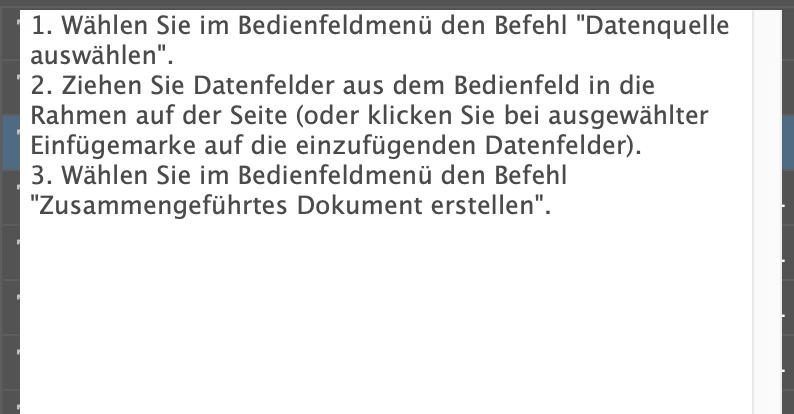


Ich habe Indesign bereits deinstalliert und neu installiert, der Fehler ist nach wie vor da.

Kennt jemand den Fehler und weiß, wie ich ihn beheben kann?


Vielen Dank für Hilfe und viele Grüße

Jasmin


This topic has been closed for replies.

1 reply

Abhishek Rao
Community Manager
Community Manager
November 15, 2024

Hi @scratchmuc,


Thank you for reaching out! Let’s work together to resolve this issue. Could you please provide the following details?  

1. Which OS are you currently using?  
2. Was Data Merge working correctly for you in a previous version of InDesign with the same CSV file?  
3. Is this issue occurring with a newly created InDesign file or an existing one?  

If possible, could you share the files with us (both the CSV and the INDD file) so we can test and investigate further?  

In the meantime, you might find this article helpful: [Data Merge in InDesign](https://adobe.ly/3OcCuhG).  


Looking forward to your response!  


Best,
Abhishek Rao  

Participant
November 15, 2024

Hi Abhishek Rao,


I am using Ventura 13.7.1.

The Data Merge with the same files are working in a previous version of Indesign.

I also can see the data fields behind the instructions:

and when I click somewhere on the instructions, the hidden data field is added to the text.

There is only the error, that the instructions do not disappear.


Unfortunately I can not share the files for data protection reasons.


Best

Jasmin

Abhishek Rao
Community Manager
Community Manager
November 15, 2024

Hi @scratchmuc,


Thank you for the update! I tried replicating the issue on my end, but everything appears to work correctly.  

Could you try resetting your InDesign preferences? Sometimes, resetting preferences can resolve unexpected behavior. Here's how to do it: [Set preferences in InDesign](https://adobe.ly/3Z6m4Ok).  

Additionally, you might find this community post helpful:  
[Data Merge Field List Obstructed by Instructions](https://adobe.ly/3YTN6aa). It includes troubleshooting steps that worked for others experiencing similar issues.  


Please let me know if this resolves the issue or if the problem persists.  


Best,
Abhishek Rao