
Copy link to clipboard
Copied
Hi,
I tried to find a specific color. In my case a Pantone color. But there were no objects in the document with that color, so it was not possible to use “Find Color.” I had to remove “style by style” to find out what format this color has.
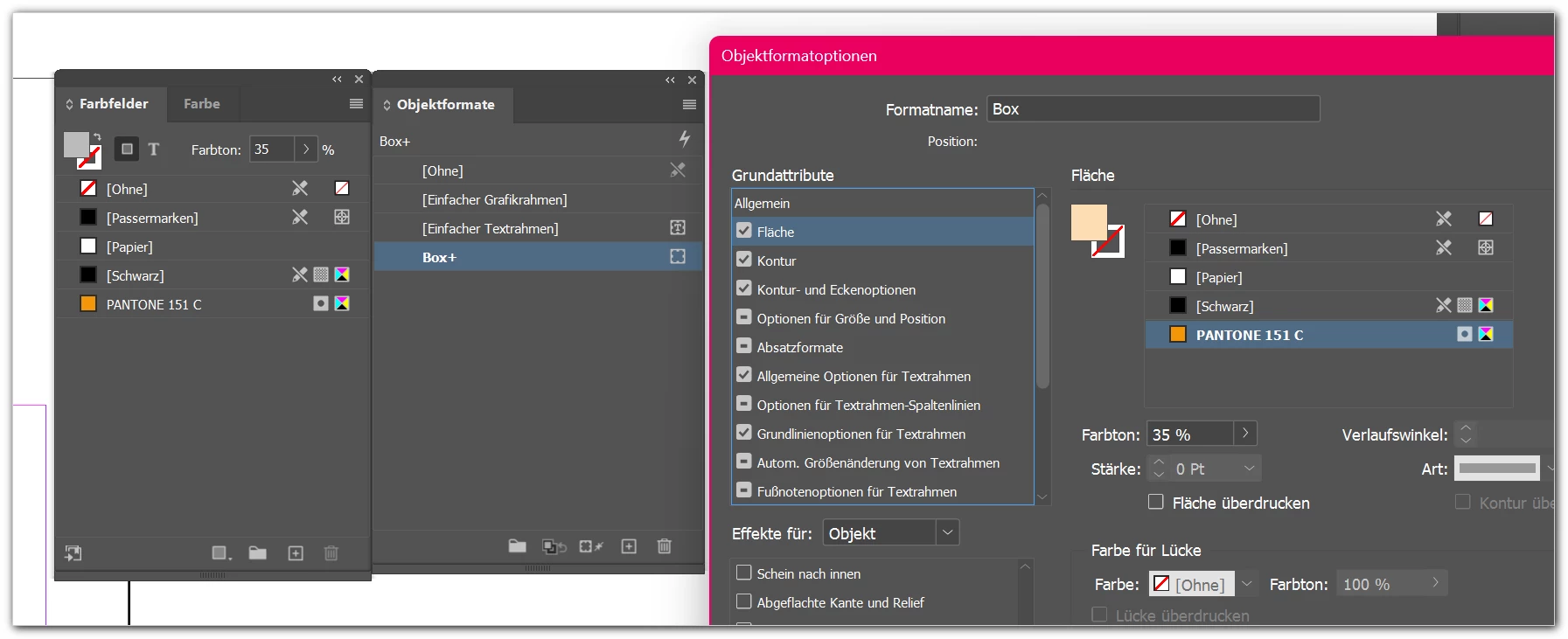
Is there a better and faster way to find such "hidden" colors?
Thanks!
mycc
Indesign, Windows 11, latest versions
Copy link to clipboard
Copied
Hi CC,
I probably misunderstand what you mean, but...
Do you mean you want to find hidden colors that are not present in the Swatches panel?
Try clicking on Swatches panel menu button (≣) in the upper right of the panel (also referred to as the hamburger icon) and then choose Add Unnamed Colors.
Copy link to clipboard
Copied
Thanks for your help!
Not quite. I wanted to clean up a final InDesign document, removing all unused formats and colors. When I selected “select all unused colors,” one color was not selected that I hadn't used at all—however, it was assigned to an object format that was still active and in use, but I had recolored one object individually.
Now I had to delete my objects one by one to find out in which object format this unused color had been set. I only found it by chance at the very end...
And there's probably no solution for this, not even with a script, right?
Find more inspiration, events, and resources on the new Adobe Community
Explore Now