


- Home
- InDesign
- Discussions
- Re: Find and Replace dialogue box not working
- Re: Find and Replace dialogue box not working

Copy link to clipboard
Copied
A few days ago my InDesign Find and Replace dialogue stopped opening. When I hit Command F, I the dialogue box simply flashes on and then off the screen. Has anyone seen this? Know what to do?
I have restarted computer.
Thanks,
LesByrd


 1 Correct answer


Yes. Start by resetting preferences:
Troubleshooting 101: Replace, or "trash" your InDesign preferences
There are two techniques outlined above. If the keystroke option doesn't work, move on the manually deleting the two files. If you are still having issues, move on to deleting the InDesign cache, but be forewarned that this will also delete things like saved Find/Change queries, custom workspaces, etc.
CC 2018 InDesign—Don't Import previous settings and preferences
One of these will fix it for yo
...
 11
Replies
11
11
Replies
11

Copy link to clipboard
Copied
Yes. Start by resetting preferences:
Troubleshooting 101: Replace, or "trash" your InDesign preferences
There are two techniques outlined above. If the keystroke option doesn't work, move on the manually deleting the two files. If you are still having issues, move on to deleting the InDesign cache, but be forewarned that this will also delete things like saved Find/Change queries, custom workspaces, etc.
CC 2018 InDesign—Don't Import previous settings and preferences
One of these will fix it for you.
~Barb
Copy link to clipboard
Copied
Tried that. Can see that my InDesign Defaults have been changed by the Date/Time stamp, but unfortunately this did not work. Any other ideas?
Thank you!

Copy link to clipboard
Copied
Do you have any third party plug-ins activated for InDesign? What operating system and what version of InDesign are you using? It seems possible that uninstalling through the creative cloud desktop app (click on the "V" next to the app name in the App section to get the uninstall option through the pull-down menu) and then reinstalling through the desktop app might be called for in this case. Before reinstalling make sure to run the Creative Cloud Cleaner Tool Use the Creative Cloud Cleaner Tool to solve installation problems .
Copy link to clipboard
Copied
Also, did you follow Barb's advice and also trash the InDesign caches? This is not the same as trashing the preferences. It is usually very helpful in solving problems with panels.
Copy link to clipboard
Copied
Good questions. I used the keystroke method. (However, I never did get the "Are you sure…" window). I was going to try the manual method however I was unable to find the InDesign SavedData file.
I found InDesign Defaults file (which appeared to have been updated based on the Date Modified column). I was able to find this file by going to the finder > Go > Go to Folder and typing ~/Library into the Go to the Folder dialogue box.
Is there another way to find the InDesign SaveData file?
Working on the latest version of InDesign CC (12.1.0.56) and system is still Yosemite.
THANKS!
Copy link to clipboard
Copied
Hi Leslie:
To see the "Are you sure" dialog box, you have to be fast. I hover my left hand over the keys, start InDesign with my right hand and immediately press and hold all four keys down until the message appears. It takes a few tries to get the timing right.
If that still isn't working,
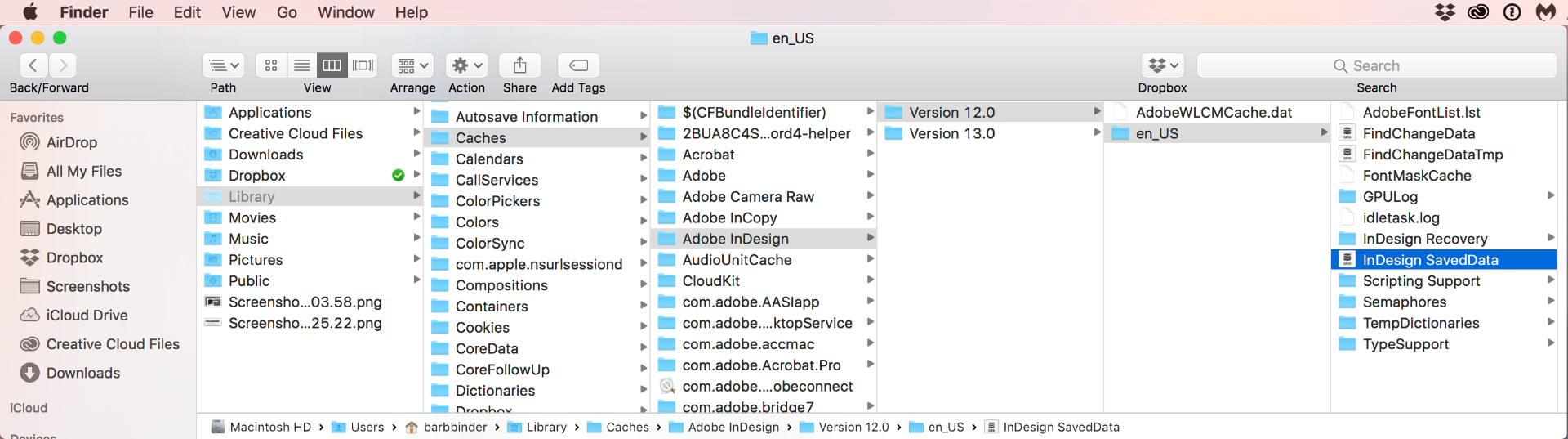
- Open Finder
- Hold the Opt key and open the Go menu > Library
- Caches > InDesign > Version 12.0 > [language] > InDesign SavedData
~Barb
Copy link to clipboard
Copied
Hi, Barb
Just a note: no need to be faster than your machine 
Just hold down the keys pressed, and then click ID icon to start the app.
Message about prefs always pops up, at least here on Windows.
Copy link to clipboard
Copied
Hi Winterm:
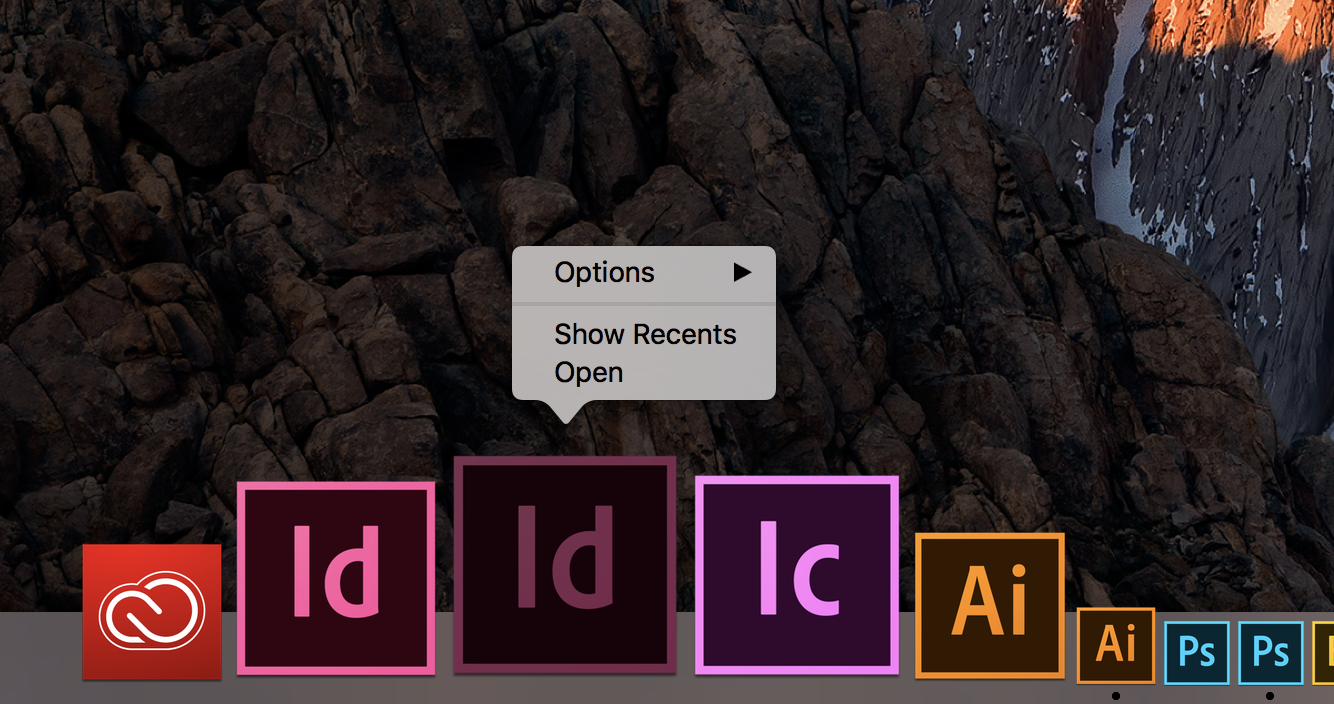
On a Mac—and Leslie is on a Mac—when you press the keys first and then click an application on the dock, it opens the context menu with Options, Show Recents and Open.
~Barb
Copy link to clipboard
Copied
Oh my goodness. I totally missed that there were 4 keys to hold down. Missed holding down the Shift key.
All is good. Find and Replace has reappeared. YAY.
Thank you all so much!
Copy link to clipboard
Copied
Oh, great. Glad that worked for you. Happy Find and Changing! 
~Barb
Copy link to clipboard
Copied
Hi Leslie:
I forgot one thing. InDesign version 12 isn't the latest version—we are up to version 13—but it won't be listed as an available upgrade unless your computer supports it.
~Barb


Get ready! An upgraded Adobe Community experience is coming in January.
Learn more
 AdChoices