kyriosity
Inspiring
July 31, 2021
Answered

Find and replace treating . like a wildcard

  • July 31, 2021
  • 2 replies
  • 804 views

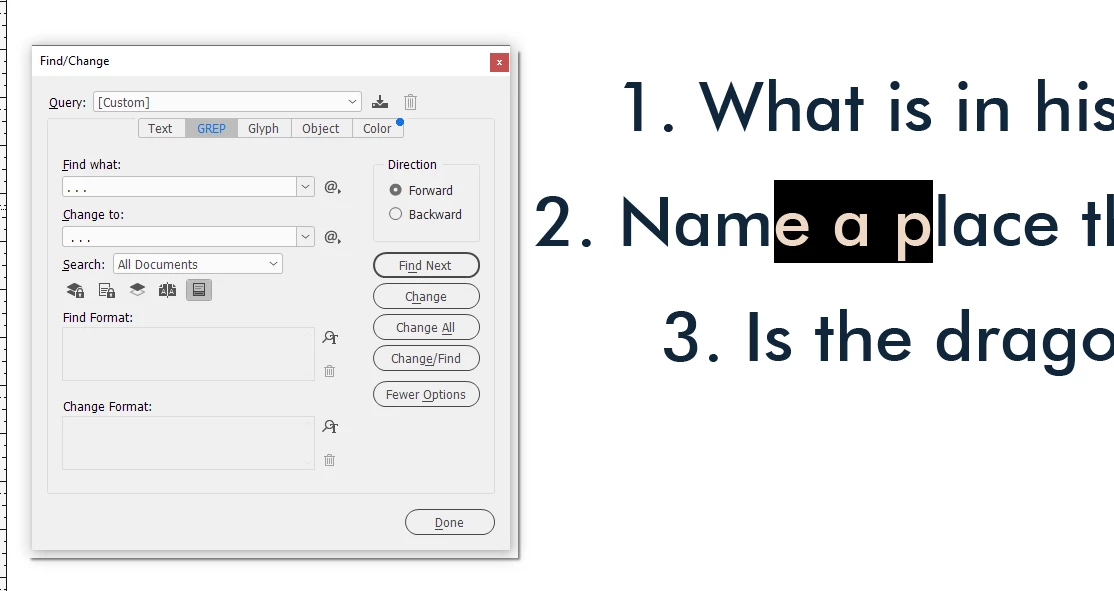
I'm trying to search for [. . .] and replace with [ . . .] (just add a space in front of the first dot), and ID has decided that . is a wildcard, so it's finding things like this:


I've restarted the program to no avail. Any other ideas?

This topic has been closed for replies.
Correct answer Eugene Tyson

@Joel Cherney is correct

You are in the GREP portion of the search function.

Switching to the Text search is what you need. 


For the record - for GREP it is finding regular expressions and period is a wildcard.

You're searching for

. . .

Which is finding [any character][space][any character][space][any character]

Which is why you're finding what you're finding

If you need to find an actual Period (the .]

Then the expression would be 

Find

\. \. \.

Replace with

 $0


That will find the [period][space][period][space][period]

And replace with

[space][found text]

(where $0= found text]



2 replies

Eugene TysonCommunity ExpertCorrect answer
Community Expert
July 31, 2021

@Joel Cherney is correct

You are in the GREP portion of the search function.

Switching to the Text search is what you need. 


For the record - for GREP it is finding regular expressions and period is a wildcard.

You're searching for

. . .

Which is finding [any character][space][any character][space][any character]

Which is why you're finding what you're finding

If you need to find an actual Period (the .]

Then the expression would be 

Find

\. \. \.

Replace with

 $0


That will find the [period][space][period][space][period]

And replace with

[space][found text]

(where $0= found text]



Joel Cherney
Community Expert
Community Expert
July 31, 2021

You're in the GREP section of Find/Replace, and you want to be in the Text section.


Joel Cherney
Community Expert
Community Expert
July 31, 2021

I mean, maaaaaybe you do want to be in the GREP  section. It's a fabulously powerful tool, and has far more flexibility than the ordinary search. But if you want to find something right now, then you probably don't want to stop and learn about how amazing this new tool is. There's a bit of a learning curve involved.