Exit
  • Global community
    • Language:
      • Deutsch
      • English
      • Español
      • Français
      • Português
  • 日本語コミュニティ
  • 한국 커뮤니티
0

Find ParagraphStyle and Content Script

Advocate ,
Dec 19, 2022 Dec 19, 2022

Hello,
I have a document with 4 pages. On page 1,2, and 4 there is a text that has a ParagraphStyle, on page 3 there is text without this phStyle.
Through a script I now want to find the pages and the content of the text.

var allPages = app.activeDocument.pages;
for (var i = 0; i < allPages.length; i++) {
  var page = allPages[i];
  var ftDm = page.textFrames[0];
  var result = app.documents.firstItem().findText();
  var curPhContents = result[i];
  if (page.textFrames.length > 0) {
    if (
      ftDm.paragraphs[0].appliedParagraphStyle.name == "Name" &&
      curPhContents != undefined
    ) {
      output = curPhContents.contents.replace(/\r/g, "").replace(/\s+$/g, "");
      $.writeln(
        "Found on page " +
          page.name +
          ": Text with the paragraphStyle: " +
          output
      );
    } else {
      $.writeln("No paragraphStyle found");
    }
  }
}


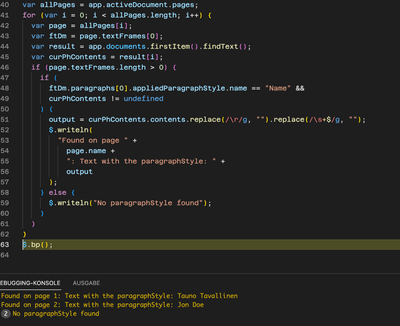
Page 1 and 2 it finds, on page 3 it says error, but it does not continue on page 4.
img_dm.png
Am a little confused.

---
Mario
TOPICS
Scripting
349
Translate
Report
Community guidelines
Be kind and respectful, give credit to the original source of content, and search for duplicates before posting. Learn more
community guidelines

correct answers 1 Correct answer

Community Expert , Dec 19, 2022 Dec 19, 2022

You've made a great attempt. I think the problem starts with not specifying the findText. Your code finds (I think) everything. I have re-written to use the findText in a more normal way, and you can see how I can then loop over the found texts. You can't do findText on a Page, so I do it on the whole document, and then derive the page for each found text. See what you think. I hope it is enough to get you to the next step of your project.

- Mark

var doc = app.activeDocument;

// reset find pref
...
Translate
Community Expert ,
Dec 19, 2022 Dec 19, 2022

You've made a great attempt. I think the problem starts with not specifying the findText. Your code finds (I think) everything. I have re-written to use the findText in a more normal way, and you can see how I can then loop over the found texts. You can't do findText on a Page, so I do it on the whole document, and then derive the page for each found text. See what you think. I hope it is enough to get you to the next step of your project.

- Mark

var doc = app.activeDocument;

// reset find prefs
app.findTextPreferences = NothingEnum.NOTHING;

// find criteria
app.findTextPreferences.appliedParagraphStyle = 'Name';

// do the find
var found = doc.findText();

// loop over each found text
for (var i = 0; i < found.length; i++) {

    var text = found[i],
        page = text.parentTextFrames[0].parentPage;

    // if the text was on a pasteboard,
    // there won't be a page
    if (!page.isValid)
        continue;

    var output = text.contents.replace(/\r/g, "").replace(/\s+$/g, "");
    $.writeln(
        "Found on page " +
        page.name +
        ": Text with the paragraphStyle: " +
        output
    );

}
Translate
Report
Community guidelines
Be kind and respectful, give credit to the original source of content, and search for duplicates before posting. Learn more
community guidelines
Advocate ,
Dec 20, 2022 Dec 20, 2022
LATEST

Hello Mark,
thank you very much, it works great.

---
Mario
Translate
Report
Community guidelines
Be kind and respectful, give credit to the original source of content, and search for duplicates before posting. Learn more
community guidelines

