
Participant
September 13, 2023
Question

Find text and replace with image

  • September 13, 2023
  • 4 replies
  • 1256 views

Hello,


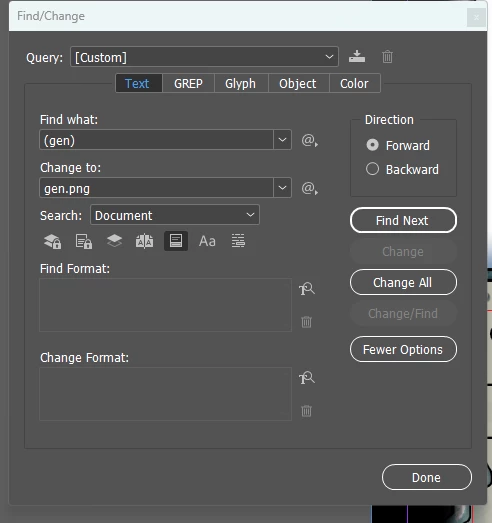
I want to find a text, let's say "test" and replace it with an image (ideally .png). Is that possible? Ideally I would like to have an image anchored within the text. I've found the find/change tool under edit, but it seems I must maintain the format. From text to text or image to image; not changing. 

If I have to write a script, that's not a huge issue.
 

Thanks very much!

4 replies

Peter Spier
Community Expert
Community Expert
September 13, 2023

I get the sense you want a different image on each card, so the clipboard methos is going to be slower than just placing the images manually. See mey previous response about how to set it up ini Data Merge.

jmlevy
Community Expert
Community Expert
September 13, 2023

First, import the image you need, on the pasteboard and copy it, using the selection tool (the black arrow). Then run a find-change, searching for the word you need to change and replace it by “other > clipboard content”  (see screenshot in French).

Robert at ID-Tasker
Legend
September 13, 2023

You can replace search results with contents of the clipboard - I think it's "^c" - so you need to copy your image into a clipboard first, then do Find&Change.


But you can't do it dynamically - in this case only through scripting. 


Participant
September 13, 2023

Thank you.


Yes... it will replace the text with an image loaded onto the clipboard. I'll see if I can execute this painfull solution.


I'll take a look into ID-Tasker too. 


Thanks

Robert at ID-Tasker
Legend
September 14, 2023

This kind of functionality - DataMerge and turning on / off layers in the images / PDFs - isn't implemented yet - but if you would like to be a beta tester please let me know. 


Peter Spier
Community Expert
Community Expert
September 13, 2023

I would say maybe. Try replacing the text with clipboard contents after copying the image to the clipboard

This is going to give you an inline anchored object, if it works, which might not be what you have in mind.

If you provide more info about waht you are doing we might have other suggestions.

Participant
September 13, 2023

I have 73 pages (game cards) where I want to have several different images anchored within the texts. I have all the information I need in excel, it's merged into indesign. 


I can't place images into excel cells, so I was hoping to write several strings and just replace them all in indesign. I know I can do it manually, but I'd have to repeat the process about 1,000 times, no exaggeration. Because there is so much to replace, I doubt working with a clipboard will solve it any faster. 


I've been working with ChatGPT to write a java script for this, but it's slow and I know little programming. 


Thanks very much for any help!

Robert at ID-Tasker
Legend
September 13, 2023

And forget about ChatGPT.