


- Home
- InDesign
- Discussions
- Find text then add a character style script
- Find text then add a character style script

Copy link to clipboard
Copied
Hello
I am trying to make a script to find any text between two glyphes ( ﴾ ﴿ ) and create a new character style for the selected text .
note : i do not want to apply a character style on the selected text , but i want to create a new character style for the selected text .
note : i do "find what "correctly but i do not know how to complete the script .
i am start but i do not know how to complete :
function main()
{
var myDoc = app.activeDocument,
FindWhat = "(?<=\﴿).+?(?=\﴾)"; // The 2 glyphes are " ﴿ " and " ﴾ "


 1 Correct answer

Moreover the below script completes with all character style properties..
...app.findGrepPreferences = app.changeGrepPreferences =null;
app.findGrepPreferences.findWhat = "(?<=\﴿).+?(?=\﴾)"
var found = app.documents[0].findGrep();
if(found.length==0){alert("No bracket text found"); exit(0);}
cstyle = [];
for(j=0; j<found.length; j++)
{
cstyle.push(found
.contents); }
for(k=0; k<cstyle.length; k++)
{
app.findGrepPreferences = app.changeGrepPreferences =null;

 40
Replies
40
40
Replies
40

Copy link to clipboard
Copied
I hope you see the revised script i sent.. if that also not worked..just change you line
app.findGrepPreferences.findWhat = "(?<=\\().+?(?=\\))"
to
app.findGrepPreferences.findWhat = "volupta" //this is your first word in screenshot
and change the color and style of that text and run the script..
Copy link to clipboard
Copied
If you want this is a sample text ... you can try the script on it .... this is maybe help to fine the problem :
In precabo. Occaborem reptate pe plabor ﴿ ﭞﭟﭠ﴾ assitat ut eaquid magnis ea inciunt labo. Ut verciis doloriatquis restiatusa consequi desequam dolut voluptat fugia voluptatus abo. Rovid magnis dolorro excerna tecatatur, conseque ﴿ ﮦﮧﮨﮩ﴾ explignistia nem vel est, vitate di optatestium que pel eumquas volessim adicipit volorro vidictur sin num nonet eum eturehe nihillenim quiatiatium consequo blaccum nam ea vitatium ut alia nes veliquatur, sitio modisqu iatem. Et endit maio blab iur ﴿ ﭑﭒﭓ﴾ andaeri squundus que cuptas quiatqui id ea doluptius suntotatus il incia commolo eos doluptatusam venis nulparibusci omni omni dis arcipsaest atquam quisqua tiumquis enduciis nonecte porerore num dolupiciae niet alit omnisque natium qui reperciat audistis mintem aut endanis tibus.
Copy link to clipboard
Copied
Yes i worked with your sample texts but I missed with fonts anyhow i put bracket for other word and it is working fine..
app.findGrepPreferences = app.changeGrepPreferences =null;
app.findGrepPreferences.findWhat = "(?<=\\)).+?(?=\\()" // apply your grep code
var found = app.documents[0].findGrep();
try
{
var new_Style = app.documents[0].characterStyles.item("my_style");
new_Style.name;
}
catch (myError){
var new_Style = app.documents[0].characterStyles.add()
new_Style.name = "my_style"; }
for(i=0; i<found.length; i++)
{
if(found.contents)
{
found.select();
new_Style.fontStyle=found.fontStyle;
new_Style.fillColor=found.fillColor;
}
}
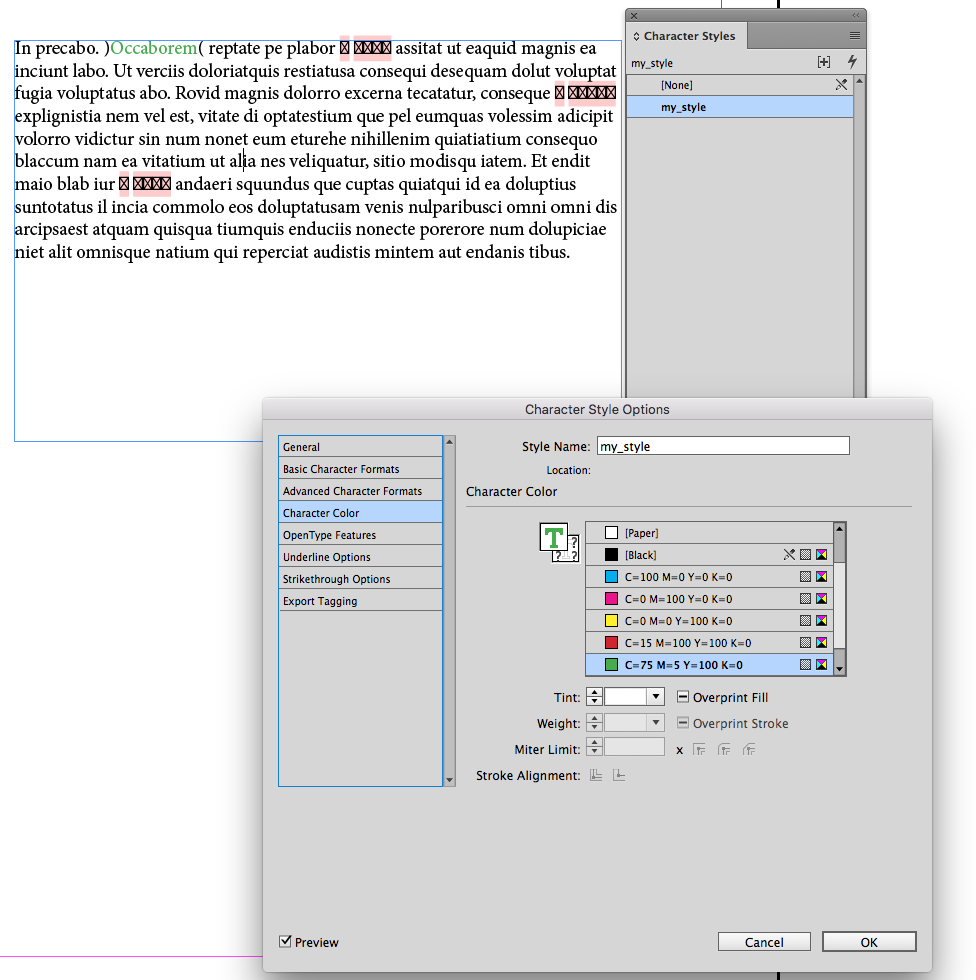

If you feel again it is not working, then just record your work as video and send to me.. or post here..
In my end it is perfectly working for all languages..
Copy link to clipboard
Copied

Copy link to clipboard
Copied
Hi
i will send a video to you
Copy link to clipboard
Copied
Hi.. Saw your file.. and the below script working fine.. eben thouth the font is missing with my side the style created successfully.. please let me know if it is working for you..
app.findGrepPreferences = app.changeGrepPreferences =null;
app.findGrepPreferences.findWhat = "(?<=\﴿).+?(?=\﴾)" // apply your grep code
var found = app.documents[0].findGrep();
try
{
var new_Style = app.documents[0].characterStyles.item("my_style");
new_Style.name;
}
catch (myError){
var new_Style = app.documents[0].characterStyles.add()
new_Style.name = "my_style"; }
for(i=0; i<found.length; i++)
{
if(found.contents)
{
found.select();
new_Style.fontStyle=found.fontStyle;
new_Style.fillColor=found.fillColor;
}
}
Copy link to clipboard
Copied
I hope all the bracket texts have same color and font style..
Copy link to clipboard
Copied
use this for better result..
app.findGrepPreferences = app.changeGrepPreferences =null;
app.findGrepPreferences.findWhat = "(?<=\﴿).+?(?=\﴾)" // apply your grep code
var found = app.documents[0].findGrep();
if(found.length>=1){
try
{
var new_Style = app.documents[0].characterStyles.item("my_style");
new_Style.name;
}
catch (myError){
var new_Style = app.documents[0].characterStyles.add()
new_Style.name = "my_style"; }
for(i=0; i<found.length; i++)
{
if(found.contents)
{
found.select();
new_Style.fontStyle=found.fontStyle;
new_Style.fillColor=found.fillColor;
}
}
}
else{alert("No bracket text found")}
Copy link to clipboard
Copied
Yes , all bracket text have same color and font style ... but different font type .
this script also do not work ... i am sorry

Copy link to clipboard
Copied
Hmm.. try this..
app.findGrepPreferences = app.changeGrepPreferences =null;
app.findGrepPreferences.findWhat = "(?<=\﴿).+?(?=\﴾)"
var found = app.documents[0].findGrep();
if(found.length==0){alert("No bracket text found"); exit(0);}
cstyle = [];
for(j=0; j<found.length; j++)
{
cstyle.push(found
.contents); }
for(k=0; k<cstyle.length; k++)
{
app.findGrepPreferences = app.changeGrepPreferences =null;
app.findGrepPreferences.findWhat = cstyle
.toString (); var myfound = app.documents[0].findGrep();
for(i=0; i<myfound.length; i++)
{
myfound.select();
var new_Style = app.documents[0].characterStyles.add();
new_Style.name = cstyle
.toString (); new_Style.fontStyle=myfound.fontStyle;
new_Style.fillColor=myfound.fillColor;
}
}
Copy link to clipboard
Copied
PLEASE FOLLOW THIS STEP...
1) CHANGE COLOR OF ALL BRACKET TEXTS
2) CHANGE THE FONT STYLE DIFFERENTLY (MAYBE BOLD, ITAL, BOLDITALIC)
3) RUN THE BELOW SCRIPT..
app.findGrepPreferences = app.changeGrepPreferences =null;
app.findGrepPreferences.findWhat = "(?<=\﴿).+?(?=\﴾)"
var found = app.documents[0].findGrep();
if(found.length==0){alert("No bracket text found"); exit(0);}
cstyle = [];
for(j=0; j<found.length; j++)
{
cstyle.push(found
}
for(k=0; k<cstyle.length; k++)
{
app.findGrepPreferences = app.changeGrepPreferences =null;
app.findGrepPreferences.findWhat = cstyle
var myfound = app.documents[0].findGrep();
for(i=0; i<myfound.length; i++)
{
myfound.select();
var new_Style = app.documents[0].characterStyles.add();
var myname=new_Style.name;
new_Style.fontStyle=myfound.fontStyle;
new_Style.fillColor=myfound.fillColor;
app.changeGrepPreferences.appliedCharacterStyle = myname;
app.changeGrep();
}
}
Copy link to clipboard
Copied
SELECT TEXT WITH IN BRACKET.. YOU CAN SEE THE STYLES APPLIED..
Copy link to clipboard
Copied
Moreover the below script completes with all character style properties..
app.findGrepPreferences = app.changeGrepPreferences =null;
app.findGrepPreferences.findWhat = "(?<=\﴿).+?(?=\﴾)"
var found = app.documents[0].findGrep();
if(found.length==0){alert("No bracket text found"); exit(0);}
cstyle = [];
for(j=0; j<found.length; j++)
{
cstyle.push(found
.contents); }
for(k=0; k<cstyle.length; k++)
{
app.findGrepPreferences = app.changeGrepPreferences =null;
app.findGrepPreferences.findWhat = cstyle
.toString(); var myfound = app.documents[0].findGrep();
for(i=0; i<myfound.length; i++)
{
myfound.select();
var new_Style = app.documents[0].characterStyles.add();
var myname=new_Style.name;
new_Style.appliedFont = myfound.appliedFont;
new_Style.fontStyle = myfound.fontStyle;
new_Style.pointSize = myfound.pointSize;
new_Style.leading = myfound.leading;
new_Style.appliedLanguage = myfound.appliedLanguage;
new_Style.kerningMethod = myfound.kerningMethod;
new_Style.tracking = myfound.tracking;
new_Style.capitalization = myfound.capitalization;
new_Style.position = myfound.position;
new_Style.ligatures = myfound.ligatures;
new_Style.noBreak = myfound.noBreak;
new_Style.horizontalScale = myfound.horizontalScale;
new_Style.verticalScale = myfound.verticalScale;
new_Style.baselineShift = myfound.baselineShift;
new_Style.skew = myfound.skew;
new_Style.fillColor = myfound.fillColor;
new_Style.fillTint = myfound.fillTint;
new_Style.strokeTint = myfound.strokeTint;
new_Style.strokeWeight = myfound.strokeWeight;
new_Style.overprintStroke = myfound.overprintStroke;
new_Style.overprintFill = myfound.overprintFill;
new_Style.otfFigureStyle = myfound.otfFigureStyle;
new_Style.otfOrdinal = myfound.otfOrdinal;
new_Style.otfFraction = myfound.otfFraction;
new_Style.otfDiscretionaryLigature = myfound.otfDiscretionaryLigature;
new_Style.otfTitling = myfound.otfTitling;
new_Style.otfContextualAlternate = myfound.otfContextualAlternate;
new_Style.otfSwash = myfound.otfSwash;
new_Style.otfSlashedZero = myfound.otfSlashedZero;
new_Style.otfHistorical = myfound.otfHistorical;
new_Style.otfStylisticSets = myfound.otfStylisticSets;
new_Style.strikeThru = myfound.strikeThru;
app.changeGrepPreferences.appliedCharacterStyle = myname;
app.changeGrep();
}
}
Copy link to clipboard
Copied
This Works
Thanks

Copy link to clipboard
Copied
Hi,
I think you need to create multiple character styles using script for each selected text.. Am i correct???
Thanks,
Prabu
Prabu
Design smarter, faster, and bolder with InDesign scripting.
Copy link to clipboard
Copied
Yes , you correct 100% ... this is what i need .

-
- 1
- 2

Get ready! An upgraded Adobe Community experience is coming in January.
Learn more
 AdChoices