
kauansales
Participant
January 17, 2018
Answered

Fit frame to content on text box

  • January 17, 2018
  • 3 replies
  • 981 views

Hello all.

I'm with a issue on InDesign CS6, I can't use fit frame to content on a text box ended with "-".

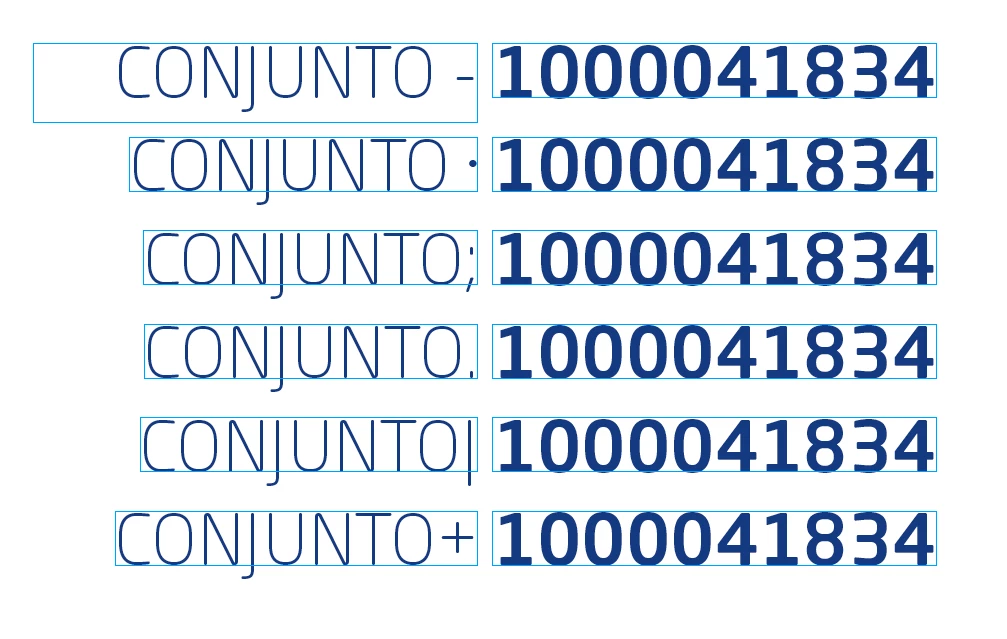
I'm using the "-" as a separator between a text with a paragraph style and a number with a different style. There is no character or space after the "-" (space after also doesn't work). 

My guess is that InDesign interprets the "-" as a hyphen and don't let me use fit frame. When I change the "-" for any other character ( ; : . | + ) the function works.

So, my question is: How do I tell InDesign to interpret the "-" just as a character? Or how can i use fit frame to content in this case?

Ps. Hyphenation ON or OFF is indifferent.

Thanks!!

Kauan
This topic has been closed for replies.
Correct answer Laubender

Hi Barb,

this issue was a bug in CS6 that is fixed now.

A workaround would be to use a character like an "l" after the dash and format it with no fill, 0.1 pt size and horizontal width of 1%. For that one you would apply a character style.

Regards,
Uwe

3 replies

kauansales
Participant
January 18, 2018

Thanks everyone for your time and help!!!

I'll try to update to the latest version of InDesign CS6.

If still not working, i'll use one of the workarounds suggested.

Thanks!

Kauan

Community Expert
January 18, 2018

Hi Kauan,

to make that clear: The bug was never fixed with CS6.
I tested with CS6 8.1.0.

Regards,
Uwe

Eric Dumas
Community Expert
Community Expert
January 17, 2018

Hi, in this case I use the following:

  1. the text is in the same text box
  2. the paragraph style is using tabs centred on -
  3. character styles setup for both formatting and used as nested styles
  4. I tried using data merge, it still worked (in case that's what you are doing)
  5. a possible trick would be to use a table, maybe 3 columns: text, -, number
Barb Binder
Community Expert
Community Expert
January 17, 2018

Hi kauansales ,

I keystroked this to see if a non-breaking hyphen was any different, but it worked as expected. What other variables are in play? Font? Version? Reference handle in the proxy?

~Barb

~Barb at Rocky Mountain Training
LaubenderCommunity ExpertCorrect answer
Community Expert
January 17, 2018

Hi Barb,

this issue was a bug in CS6 that is fixed now.

A workaround would be to use a character like an "l" after the dash and format it with no fill, 0.1 pt size and horizontal width of 1%. For that one you would apply a character style.

Regards,
Uwe

Barb Binder
Community Expert
Community Expert
January 18, 2018

I never encountered that, Uwe. Thanks for letting us know!

So kauansales, I'm going to mark Uwe's answer as correct—you can update InDesign or follow his work-around.

~Barb

~Barb at Rocky Mountain Training