
johnc16723100
Participant
February 21, 2019
Answered

Fixed Layout ePub Exported by InDesign Fails Validation in ePub Checker v4.1.1

  • February 21, 2019
  • 6 replies
  • 16331 views

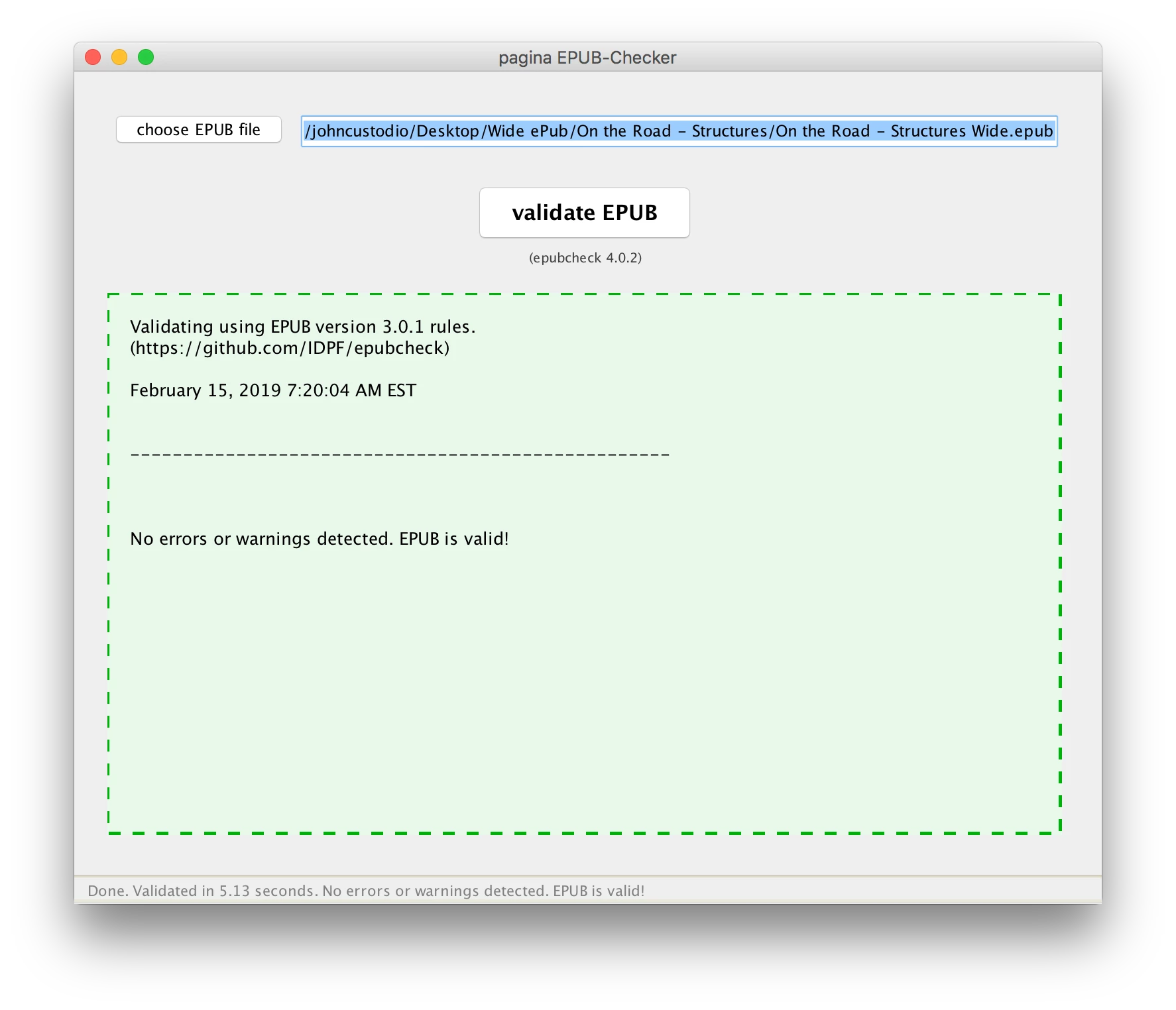
I'm using InDesign to make Fixed Layout ePubs. I just upgraded ePub Checker to v4.1.1 and now all my ePubs that had no errors before with v4.0.2 now generate an error. Here are screen shots of the v4.0.2 and v4.1.1 check results:
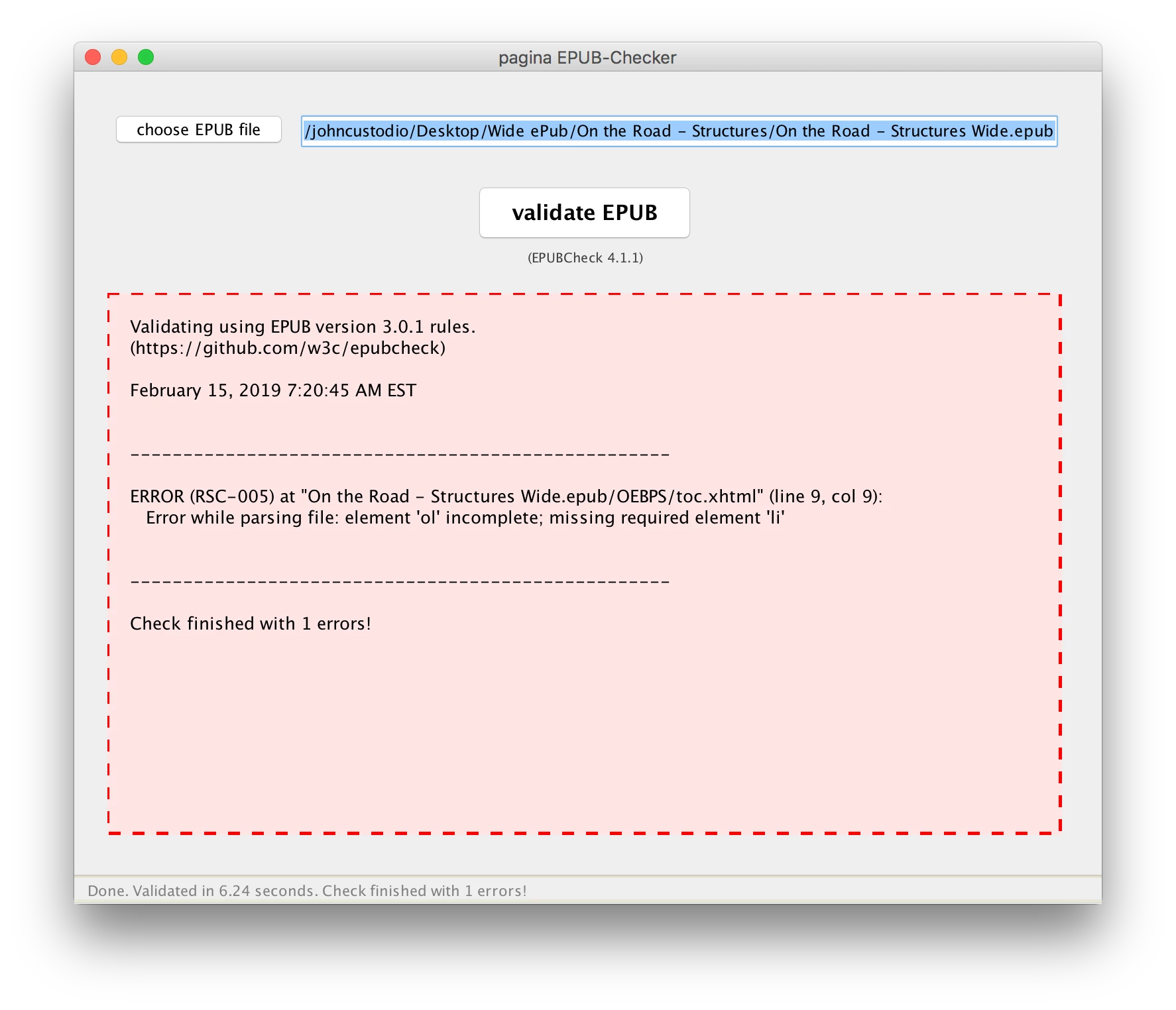
The error returned is in toc.xhtml: Error while parsing file: element 'ol' incomplete; missing required element 'li'. Here's a screenshot of the toc.xhtml:
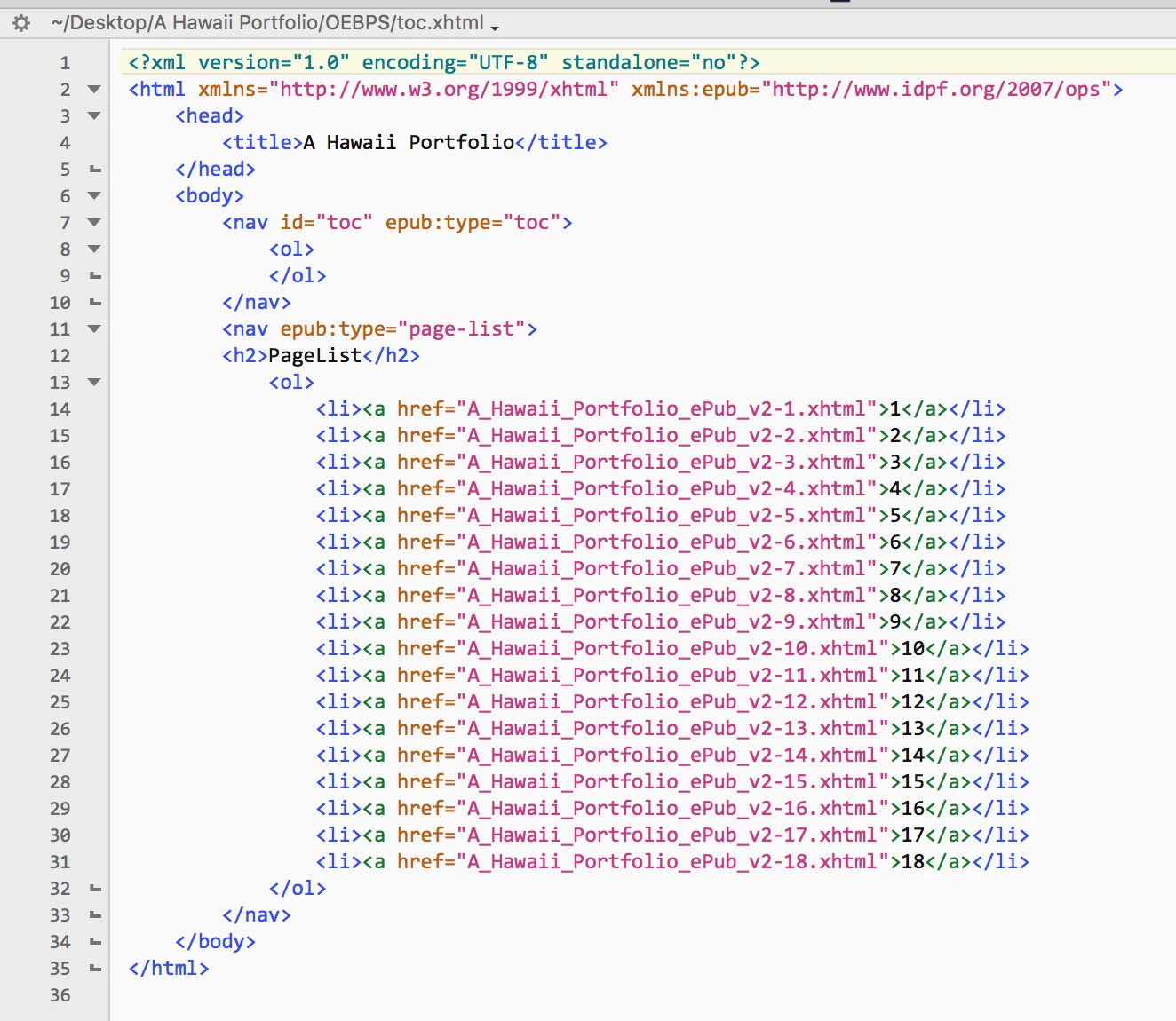
The error is at line 9. There needs to be an entry between <ol> and </ol>. Leaving this empty is apparently no longer valid using the 4.1.1 ePub Checker library, but used to be OK with the 4.0.2 library. I contacted the developer of ePub Checker and he said:

This comes from the underlaying validation engine of the official EPUBCheck library.  There has been a minor update as you can see when having a look at the version numbers (4.1.1 vs. 4.0.2).

Core developers made an update to the TOC schema with PR #763 (https://github.com/w3c/epubcheck/pull/763😞

> fixes nav doc validation to be more faithful to the spec

> * require at least one li child for ol

So this is be intention and it seems you have some empty <ol> elements with no children in your toc.xhtml which is not valid anymore.

You have to fix these... so InDesign is not producing ePubs that conform to the current standard. The problem is, that InDesign is exporting an empty TOC with an empty <ol> element if you do not set toc titles properly before exporting.

Note that I'm using the most current version of InDesign (2019 v 10.0.1), and that the ePubs I'm exporting out of InDesign are Fixed Layout, so setting toc titles is not an option in the export dialog. So to fix this I would have to add an li child between <ol> and </ol>.

So starting at line 8 it would read

                   <ol>

                           <li>  ????????  </li>

                   </ol>

Not being really familiar with html and relying on InDesign to produce my ePubs, I don't know what to put here. What should I put here as a work-around to make the ePub valid? Note that the ePubs I now have that validate correctly against the old standard still work fine as far as being able to be read. So the only change is to make the ePub valid – there is really no change in the way the ePub is read or displayed on various devices. Or, the ultimate question: Do I really need to worry about this? Looks like the ePub Checker developers just made a tweak in the validation procedure to conform more tightly with the specs, but will the minor error, which apparently doesn't affect how the ePub is read, cause iBooks and others to reject the ePub? Bottom line, however, is that Fixed Layout ePubs produced by the current version of InDesign apparently do not conform to the current standard.

Correct answer johnc16723100

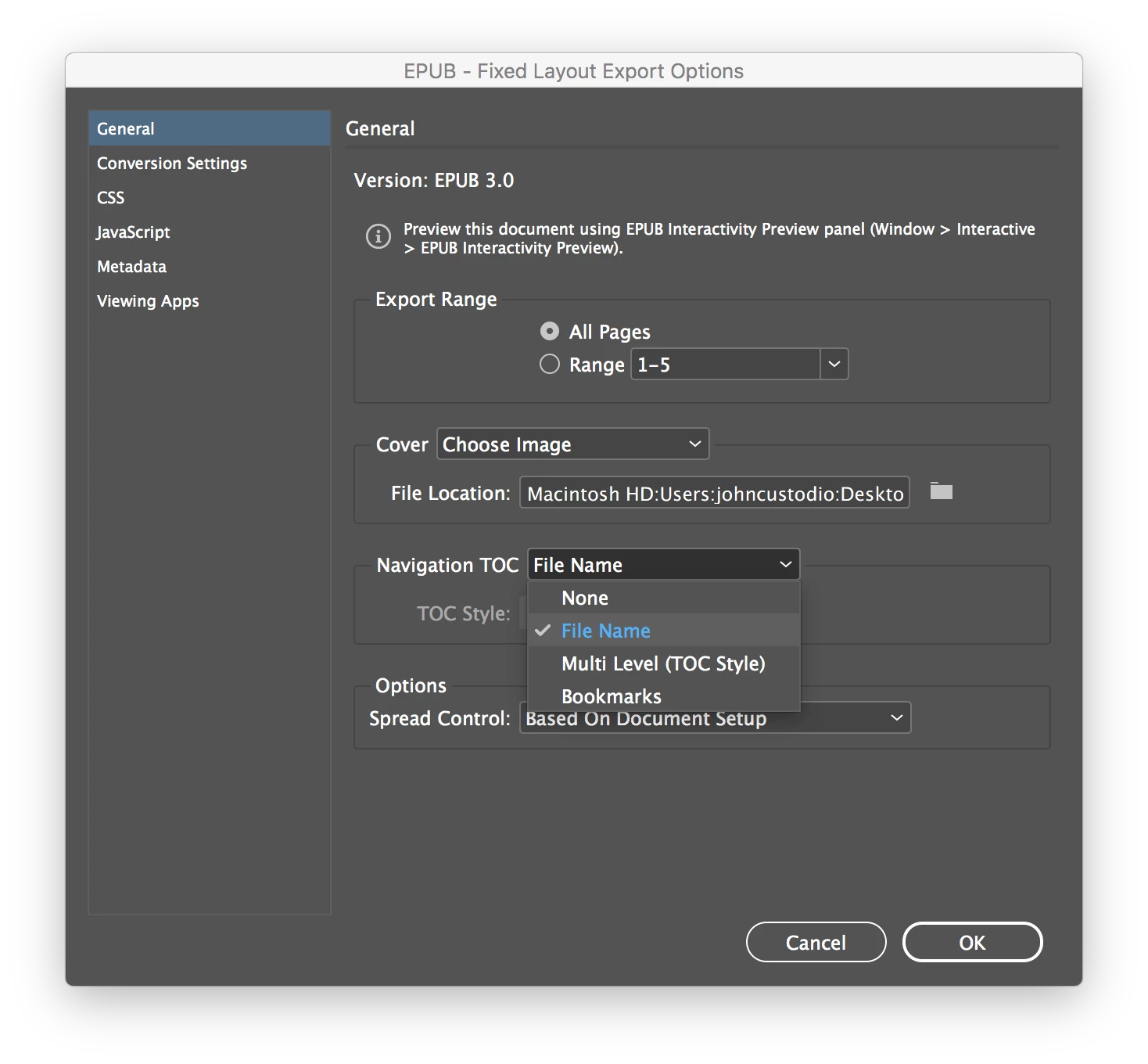
Problem solved! When exporting the Fixed Layout ePub, select "File Name" when setting the Navigation TOC. I had mine set on "None" which was OK when validating the file with the old version of ePub Checker (v4.0.2), but generates the above error when using v4.1.1.

@

6 replies

Inspiring
June 27, 2024

For 2 weeks, I've been working through issues, but to no luck at all. Not sure how to get past this. The TOC option only helped one issue, but the fonts are still throwing errors "(PKG-026): /META-INF/encryption.xml: Obfuscated resource must be a Font Core Media Type (was declared as "application/x-font-ttf" in "OEBPS/content.opf")".


I've replaced fonts to google font alternatives that are "open fonts" but still I getseveral of those errors, without ANY help in that error as to why. I can't find anything online anywere. The issue is clearly InDesign at this point!


Any ideas?


James Gifford—NitroPress
Legend
June 27, 2024

It's not entirely useful to tack on a different problem to a 2-4 year old topic — and at that, there are other discussions that have focused on your specific font problem.


Here's a fairly recent discussion of the problem, although it contains no absolute answers. A short overall answer is that FXL is an obsolete format that has only a few narrow useful purposes, is difficult to tweak or fix if the export isn't perfect. that many validation errors it throws have no effect on its actual function/readability in a standard EPUB reader (it's the nonstandard platforms that choke, typically)... and embedding fonts is and always has been a clumsy, complicated, fraught practice best avoided.


Whatever faults InDesign itself brings are, in my experience, largely through not using conventional hacks and workarounds that make FXL work in the nonsstandard tools, format and reader arena. One of those "faults" seems to be adherence to font and resource encryption and rights management; since ID is an Adobe product, it seems to be stricter about what fonts can be embedded, and under what conditions, than the amateur/freeware/nonstandard slate of tools.


The real solution overall is to not use fixed layout EPUB.

Participant
July 15, 2022

GRACIAS !!!


Participant
August 14, 2021

I'm using ID 16.3.2. I checkoff -- Make text anchor in source paragraph, which fixed a few things including my TOC navigation for Fixed layout EPUBs. I'm left with two items - 'missing NCX file' and 'submitting an encrypted epub 3.0 file'.'

Participant
August 15, 2021

Never mind I figured it out. Currently using reflowable.

Participant
May 21, 2021

Oh my god, thank youuuuu!

Participant
May 30, 2021

God bless you, whoever you are! I was ready to screech. all good. thank you.

Participant
July 17, 2021

Same here! I wasted 2 days trying to figure it out! Thank you!!!

johnc16723100
johnc16723100AuthorCorrect answer
Participant
February 22, 2019

Problem solved! When exporting the Fixed Layout ePub, select "File Name" when setting the Navigation TOC. I had mine set on "None" which was OK when validating the file with the old version of ePub Checker (v4.0.2), but generates the above error when using v4.1.1.

@

Participant
August 8, 2020

Thank you thank you - you've saved me from humdreds of hours of head scratching to solve this issue...

Steve Werner
Community Expert
Community Expert
February 21, 2019

Moving to InDesign EPUB forum