
liamh82859340
Participating Frequently
April 4, 2024
Answered

fixed layout epub exported from indesign with image over two pages (spread) appears with scroll bar

  • April 4, 2024
  • 2 replies
  • 1153 views

fixed layout epub exported from indesign with image over two pages (spread) appears with scroll bar in the epub. Should only show image accross the two pages without center having scroll bar. How to fix. Thanks


This topic has been closed for replies.
Correct answer BobLevine

When you export, choose to combine the two pages as spreads. 
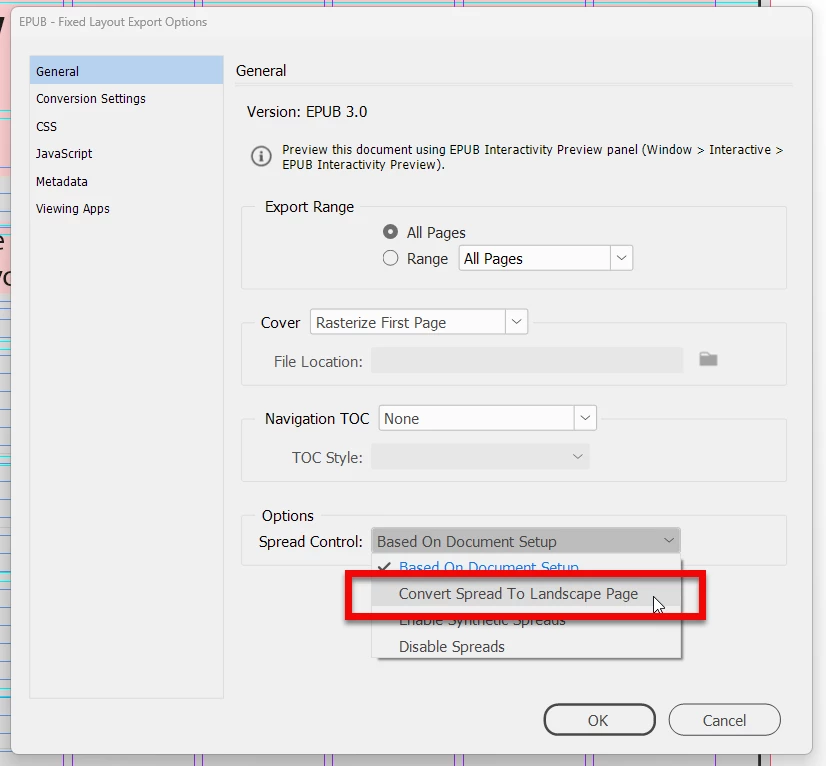
 

But, please be aware that fixed layout epub is an awful format that is highly limited to very few epub readers.

2 replies

James Gifford—NitroPress
Legend
April 4, 2024

Bob's dealt with the technical issue, but let me throw in the two basic caveats: fixed-page EPUB (FXL) is a specialized and largely deprecated format, suitable ONLY for "picture as a page" books. Which, to be fair, it sounds as if yours is. And to further clarify, FXL is a very poor choice for "text" books although many novices choose it as what seems to be the simple and obvious option, like PDF. (It's not. Text books should be reflowable EPUB.)


The other point is that EPUB is highly dependent on the reader. While there is an option/fix for your specific problem, you are at the mercy of whatever reader every user chooses to use, and hardly any two of them display pages in the same way. You may well discover or get complaints that your book displays poorly or awkwardly for another user, and there is little you can do except suggest they use the same reader you have found to work correctly. (If that's iBooks, fine, but Apple's reader is not quite standard and books that appear properly in it may not appear correctly in a more open-market reader like Calibre or Thorium. You are thus limiting sales and a satisfied user base to the Apple ecosystem.)


But good and simple solution to a problem here; that's just not common with EPUB export!


ETA: one of the faults of fixed page, especially with converte spreads, is that screen sizes are only so large. I'm not sure zoom and pan is an asset when trying to view art or "arty" pages. The primary rule for book design and publishing, to me, is "respect the medium" — and it's a fault, I think, compounded/enabled by most FXL layouts, to try to make digital pages replicas of print ones. What works in a coffee-table format doesn't work, really, on even the largest common tablet screen.

liamh82859340
Participating Frequently
April 4, 2024

Thanks for your input. I am aware of the limitations, but I want to get my first serious publication (at 80 years of age) onto the market. Then, I can appraoch someone to print it as an art book. Actually it is a meditation guide with images and poetry.

James Gifford—NitroPress
Legend
April 5, 2024

Hi James, thanks for the info. I guess you could say I am now enlightened. As it is, it only formats correctly on ibooks, as you indicated in your writings. That said, I am too far down the road for this project to alter. It seems like a lot of work to reflow it from scratch. Yes, better to have started from scratch. I have tried to convert with Calibre - no good.


Seems like a big learning curve to flow rather than fixed. You wrote about so many tech stuff that I am not familiar with.


Can you make a suggestion?


Thanks


I wish there was some simple answer, but EPUB is not a format that lends itself to simple conversion or 'recasting' into other forms. I'm sorry you have so much time invested in what's probably a difficult or limited road. All I can say is it's not your fault; it is very difficult to get useful, complete information on EPUB and e-book creation in general, for many reasons. You have to sort of fumble your way up to speed with the tools, probably making many basic mistakes along the way, and if you seek help or advice you find almost entirely useless, outdated and (shall we say) idiosyncratic information.


As painful as it is to find you've gone down a dead end path, I don't think it's an impossible amount of work to take the content and start over with a clean print layout and a parallel path to reflowable EPUB. You already have the content, and useful experience with InDesign and the basics of EPUB creation, so it's a "paved road" this time, at least. 🙂


And you seem to think the EPUB/iBooks version was some kind of stepping stone or path to the print edition. I'm not sure that's true; while an e-book edition of almost anything is nice to have and opens some sales channels, you can go directly to a print edition using Amazon KDP, or (with a bit more effort and less sales support, but some better print options including a full-wrap jacket) services like Lulu.com. Print, and I assume color print, has its hurdles but is not nearly as technical and esoteric as first-time reflowable EPUB creation. It is InDesign's fundamental purpose and much easier to execute with a good tool.

BobLevine
Community Expert
Community Expert
April 4, 2024

What reader are you looking at this with? Is that a two-page spread converted to a single page on export?

liamh82859340
Participating Frequently
April 4, 2024

Hi Bob,

Thank you for commenting. The reader is ibooks. It shows both pages at a time. if the images do not overlap the center of the two pages there is not a problem. But if I have an image that crosses both pages it shows a scroll bar.  I also opened it in Calibre, but it only displays one page at a time. When I look to export to epub I do not see any choices to change anything, it just exports. If I export to a pdf, there is no problem.


I am using a Mac with a 32 inch screen. If I make the epub display about the size of an iphone or view it on the iphone it is perfect. Any ideas?

Thanks


BobLevine
Community Expert
BobLevineCommunity ExpertCorrect answer
Community Expert
April 4, 2024

When you export, choose to combine the two pages as spreads. 


But, please be aware that fixed layout epub is an awful format that is highly limited to very few epub readers.