


- Home
- InDesign
- Discussions
- Re: FIXED LAYOUT EPUB - PROBLEMS IN Adobe Digital ...
- Re: FIXED LAYOUT EPUB - PROBLEMS IN Adobe Digital ...
FIXED LAYOUT EPUB - PROBLEMS IN Adobe Digital Editions -ANYBODY????????????

Copy link to clipboard
Copied
This is a new post which is part of an older one. I tried to delete the older ones but do not know how. I have an irate client who I need to re do an ePub file for.
I exported a fixed layout epub from InDesign 2017
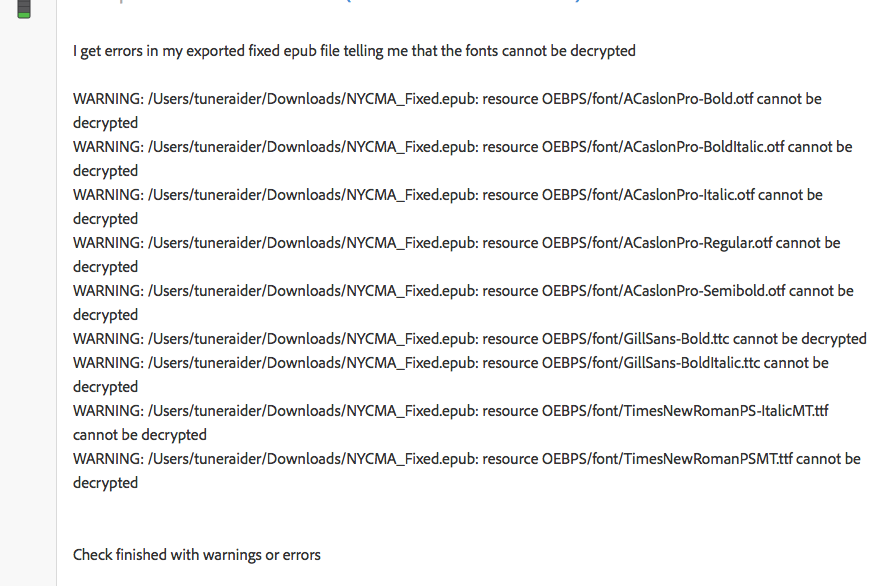
I have worked doing fixed layouts for a long time so it's not that I'm a newbie, with that said I was gettingg warning messages from certain pub checkers which are telling me that certain fonts in the book cannot be decrypted. I posted the warnings and could not get a straight answer. My concern was if its only a warning will the pub still pass validation?
While I was waiting for an answer to that I got a message from the client that he was looking at the pub I sent him in Adobe Digital Editions and the text is gigantic. Never ever saw this before so I'm thinking that maybe it has something to do with the embedded fonts so , I went into the document fonts folder and deleted all fonts, reserved the pub and opened in ADE and I get the same gigantic font.
The same pub looks perfect on my Ibooks on my iPad and Desktop.
So then I went and opened three older fixed layout pubs I had done months ago ( totally different projects ) and all of this e display fine.
I'm stumped.
Last thing I can think of is all the other fixed layouts were compiled from .indd files
THIS file with the problem is being compiled by an .indb file
Could that be the problem ??????
Can anybody point me in the right direction here as I could lose my job over this, I'm in big trouble unless I find out what is causing this.
I posted in the ADE forum and will have to repost this there as well.
anybody ??????


 6
Replies
6
6
Replies
6




Copy link to clipboard
Copied
What version of ADE? What platform?
Have the client check it in Readium.
And no, I would never ignore a font alert.
Copy link to clipboard
Copied
AH thanks so much for replying, as I was looking at other fixed layouts I had done viewing in ADE they all look great, then I see there is the small dropdown and I go to get info and I see this error in the screenshot, so it is a font problem? I'm using InDesign 2017 and I looked in ADE to find what version its1.7.2.1131 so now getting back to the font error its in the second screenshot and in my earlier posts I was trying to find out how to fix that warning.


Copy link to clipboard
Copied
Just checked the file on radium and it looks great
Copy link to clipboard
Copied
I went ahead and found there is a newer version of ADE 4.5.2.151207, I downloaded and opened the book in the new version and it looks great and in the info dropdown I do not see that error.
But for the future how do I correct that warning coming out of InDesign?
Wow what a relief!!!!!!
R
Copy link to clipboard
Copied
Only use high quality opentype fonts.
Copy link to clipboard
Copied
thx!


Find more inspiration, events, and resources on the new Adobe Community
Explore Now
 AdChoices