
Known Participant
July 22, 2025
Question

Fixing dense epub text

  • July 22, 2025
  • 1 reply
  • 353 views

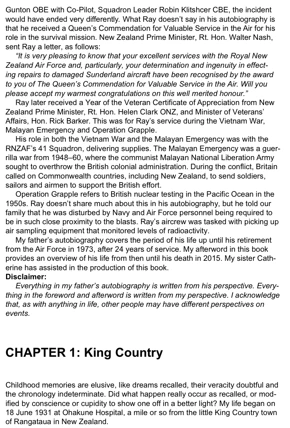
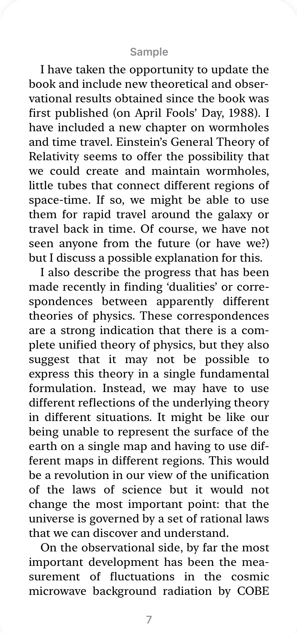
Hi please can you help. I designed my Dad’s autobiography epub as per online recommendations: 11pt with 13.2 pt leading. But when downloaded to any reader including Kindle, Apple Books and Google Books, my book displays as a large amount of tightly woven text per page. No other books on Kindle that I have seen or purchased look like this. Please can you recommend the best option to fix this?  It’s not about adjusting the settings on the e-readers as I don’t need to for any of the ebooks I've bought. Two screenshots below: My book on Apple Books and a Stephen Hawking book sample page on Apple Books. 


1. My book 


STEPHEN HAWKING BOOK


1 reply

Derek Cross
Community Expert
Community Expert
July 22, 2025

What do you mean "tightly woven text", can you post a screen shot?

Have you set up Paragraph (and Character) Styles in InDesign for your Reflowable ePub?

ali_4619Author
Known Participant
July 22, 2025

Thanks Derek. Below screenshots. Firstly, a page from my e-book with 13.2 pt leading. Then a page from my trial with 18 pt leading. Then the third screenshot is from a Stephen Hawking book. All in Apple books. By tightly woven text, I mean it appears as if there's very little leading between the lines of text in my versions and my versions look wider on screen than Stephen Hawking's book so harder to read. I have set paragraph and character styles throughout and am exporting as reflowable. Screenshots attached , with many thanks. 

Derek Cross
Community Expert
Community Expert
July 22, 2025

Just to be clear with the basics, you appreciate that the text is Reflowable in a Reflowable  ePub (unlike a FXL ePub, which means the text will flow to the width of the device it's being used on. Is that true of your text?