
Participant
June 6, 2023
Question

Floating menus going off screen when connect with external monitor on Windows 11 and CC 18.5

  • June 6, 2023
  • 4 replies
  • 1686 views

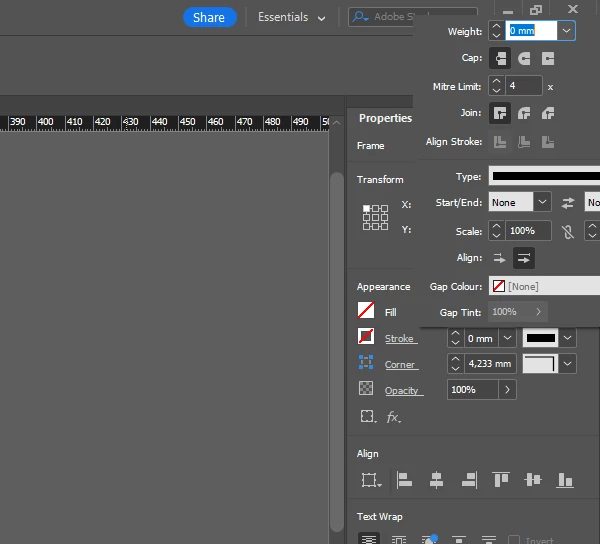
I'm having issues with all floating menus like this, this is the top right of my screen. When clicked on stroke menu for instance, the floating goes off the screen and I can't rearrange it. Is there any fix to this. Only happens when using dual monitors.
<Title renamed by moderator>

4 replies

Barb Binder
Community Expert
Community Expert
August 30, 2023

Hi @Nick31978105guh7:


That is true. Books and the original libraries need to be docked each time you open them. When I open either, I immediately dock them and they stay until I close them, even with Window resizing.


I've never had either open off my screen though where I can't get to them. Is that happening to you?


~Barb

~Barb at Rocky Mountain Training
brianb2516
Participant
November 1, 2025

Go to full screen mode, the panel will become fully visible. Then you can move the panel to a place where it will be fully visible when you go back to normal mode or whatever you were working in. When i switch from dual monitors, I switch my workspace to avoid. But often forget.

James Gifford—NitroPress
Legend
August 29, 2023

Double check your monitor setup (right click on desktop, Display) to make sure your monitor sizeresolutions are correct and you have them in approximately the matching configuration. It's low probability but worth checking.

Barb Binder
Community Expert
Community Expert
August 29, 2023

Hi Elton:


Is it important to you that some or all of the panels are floating? Is there any reason not to dock them? If you're not sure how we can certainly give a hand.


My preferred workflow is to set up the panels the way I like them, docked on both side of the screen and then I save that workspace using Window >Workspace > New Workspace. This allows me to maximize my window and reset my workspace when I move from one display to the other, so that everything is exactly where I want it. Nothing is going to float off screen if it is docked.


~Barb

~Barb at Rocky Mountain Training
Participant
August 30, 2023

Hi Barb, this works for panels generally, except a long-standing bug where the Books panel is not treated like other panels and is not included in the Workspace definition. It will appear undocked every time you restart Indesign and open a book.


Nick

HARSHIKA_VERMA
Community Manager
Community Manager
June 16, 2023

Hi @Elton24228302rp4e,


Thank you for taking the time to reach out and report the issue. To assist us in investigating the issue further, could you kindly provide a screen recording that demonstrates the problem? Additionally, we would greatly appreciate it if you could share the details of your operating system, including any information about your external monitor setup. It would also be helpful to know the specific version of InDesign installed on your machine, as this will allow us to escalate the issue appropriately.


We assume that the issue appears to be related to misalignments between the laptop and monitor, particularly when the resolutions and alignments differ. If the resolution and alignment settings are the same, the issue does not occur.


Rest assured that we are committed to providing the best assistance possible.


Thanks,

Harshika

Participant
August 30, 2023

Hi Harshika


I suffer the same problems and am on MacOS (13.4.1) and Indesign 18.5, so it's not just Windows.


The problem seems not so much about misalignments of monitors, as it is to do with Adobe apps not doing windowing correctly on MacOS at all. My monitors are not the same size/resolution, but they shouldn't need to be. Other apps will switch monitors and Spaces quite happily, and also have a menu bar item for moving a window to another display, which none of the Adobe apps have and which I assume is part of the same problem.


This isn't just an occasional annoyance. _Every time_ my Mac goes to sleep I come back to Indesign having moved itself back to my built-in display from the external monitor, positioned with menus offscreen, and the Book panel with its tab inaccessible off the top/right of the display. I have to move the main application window manually back to the external monitor, then reset the Workspace which will pull the panels back to the external monitor per the Workspace setting, with the exception of the Book panel which is impossible to retrieve. For that, all you can do is select it from the Window menu, which brings up the Don't Save/Cancel/Save dialog, essentially forcing you to save/close/reopen the book file every time.


For what it's worth, my monitors are arranged vertically rather than horizontally, and the external 4K display which I want to use for Indesign is above a 14" Retina display, the internal display is set as the primary display. But different-sized displays and arrangements is a red herring really, this is a bug caused by Adobe going off-piste with its window management.


It would be great if Adobe could come up with some kind of workaround for the Book panel, or just get it to be as fixed as any other panel so it can be part of a Workspace, as this is such a long-standing bug. But really what is needed is a rewrite of windowing so it behaves correctly with the system, and the Adobe "Application Frame" sits at the root of the problem.


Nick

James Gifford—NitroPress
Legend
August 30, 2023

I'll just note that I've run Adobe apps on a series of Windows systems, all with multiple and mismatched-res monitors, for a very long time and never experienced any of the issues reported with such combinations. The one thing I have rarely done, other than with client/employer systems, is use a laptop-based setup that's docked and undocked from secondary monitors (but I've had no trouble with those, eitther).


So my assessment is that it's nothing fundamentally wrong with ID or other CC apps' desktop management, but a conflict with systems that, for one software or setup reason, are 'trying too hard' to manage desktop elements. I wouldn't be surprised if it can be narrowed down to a particular brand of system or narrow stripe of video subsystem/driver.


The Book pane thing is a real pane, though. 🙂