Bob8888
Participant
February 14, 2020
Question

Font issue going to or from Mac/Windows

  • February 14, 2020
  • 4 replies
  • 4602 views

Another InDesign user has created a document using OpenType font on a Mac.  When I open it on my windows machine it doens't reconize the font.  If I change the font to what it should be and send it back, their InDesign doesn't reconize the font.   We have the same version of InDesign, I have even packaged the fonts and installed them going both directions, still no sucess.  How do I get both to reconize the fonts from one machine to the other?

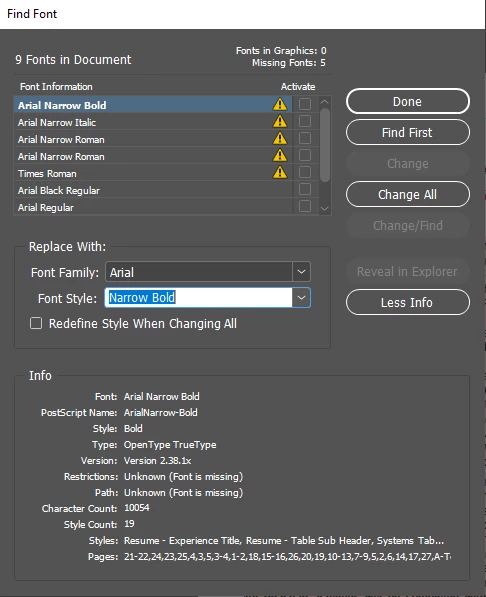
 Attached is the screenshot for find fonts on my Windows machine. 
 

This topic has been closed for replies.

4 replies

rob day
Community Expert
Community Expert
February 19, 2020

The OSX Arial system font is listed as OpenType with TrueType outline by Font Agent, but the extension is .ttf. I’m wondering if that’s a problem when crossing between platforms?


Bob8888
Bob8888Author
Participant
February 19, 2020

The font is listed as an OpenType font on both OS's but it also is TrueType in the screenshot I attached.  Regardless, because it is an OpenType it should work for both but neither one reconizes the others version.

Scott Citron
Legend
February 19, 2020

Switch to an OpenType version of your fonts, which are all cross-platform compatible.

Dov Isaacs
Legend
February 15, 2020

The problem seems to be with some of the Arial fonts. The Arial and Times New Roman fonts on Windows and MacOS are quite different in terms of encodings, glyph complements, etc.


That is probably the cause of the problem. Conceivably packaging the fonts would solve the problem, but I suspect that InDesign is finding both the packaged and installed fonts and is noting the conflict.


- Dov Isaacs, former Adobe Principal Scientist (April 30, 1990 - May 30, 2021)
Bob8888
Bob8888Author
Participant
February 15, 2020

Would deleting the other fonts and only installing Mac fonts work?

Dov Isaacs
Legend
February 15, 2020

Don't do that!


Windows counts on the availability of the glyphs and encodings of its system fonts including Arial, Times New Roman, Courier New, etc. You'd probably be much better off using a font family other than Arial 🙄


- Dov Isaacs, former Adobe Principal Scientist (April 30, 1990 - May 30, 2021)
BobLevine
Community Expert
Community Expert
February 14, 2020
That really tells us nothing. Are you actually emailing packaged files or working on a shared drive or perhaps via dropbox?

That font has to either be in a document fonts folder or installed.
Bob8888
Bob8888Author
Participant
February 14, 2020

I've tried it both ways.  Through email and sharepoint.  We sent the files over email and got the error.  Then we packaged the fonts, saved the package on sharepoint, installed them on the other OS, but still got the error.