
Known Participant
April 10, 2019
Question

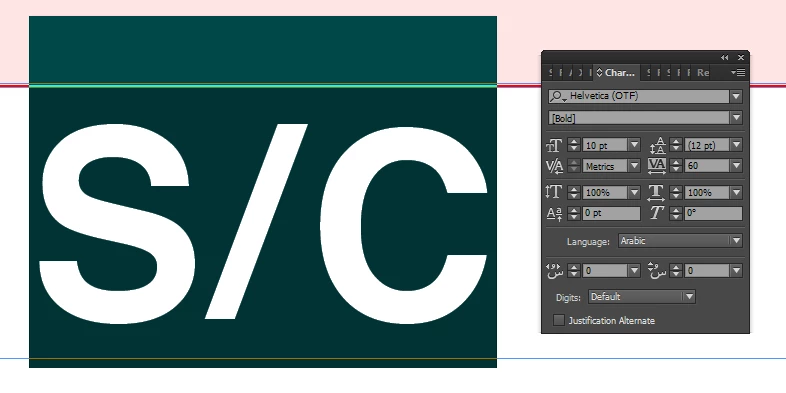
Font Not Supporting: [Helvetica Bold]

  • April 10, 2019
  • 2 replies
  • 5141 views

Hi All,


I am using "Helvetica Bold.ttf" font in Adobe Indesign. Before it was installed in system and worked fine. I don't know suddenly font get crashed and it's not supporting to Indesign software. Please give suggestion how to resolve this issue? It'll be helpful to proceed further.
[Title edited for clarity by moderator to include “Helvetica Bold”]

    This topic has been closed for replies.

    2 replies

    Willi Adelberger
    Community Expert
    Community Expert
    April 10, 2019

    Maybe that the font does not support Arabic text and RTL?

    Dov Isaacs
    Legend
    April 10, 2019

    Exactly what do you mean by “suddenly font get crashed?”

    What your screen shot shows is that text formatted in the font is getting substituted. Apparently InDesign believes that the font isn't installed or has been corrupted in some manner.

    If you are running on MacOS, open FontBook and ascertain that the font is indeed still installed and not corrupted.

    If you are running on Windows, likewise check that the font is installed via the Fonts Control Panel.

              - Dov

    - Dov Isaacs, former Adobe Principal Scientist (April 30, 1990 - May 30, 2021)
    Known Participant
    April 11, 2019

    Hi Dov,

    Thanks for your reply. We have fixed the query. Actually in our server, we have installed same font for multiple time with ".OTF" and ".TTF". Due to that font get corrupted i mean to say "suddenly font get crashed". It's resolved now. Thanks for your help.

    Dov Isaacs
    Legend
    April 11, 2019

    Thanks, Dov. GTK.

    Question: How "new" is new? (What OS did they change?)


    Don't recall with MacOS 10 release gave up the ghost on resource fork-based TrueType fonts. Sorry!  

              - Dov

    - Dov Isaacs, former Adobe Principal Scientist (April 30, 1990 - May 30, 2021)