Answered
Font show different on general text and text field
When i try to create a pdf in indesign (Mr Eaves Mod OT), general text are are ok but when i add some text field the font are showing are not same as Mr Eaves Mod OT.
Why it is happening

When i try to create a pdf in indesign (Mr Eaves Mod OT), general text are are ok but when i add some text field the font are showing are not same as Mr Eaves Mod OT.
Why it is happening
Open Button and Forms panel ( Window > Interactive > Button and Forms ), highlight the Text Field and make sure the correct font is selected.
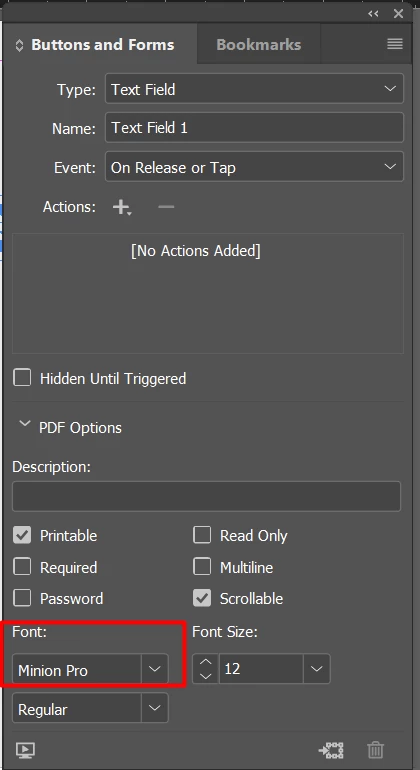
Regards,
Srishti
That will only work if the font is also present on the other computer, as you should know Srishti, the problem is that if one uses a font of its own machine and sets that as the font for a form field, the font still is NOT embedded and will not be used.
A long known 'problem'.
Or use Acrobat Pro to tru and fix the form field there.
If the font is embedded, bacause hou use it on the page elsewhere as well, you can try and fix the form field in Acrobat Pro.
So it will not work Dev1Staging5C16 with your own fonts in InDesign, never has, sorry.
Already have an account? Login
Enter your E-mail address. We'll send you an e-mail with instructions to reset your password.
 AdChoices