
deborahm27080657
Inspiring
December 5, 2018
Answered

Footnote issues related to columns

  • December 5, 2018
  • 3 replies
  • 796 views

I am designing a layout in Hebrew in the latest InDesign CC.

I am working with footnotes and experience a few problems:

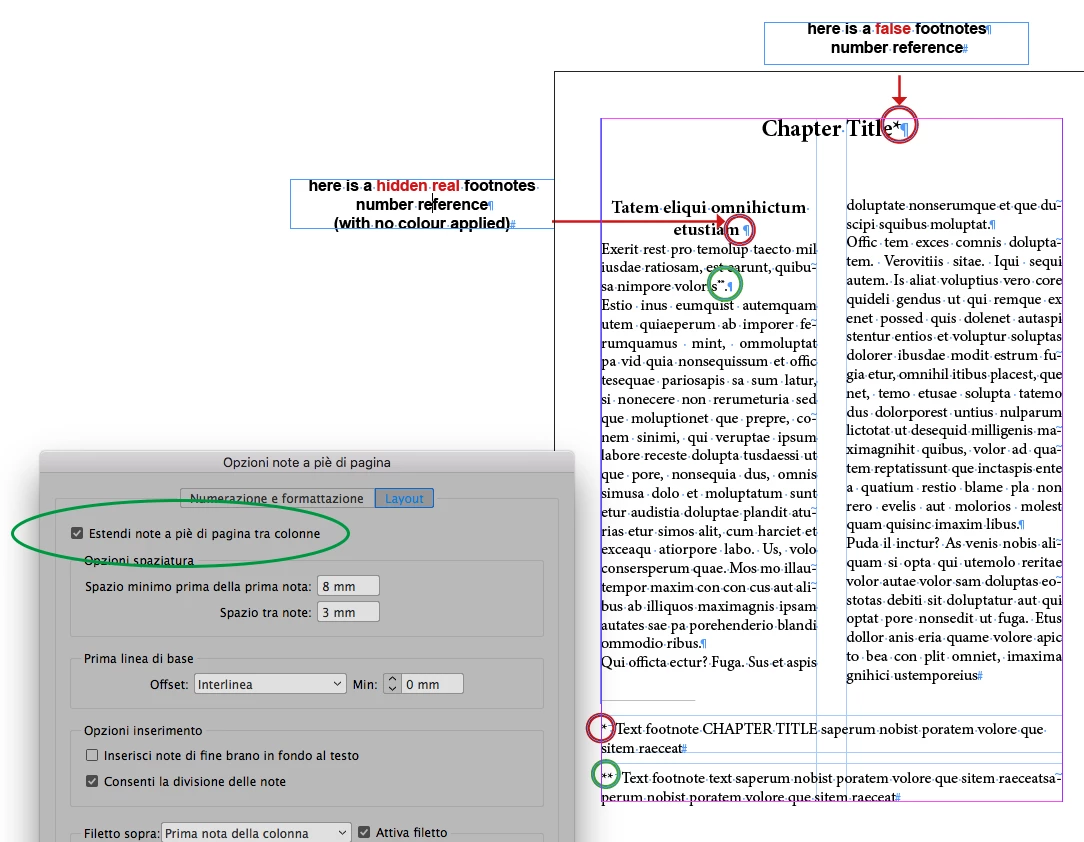
  1. I inserted a footnote into the chapter title (which is acceptable in Hebrew) which spans both columns. This caused the footnote to go right under the chapter title with the divider!
  2. I want the footnotes to begin in the first column (right column) and continue into the second column (left) like the text, but the footnotes are only placed in the column where the asterisk is, even if the only footnote is in the second column.

Here is a screenshot:

I would appreciate your expert community advice.

Thanks in advance!
This topic has been closed for replies.
Correct answer vladan saveljic

3 replies

TᴀW
Legend
December 5, 2018

Deborah,

I'll make a plug here for my commercial Footwork add-on, which is designed exactly for these sorts of layouts, with Hebrew typesetting in mind:

https://www.id-extras.com/products/footwork

It will solve the issue of the footnotes in the heading without resorting to hidden footnotes, and will deal with the footnote layout issue.

Ariel

deborahm27080657
Inspiring
December 5, 2018

Footwork looks amazing. But I'd rather send this project to my expert typesetter who uses Tag. I'm merely a novice trying to learn new tricks to improve.

Pardon me for asking on this Adobe forum, but why doesn't InDesign perform this simple feature? I'm not asking for a rose garden, am I?

Steve Werner
Community Expert
Community Expert
December 5, 2018

Footnotes is a very complex area, and updates have added new footnotes featues in the past couple versions.

If you'd like to make a feature request you should post it at the InDesign User Voice website so the engineers and product managers can consider it, and those interested can vote for it.

Adobe InDesign Feedback

Inspiring
December 5, 2018

vladan, maybe Debora's book doesn't work with *s, but with numbers or letters. And our solution is great for a short text, but what happens with dozens of footnotes?

I saw someone asks that question here (Hebrew), to put footnotes in one column when the text has 2:

https://indesign.tips/forums/topic/%D7%A2%D7%91%D7%95%D7%93%D7%94-%D7%A2%D7%9D-%D7%94%D7%A2%D7%A8%D7%95%D7%AA-%D7%A9%D7%…

deborahm27080657
Inspiring
December 5, 2018

Thank you, Haggay, for your link.

I am not familiar with scripts, though, and don't have time now to learn.

Vladen actually answered my original question, but l really want both text and footnotes to have 2 columns, and it's not working for me.

vladan saveljic
vladan saveljicCorrect answer
Inspiring
December 5, 2018

deborahm27080657
Inspiring
December 5, 2018

I checked the Span Footnotes Across Columns box, and that solved the issues of the footnote appearing at the top of the page and of the footnote starting in the second column. Thanks!!

But I don't want the footnote to span both columns. I want them to run like the text from one column to the next. (The page size is wide - 22 cm.)

Is there a way to accomplish this?