


Copy link to clipboard
Copied
Hi, tried looking this up first but i could not find what i was looking for.
question.
can i set form styles? example: i have a 100 document that was a print document. the client wants it to be available on the ipad. There were lost of quizzes where users had to fill in answers.
Now i am making those into form fields. However, how can i control all of the formatting for all of the form fields from once place? as in i set arial, non-pritable, and so forth as my settings, but what if the client wants to change the font of the form field? do i now have to select every frame and change the font one at the time? is there no way to set styles for your form options?
thanks
jonathan


 1 Correct answer


Things are great here! Summer has finally arrived in the Rockies. (Although yesterday I was caught in a surprise.25 to .5 inch. hail storm on the highway in a convertible. Ouch. I should keep a ski helmet in the car.  )
)
Yes. It makes sense so I'd encourage you to put in a feature request. There currently isn't a forms field category of any sort—I'd be happy to vote for it. Adobe InDesign Feedback
~Barb

 17
Replies
17
17
Replies
17

Copy link to clipboard
Copied
Good morning, Jonathan:
You are referring the controlling the font in a text field globally? In InDesign, maybe through scripting. Or after the form is in Acrobat, you can highlight multiple text fields on the same page and change them all at once.
~Barb
Copy link to clipboard
Copied
Hi Barb, how are things in your neck of the woods  ?
?
yes, i am referring to been able to edit and adjust all of the setting you have available via the form pane for buttons, check boxes, radio, combo and so on via an object style. at least i think it should be under object styles.
maybe a feature request?
Copy link to clipboard
Copied
Things are great here! Summer has finally arrived in the Rockies. (Although yesterday I was caught in a surprise.25 to .5 inch. hail storm on the highway in a convertible. Ouch. I should keep a ski helmet in the car.  )
)
Yes. It makes sense so I'd encourage you to put in a feature request. There currently isn't a forms field category of any sort—I'd be happy to vote for it. Adobe InDesign Feedback
~Barb
Copy link to clipboard
Copied
i am at 107 on the heat index down in Mobile. But some cold oysters help cool me down.
i will post the idea

Copy link to clipboard
Copied
JonathanArias wrote
the client wants it to be available on the ipad.
A fillable PDF form for iPad will definitely be a challenge and you (and your client) may want to reconsider a different approach.
But, if you do proceed with constructing the form as a PDF, I would suggest using Acrobat's Create Form function to mass produce hundreds of form fields quickly. And once form fields are created, you can select multiple forms and their properties. Also you can create a default standard format that can be applied to other form fields.
Copy link to clipboard
Copied
i agree they are glitchy.
here is an example:
this is what i made, below you see check boxes added, on the first question they can select as many answers as they want, second there is only one correct answer:

and this is how it look on acrobat dc on my mac, notice how the second question check marks look like circles with dots:

now, this is what it look like on acrobat on the ipad, notice the second set of check boxes have a stroke now... but at least the circles went away:
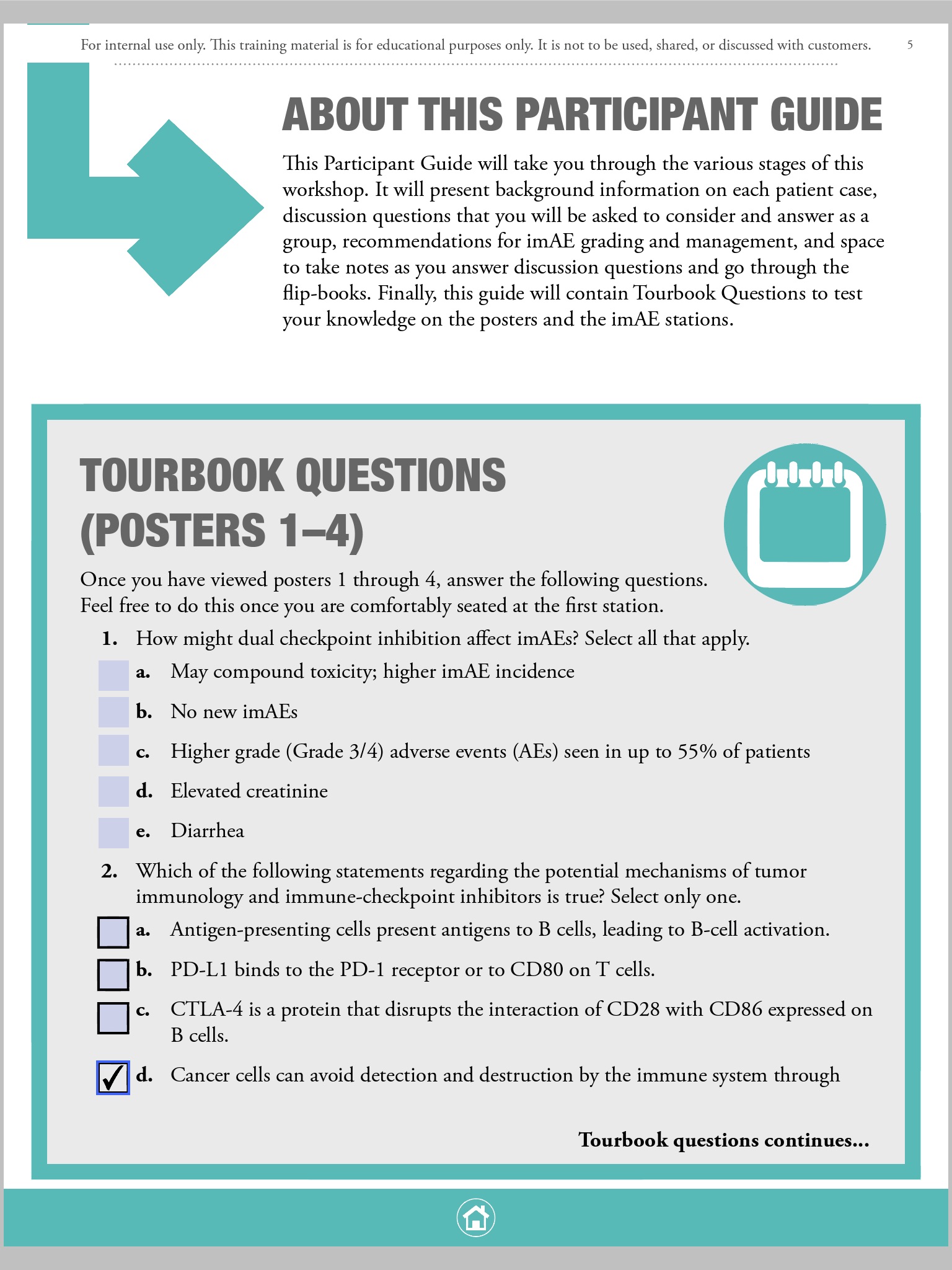
i have a 100 page document to work on. is this what i have looking forward to? is this all normal?
Copy link to clipboard
Copied
This issue is "appearance and style" of checkbox/radio elements. As you can see, there is no consistency and/or predictability of what visual outcome the selected checkbox will provide the visitor: the appearance (applied in ID) or the style (controlled within Acrobat).
If this was my project: I would not be concerned with the appearance applied in Indesign, and just use the style instead, which is set in Acrobat. Also, a "Check" style can be used for both radio and checkbox buttons.
Copy link to clipboard
Copied
the problem with working from acrobat is that when they have edits, i will need to set everything up from scratch in acrobat no? i work with an editorial team and they go to the indesign files to make edits. or send me edits. either way the indesign file is getting/going to be worked on constantly which is why is better to make all of this from indesign in my opinion
Copy link to clipboard
Copied
Check box and radio buttons can have their appearances removed within Indesign. A style is inherently assigned. The default style for a checkbox is a "check" and the default radio is a "circle". If you kept with the default styles, then you could edit ID doc, and export PDF without further manipulation.
In the event there are edits, and you need to maintain interactive elements that may have been modified in Acrobat, the workflow would be to export just page content (not interactive). Then in Acrobat replace page(s). This will keep interactive elements intact.

Copy link to clipboard
Copied
FormMaker could really help you here: FormMaker | Id-Extras.com
With FormMaker you can change and apply fonts, colours, alignment, and more, using InDesign paragraph styles, and basically do everything needed (including adding validations, calculations, etc.) all in InDesign.
If anything is missing in FormMaker, I'd also be happy to work with you to add it (for instance, currently there's no way to change the default appearances of checkboxes and radiobuttons, but that could easily be added).
Ariel
Copy link to clipboard
Copied
works nice. will this work on IPAD?
Copy link to clipboard
Copied
Are the users of this questionnaire working with a local form or an online form?
Copy link to clipboard
Copied
they will have ipads, all of them. they may have access to wifi. not sure. it this all dependent on an online connection?
Copy link to clipboard
Copied
JonathanArias wrote
works nice. will this work on IPAD?
FormMagic creates a plain-vanilla interactive Adobe PDF. The end-user needs no special software installed. So wherever interactive PDFs work, a FormMagic PDF will work.
If iPad's have proper PDF-Reader software that respects interactivity and Javascripts (if you use them), it will work.
No Internet connection necessary.

Copy link to clipboard
Copied
TᴀW wrote
If iPad's have proper PDF-Reader software...
That's a potentially big IF. It's one of the tougher platforms for which to author interactive PDF. Even Adobe Reader for liePad has tripped on some interactive PDF's of mine. All I can say is test all the interactivity on an iPad thoroughly yourself after each element is set up. (Adding the next field could interfere with one that worked 3 fields ago.)
Good luck.

Copy link to clipboard
Copied
The last time I researched that topic (a couple years ago) PDF Expert had the most sophisticated support for PDF interactivity for iOS, including iPad (as well as many other things). You can find out about it here:
Copy link to clipboard
Copied
this all helps a lot, thanks


Get ready! An upgraded Adobe Community experience is coming in January.
Learn more
 AdChoices