
rehana36276218
Known Participant
February 16, 2024
Question

formatting issue

  • February 16, 2024
  • 7 replies
  • 505 views

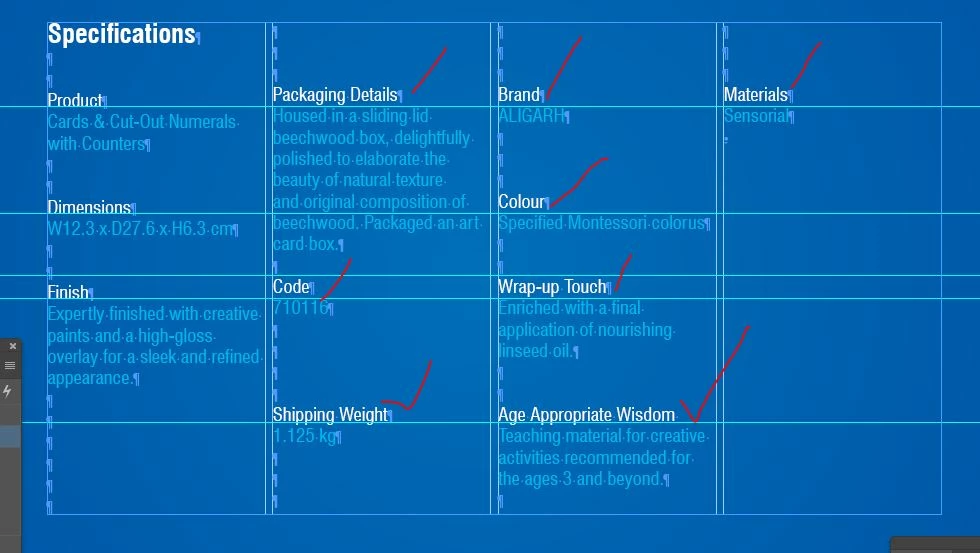
hi guys  in indesign i make these columns and you can see the headings in white where i am pointing in red is not perfectly line , i dont want to use base line shift manually becuase its not professional approach , what its going wrong if any body can help..


thanks in advance


This topic has been closed for replies.

7 replies

Joel Cherney
Community Expert
Community Expert
February 16, 2024

Well, the answer to your question "what is going wrong" is that you've used empty paragraphs to position text. The other suggestions made in this thread are very good suggestions - this would have been a great time to use a table. If you don't want to rebuild your table from the ground up, then @davidt12412601 's baseline grid suggestion would get it to look right without needing you to rebuild the whole thing.


But the why here is simple: in your 2nd through 4th columns, you've used three empty paragraphs to align your content. In the 1st column, it's two empty paragraphs and the word "Specifications." The leading on "Specifications" is greater than that of your empty paragraphs; it's just taller. It pushes the rest of the "Product" content down a few points. If you made the first empty paragraph of each of columns 2 through 4 have the same leading as the word "Specifications" then everything should line up. 


I'm not suggesting that solution, mind you. It's quick and dirty. There aren't many good answers to @Barb Binder 's question "Is there any reason not use a table here?"  besides "Okay, okay, I'll go rebuild it with a table." That would give you the best control of the layout. But if it's only going to print, and it's not going to be revised, and it was due to your client yesterday... well, you might choose the quick-and-dirty solution that I am absolutely not suggesting. 

Robert at ID-Tasker
Legend
February 17, 2024

@Joel Cherney


It would be enough to set leading for the "Specifications" EXACTLY the same as the rest of the text. 


Barb Binder
Community Expert
Community Expert
February 16, 2024

Hi @rehana36276218:


Is there any reason not to use a table here? Cells have vertical alignment controls, so you can set your white heads to align bottom, and your blue paragraphs to align top, cell insets for spacing so that they don't actually touch each other, and merge cells under Packaging Details.


~Barb

~Barb at Rocky Mountain Training
davidt12412601
Inspiring
February 16, 2024

As a quick fix, without addressing other issues, setting the Specifications paragraph to span all columns may help. That is, if this is a multicolumn text frame with guides, and not a table.

Peter Kahrel
Community Expert
Community Expert
February 16, 2024

 i dont want to use base line shift manually becuase its not professional approach


Well, adding all those returns isn't exactly professional.

jmendesign
Inspiring
February 16, 2024

If you are not using tables then the text should be aligned to the grid. As the first entry with the word Specifications is composed in a larger body, you will have to indicate in the paragraph styles that it does not align to the grid and the body text paragraph style to align to all lines.

jmendesign
Inspiring
February 16, 2024

Table > Cell Options > Text > Cell Insets

jmendesign
Inspiring
February 16, 2024

Did you see if there was any space after the character applied to these cells?