monical48791085
Participant
February 11, 2019
Answered

Forms and default fonts

  • February 11, 2019
  • 5 replies
  • 7172 views

Hi,

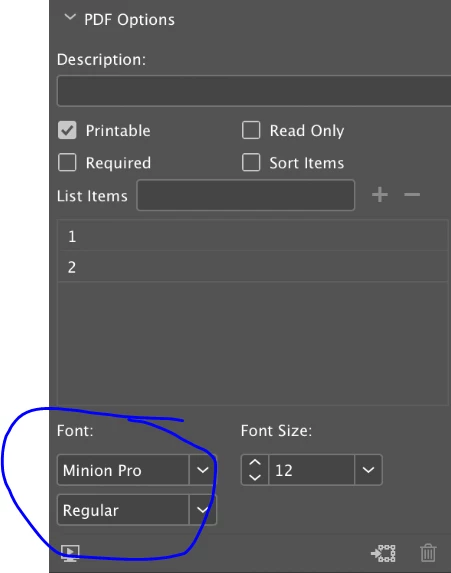
How do I change the default settings of the interactive form? I want to change the font from Minion pro to Flama, but I can´t find where to do it.

Correct answer Steve Werner

You should be able to do it in InDesign CC 2019 as documented in this article:

https://indesignsecrets.com/whats-new-with-indesign-cc-2019.php

Jump to the section, "PDF form fonts". But here's a warning:

"However, note that just because you choose a font doesn’t mean your audience will see it. Fonts used for list or combo boxes are embedded (so the final viewer will definitely see them in the correct font). However, fonts you choose for text fields are not embedded in the PDF, and so the end user will only see the correct font if they’re using Adobe Acrobat or Reader and have those fonts active on their computer. If the fonts aren’t present, Acrobat and Reader will substitute Adobe Serif MM or Adobe Sans Serif MM."

5 replies

Participant
March 10, 2021

If you aren't using Minion Pro otherwise in the document, you can go into "Package" and from the "Fonts" section use the "Find/Replace Font" function to change all occurrences of Minion Pro font family to another font family. It works by family and by style, so if for some reason bold and regular (for example) are both used, you have to change each one to what you want to clear them all. 


I didn't actually think that this way of correcting fonts (something I use when making sure a print production document is in order) would work for form fields; but I tried it and 'lo and behold' it did.

Participant
March 10, 2021

(Still doesn't let you change the default--which I was also looking for--but faster fix than some of the answers I saw.)


Participant
July 30, 2020

I haven't found the ideal solution for this, but I have found an easier way to go about it. First I create all of the interactive fields I need with the default options set and then export it to an interactive pdf. Then I open it in Adobe and select Prepare Form. Then I select ALL fields I want to edit and then I right click (control click for Mac) and choose Properties. Then I make the font changes, etc there. That should change all fields at once. Then save the document and you should be good to go!

Participant
November 19, 2020

Thanks, Brittany, For the life of me I don't know why this is SO COMPLICATED but yours is the best answer.

Community Expert
May 27, 2020

Hi together,

an obvious workaround would be to do some form fields with the desired font settings and duplicate the ones for future projects.


Just tested this: InDesign is able to store a form field as snippet file ( *.idms ) and as asset with InDesign library files or CC Libraries for exchange. The applied font will be maintained when placing the idms file or the asset.


Regards,
Uwe Laubender

( ACP )

TᴀW
Legend
February 11, 2019

Usually one would set defaults without any documents open.

But if no docs are open, the Buttons and Forms panel is greyed out.

I also tried changing the default font (with no docs open) when the Text tool is selected, as well as redefining [Basic Paragraph Style]. Doesn't help.

Maybe redefining [No Paragraph Style] would do the trick, but I don't recall how that's done, and it's probably not a good idea.

So it doesn't look like the default font for text fields can be easily changed.

With our FormMagic | Id-Extras.com product this can all be done, and there's also a free version for short 1-page forms. It also has the advantage that the fonts you choose for text fields would be embdedded in the PDF so you can be sure the end user will see them.

Ariel

Steve Werner
Community Expert
Community Expert
February 11, 2019

Ariel’s solution sounds like it might be a good one for you.

Participant
May 26, 2020

Why would I want to spend another $15 a month for another product when I am spending A LOT of money on Creative Cloud for a plug in from an outside vendor?

Here's another question - why is Minion Pro the default font? That is NOT one of the common use fonts that will show up on everyone's computers. I am trying to change it so that Arial or Century Gothic are the defaults for the forms I am creating, and I must change it EVERY time for every text box. Can't you set a Form Filler Text Style? 


I came on here because I have the same issue monical48791085 has. Have there been any updates?

Steve Werner
Community Expert
Steve WernerCommunity ExpertCorrect answer
Community Expert
February 11, 2019

You should be able to do it in InDesign CC 2019 as documented in this article:

https://indesignsecrets.com/whats-new-with-indesign-cc-2019.php

Jump to the section, "PDF form fonts". But here's a warning:

"However, note that just because you choose a font doesn’t mean your audience will see it. Fonts used for list or combo boxes are embedded (so the final viewer will definitely see them in the correct font). However, fonts you choose for text fields are not embedded in the PDF, and so the end user will only see the correct font if they’re using Adobe Acrobat or Reader and have those fonts active on their computer. If the fonts aren’t present, Acrobat and Reader will substitute Adobe Serif MM or Adobe Sans Serif MM."

Known Participant
December 12, 2019

I know this thread is marked as "solved" and this is marked as the "correct answer" but it really isn't. The orignal post was quite clear in that it asked how to define the default font settings for the Buttons & Forms "PDF Options" font panel. Obviously "monica 48791085" knew how to set the font per field via this panel as she'd included a screenshow showing the relevant section. The question is where does Indesign get the settings for this default? Whenever you add a new field I see the font set as "Minion Pro 12pt", even if I changed these details for the previous field. Why Minion Pro 12pt? There's gotta be some config file somewhere that this is picked up from, even if it's not something directly editable in Indesign. At the very least adding the ability to have more control over field settings should be put onto some feature request list; Indesign support for PDF forms is appallingly basic.