
Participating Frequently
November 22, 2018
Question

FR: How to Disable "Learn More" Pop-Ups in InDesign

  • November 22, 2018
  • 51 replies
  • 35186 views

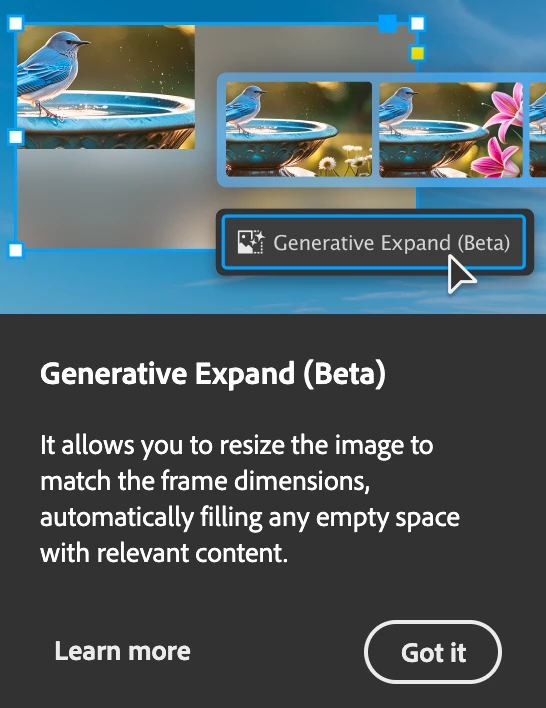
After a recent update, my InDesign is now showing all these stupid pop-ups the whole time.


Screenshot attached.  To be absolutely clear, I am talking about the entire dialogue box, not the tool-tip illustrateed in a section of the dialogue box shown.


How do I kill them off once and for all ?  I've looked through Preferences but canot spot anything obvious.


<Title renamed by MOD>

51 replies

Participant
March 16, 2025

Once upon a Time, when you bought a software, it was a complete finished quality product. Nowadays all of these companies, laughing at your face. 

Can someone please mention all of Indesign finest alternatives out there?

Dave Creamer of IDEAS
Community Expert
Community Expert
March 16, 2025

@NMS2025 Are you looking for an alternative because of the popups? (That's what this thread is about.)

Did you try googling your question or was it just a retorical question/complaint?


David Creamer: Community Expert (ACI and ACE 1995-2023)
Gavin at MRP
Inspiring
March 18, 2025

For RTL, don't bother looking at Affinity.


Okay, I see what you mean about RTL (right to left languages like Hebrew and Arabic). But aside from that …


While I still use Adobe for work, as it's a requirement, I switched Affinity at home a couple of years ago, and find that the only two things I really miss at all (after 30+ years with Adobe) is: GREP in Paragraph Styles in InDesign, and Image Trace in Illustrator. Affinity doesn't have these features … yet.


Everything else works fine, and they are chomping at the heels of Adobe. As a former QuarkXPress user, I would say that Adobe is right at the point that Quark right before their user base jumped ship. Right before Quark went down, they stopped listening to their users. That's where most of us feel Adobe is right now.

Inspiring
March 10, 2025

Years after users complained, these pop up windows are here to stay. They won't go away after being dismissed many times. They always pop back up again with different things users can learn more--stopping users from working on projects, disrupting workflows, and increasing blood pressure.  Way to go Adobe.  😞

timz67519437
Inspiring
March 7, 2025

This is still happening. In 2025. No way to turn off these annoying blue bars. I get one almost every day that I open InDesign.

Participant
March 5, 2025

Has anyone else noticed a general enshittification of the usablity of InDesign and Illustrator? Maybe other apps too, but they're the two I use the most so they've become the most annoying.


Things like:

- ENDLESS unwanted pop-ups, product tours, and suggestions (I'm looking at you, InDesign History panel) and no way to turn them off?

- I do not need a tour of CC Libraries every single time I open Illustrator. General info on this forum suggests that they stop after a couple weeks, but nope. Every. Single Time.

- Those blue banners at the bottom of the screen yelling at me to Try This New Thing You Don't Need! Also no way to shut them off.


Halp. I'm thinking of resorting to ~Canva~


Inspiring
March 5, 2025

It seems to be connected to the fact that InDesign doesn't remeber our Workspace setting from boot to boot, so it thinks we're new all the time.

Participant
March 5, 2025

Thanks for that intel. It makes sense if that's the case but still so annoying. I have many grey hairs and memories of Photoshop 2.0 to prove that I'm not new 

danpinho
Known Participant
February 28, 2025

Congrats Adobe, 7 months later and still no solution. But when it comes to increase Subs prices…

Participating Frequently
February 28, 2025

So frustrating. So maddening. So irritating. What do we do? I have some ideas but I can't say them here. But I do I suggest we start writing letters to the Adobe board: https://www.adobe.com/about-adobe/leaders/board-directors.html.

Be nice. Be polite. But let them know.

quote

Congrats Adobe, 7 months later and still no solution. But when it comes to increase Subs prices…


By @danpinho


designer-images
Known Participant
March 5, 2025

Like you all, this has been an irritating and disruptive issue for me too over the last few months.

A couple of days ago I saw an update to 20.2. Interestingly, the relentless popups for Generative Fill etc. stopped, with exception of the History Panel Tour popup (which I could live with).

However, after updating, i then endured endless crashes, usually when exporting to PDF or sometimes when closing a file...

My custom workspace would always switch to the default upon restart, so I wondered if that had something to do with it, but it didn't.

Don't know if it's related but I use Typeface and use the Auto Activation for Indesign feature which worked well until this version. Tried switching that setting off, but it made no difference. I even uninstalled and reinstalled InDesign with fresh preferences but it still crashed all the time.

I've now reverted back to 20.1 and got to say hello again to my old mate... (looks like popups are back for me again). 

However, Indesign hasn't been crashing (yet), and my font activation through Typeface is behaving more as it should it seems. So it's possible Adobe have solved one problem and created others in the process. Anyway thought I'd share my experience, Perhaps proceed to 20.2 with caution if you feel you must.

Participant
February 25, 2025

For me, this has become a hard stop. A forced tutorials locks up in a state I can't dismiss, and I'm not able to make use of the program at all. My only way out is through by closing out the program through task master. I've uninstalled and reinstalled to no effect. Suggestions welcome.

Inspiring
February 25, 2025

You can't and Adobe doesn't care. This has been going on for almost a year with many updates since it first became a nuisance. 


What's happening, and is more important, is that InDesign is not remembering our personalized Workspace setting. It seems random when it forgets. And so each time it thinks you're new. Mindbending.

Participant
February 11, 2025

Hello Community,

weiß jemand wie man diesen Link/mit Foto im Indesign entfernt? Er erscheint immer wenn ich einen Bildrahmen erstelle oder einen vorhandenen berühre, also andauernd ... nervt!

Danke jetzt schon für eure Hilfe!


Inspiring
February 11, 2025

Du kannst nicht. Adobe hat beschlossen, dass Ärger ihr zweiter Vorname ist.

Participant
February 5, 2025

The below tutorial window (scrrenshot) for Text to image pops up every single change I make to scale an image, which is not releavant and frustrating.

There is no way to click got it or any buttons on the pop up. I have to press enter to get rid before i can make a single change to scale, and it comes up again.


Please advise how I can get rid of this, it is affecting my work, I like to preview the scale change and do this gradually to fit in the the document.

Many thanks,


leo.r
Community Expert
Community Expert
February 5, 2025
quote

The below tutorial window (scrrenshot) for Text to image pops up every single change I make to scale an image, which is not releavant and frustrating.

There is no way to click got it or any buttons on the pop up. I have to press enter to get rid before i can make a single change to scale, and it comes up again.

By @radiant_wish4756


that's some unusual behavior.


try these general troubleshooting steps, especially cleaning caches:

https://www.rockymountaintraining.com/adobe-indesign-rebuilding-preferences-cache/


will it make a difference?

Participant
February 6, 2025

Thank you for the advice 🙂

I have tried this, and now looks like it has stopped (at least for the time being).

Will see if this is a continuing fix

brainfade619
Participant
February 4, 2025

I Love Paul Tranni, but his popups in my apps are driving me nuts!!!!


How do I remove the abobe popups!!! Ughhhhh

Participant
January 31, 2025

YES INDEED these pop-ups are EXTREMELY annoying! Another thing that drives me crazy is the Workspace setting that resets itself randomly very often. Sadly, after 30 years of working with Adobe software, I can not move my workflow to any alternative because of the company policy (I get the work files from outside). Adobe products have turned into CPU power eating monsters, especially After Effects.

Inspiring
January 31, 2025

That's the real issue here: the Workspace reseting all the time. If it worked as it should the popups wouldn't happen anymore. But the Workspace issue has been an ongoing problem for years. Apparently not a priority. Stunning.