
Participating Frequently
November 22, 2018
Question

FR: How to Disable "Learn More" Pop-Ups in InDesign

  • November 22, 2018
  • 51 replies
  • 34608 views

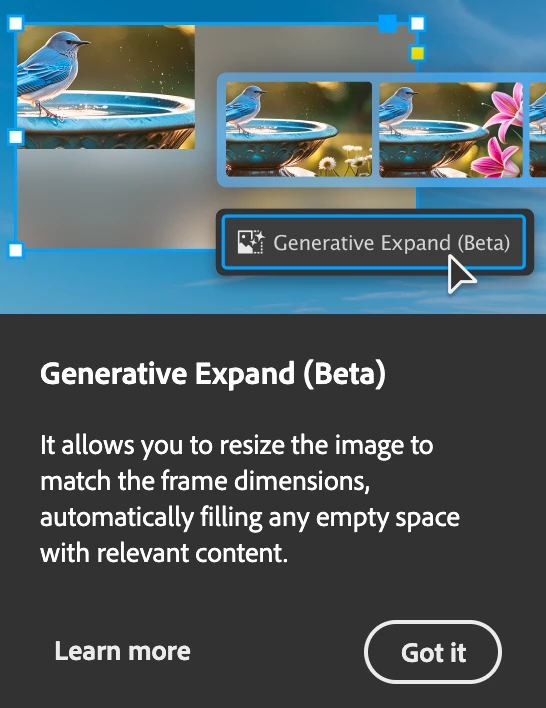
After a recent update, my InDesign is now showing all these stupid pop-ups the whole time.


Screenshot attached.  To be absolutely clear, I am talking about the entire dialogue box, not the tool-tip illustrateed in a section of the dialogue box shown.


How do I kill them off once and for all ?  I've looked through Preferences but canot spot anything obvious.


<Title renamed by MOD>

51 replies

Zen Creative Agency
Known Participant
April 8, 2025

I keep getting that stupid History pane tour coming up, it's SOOO ANNOYING!!!

Participating Frequently
April 9, 2025

The History pop-up (my favourite), which always appears unexpectedly and blocks ongoing activity, is a perfect Adobe trap that must have been invented by someone extremely "forward-thinking" and "clever".

Abhishek Rao
Community Manager
Community Manager
April 3, 2025

Hi everyone,


I wanted to share an update on this issue after following up with the product team. They’ve acknowledged the feedback and confirmed that many onboarding prompts and pop-ups will be removed in the upcoming InDesign 20.3 update, scheduled for release in April.

I’ve specifically raised the concern about the "Learn More" pop-up that appears after updates, installation, or resetting preferences, as this has been a recurring frustration for many of you. The team is checking the status of this particular pop-up, and I’ll provide further updates as soon as I hear back.

I also want to take a moment to thank our community experts, especially @Dave Creamer of IDEAS, for stepping in and backing up this request. Your insights and support go a long way in making sure these concerns get the attention they deserve.

I appreciate your patience, and as always, I’ll keep you posted on any new developments.

If you haven’t already, please continue upvoting the UserVoice request to help keep this a priority. 


^
Abhishek

designer-images
Known Participant
April 3, 2025

Hi @Abhishek Rao ,


Thanks for the update mate, I appreciate your efforts in trying to move this slow beast of an issue forwards.


Apologies if this is the right place to raise this but I use Typeface for Mac. InDesign 20.2 has a known issue with the font activation feature that causes it to relentlessly crash. Because of that, I'm still on 20.1. If that can somehow be addressed in the upcoming update as well (assuming it's an INDD issue), that would be greatly appreciated as I'd love to finally say goodbye to these intrusive popups.

Abhishek Rao
Community Manager
Community Manager
April 3, 2025

Hi @designer-images,


Thank you for your kind words. This is a known issue, and the product team has been working on it. A fix is planned for the upcoming 20.3 release and already in the current pre-release or InDesign (https://adobe.ly/3DTi8sx). You can follow the discussion and updates in this thread:
InDesign 20.2 crashing after export to PDF/close file

Additionally, the issue has been reported on UserVoice, where you can upvote and add any comments: InDesign 20.2 - Open any document, do nothing in it, and crash

I appreciate your patience. 


^
Abhishek

Abhishek Rao
Community Manager
Community Manager
April 1, 2025

Hi everyone, 


Thank you for sharing your thoughts on the persistent "Learn More" pop-ups. I understand how much value this feature would add for users. I have escalated this with the product team and they are looking into it. 


For better visibility, could you please upvote this UserVoice here: Preference to disable contextual menus annoyance

and add your comments. 

I’ll be sure to share any progress on this thread soon as I have more information!


We truly appreciate your patience.


^
Abhishek

Participating Frequently
April 2, 2025

You've got to be kidding me. This is unbelievable. So we have to register on another server because no one reads the opinions of users on your server?

Dave Creamer of IDEAS
Community Expert
Community Expert
April 2, 2025

Use the same log-on info you use on this forum. That makes it easier to log in.


This forum is mainly a user-to-user support forum, often with "how to" questions. Some Adobe employees, such as Abhishek, do frequent them, but as a whole, this is not where Adobe determines what is important to add/fix in their software. 

For example, there were/are issues with InDesign on Mac--some caused by non-Adobe utilities--that where all over the InDesign forum. Why? Because it was causing a problem for THOSE users. However, a majority of the users were not having a problem, but if you looked at just the forum, one would think it was affects most of the users.


That's why the UserVoice site is critical to post your opinions--just be sure to search for existing posts to eliminate duplicate posts. That just dilutes the vote numbers and the number of votes shows Adobe what to focus on first.


David Creamer: Community Expert (ACI and ACE 1995-2023)
Abhishek Rao
Community Manager
Community Manager
March 28, 2025

Hi everyone,  


I appreciate all the feedback shared. Just wanted to let you know that this is something the product team is actively looking into. We’re working on improvements, and I’ll share any updates as soon as I have them. Thanks for your patience and for being part of the InDesign community! 


Best, 

Abhishek

Inspiring
March 28, 2025

Abhishek, for what it's worth I'd like to reiterate that it's clear to many of us that these popups wouldn't happen as often as they do, or ever again,  if the ID team could once and for all solve the years-long issue of ID constantly forgetting our personal Workspace setup. No other app does this, including other Adobe apps. It's been infuriating and a productivity pylon.

danpinho
Known Participant
March 28, 2025

Still can’t disable it. Still no official fix. Still pretending this is normal in professional software.


For those new to the community:
I will be posting about this every time Adobe pushes an update. Or maybe every month IDK. Why?


Because after eight months of feedback, silence, and repetitive interruptions to my workflow, it’s clear the only consistent part of the InDesign experience is this pop-up.


This is less about venting and more about creating a searchable record so users know it's not just them. Adobe hasn’t addressed it, so here we are.


See you all again on the next update. Same time, same pop-up.

Original from October: https://community.adobe.com/t5/indesign-discussions/how-to-disable-quot-learn-more-quot-pop-ups-in-indesign/m-p/15233833#M618030

Mike Witherell
Community Expert
Community Expert
April 1, 2025

Hi Dan,

Yes, this should be switchable in Preferences. On for newbies; off for veteran users.

Mike Witherell
Abhishek Rao
Community Manager
Community Manager
April 1, 2025

Hi @danpinho,  


I hear you, and I understand how much value this feature would add for users. Just wanted to let you know that the product team is actively working on this request, and we appreciate your patience. You should be hearing an update on this soon.  

I’ll share any new developments as soon as I have them!  


^

Abhishek

Participant
March 26, 2025

For now, and unless someone has discovered a disable option, all I have found was reporting it:

https://indesign.uservoice.com/forums/601180-adobe-indesign-bugs?query=Pop%20Up%20Window%20-%20History%20Panel%20Tour

Participant
March 26, 2025

My favorite is when InDesign crashes repeatedly and forces you to endure the same Tours and Tips over and over and over and over and over. 


Stop asking me to invite people to my library. Stop asking me to share my work. Stop dangling new features in front of my workspace, disrupting my workflow. Most people have a specific goal in mind every time they open these applications - interruptions are just an annoying obstacle to overcome before achieving that goal, closing the software for the day, and getting on with life. Stop advertising your products to people who are already paying to use them. Give us an opt out.

And while I'm at it - can you please stop telling me via popup that I can "update my profile" every time I interact with the Adobe Community? We know how web forums work. Believe it or not, we use digital products regularly!

SummersJ
Participant
March 21, 2025

I had to crash Photoshop just to get rid of the #@$% blue tooltip, too, even after I'd closed the garbage pop-up!

Participant
March 19, 2025

These pop ups have got to stop! It keeps telling me the same things on repeat while I'm trying to work. Make it stop, for the love of God.

Participant
March 18, 2025

What if you can't even click the pop up to close it? Suddenly with a recent update I assume, the popups are oversized and only partially show, so I can't click to close them. I can't work with them covering part of my document. I'm on a laptop with high res display. If I adjust the scaling smaller, I can't read anything, all the text and icons are microscopic. Adobe really needs to provide a way to disable these.