

dublove
Legend
November 4, 2024
Question

FR: Need Alignment Options for Bleed in InDesign

  • November 4, 2024
  • 6 replies
  • 935 views

Strange that there is no option to align to bleed(cut-offs) in the alignment panel?

Is it that the officials don't think it's useful?
I personally need it. What about you guys?
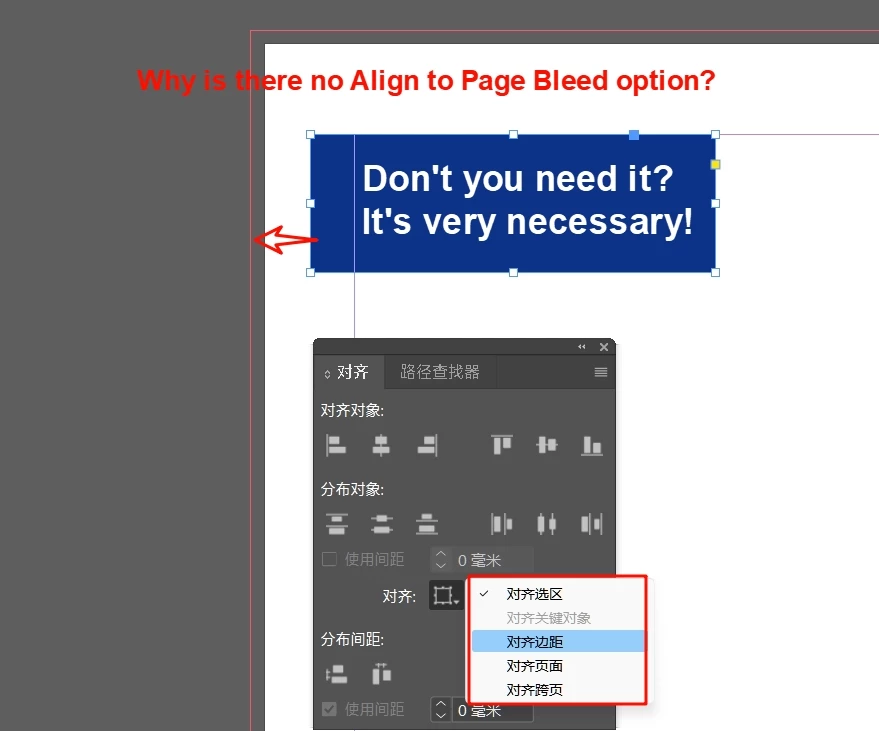


<Title renamed by MOD>

6 replies

rob day
Community Expert
Community Expert
April 11, 2025

Hi @dublove , In your example do you want to move the selection or extend it to the bleed? Or, consider this more ambiguities example:


Should the rectangle be moved or extended? Where? All four sides? One, two, three, or four?


dublove
dubloveAuthor
Legend
April 11, 2025

Hi @rob day  I've been waiting for you for 10,000 years.

It's moving.
It's simply alignment moving.
This issue is just expected to be discovered by Adobe and we don't have to put much effort into it.
There's not much point in going back to scripts or plugins.

Actually, I was expecting that it would be possible to have objects aligned to the reference(guide?) line.


Thank you very much.


Speaking of extensions, it turns out you modified a script for me.
Been meaning to ask: it now applies to text boxes, how do I make it work for images and frames?
I've posted the last one at the end of this post, so please help me out.

fit to colum and typearea 

rob day
Community Expert
Community Expert
April 11, 2025

Apologize. I can't understand.
The extension you're talking about is probably what I mean by a frame or picture that fits into a bleed, or typearea.


I can't understand.


If you are adding a bleed for print, you wouldn’t want the text to move when you add the bleed to the text frame.


This:


Not this (which would happen when the text frame is moved):


Frans v.d. Geest
Community Expert
Community Expert
April 11, 2025

You can align with an Object Style to the bleed lines (by reference point -3 with a 3mm bleed for instance), agreed not the same as with the alignment panel, but it works.

Pariah Burke
Community Expert
Community Expert
April 11, 2025

I forgot about moving by object style (-0.125 in, if you're using Imperial measurements). Still, my script might be useful to someone who doesn't have exclusive object styles on the bleeding objects.


Pariah Burke
Community Expert
Community Expert
April 11, 2025

While we're waiting for Adobe to build it into InDesign, I've created a free script you can use to snap objects to one or more bleed guides. Download it here: http://abbrv.it/IDAlign2Bleeds


dublove
dubloveAuthor
Legend
April 11, 2025

@Pariah Burke 

?
Is it just me displaying it, or did you post and not send it successfully?
The bottom of your post is blank.

Pariah Burke
Community Expert
Community Expert
April 11, 2025

Huh. That's weird. I just updated my original reply to re-add the link above the video. It seems to be staying there.


Participant
April 10, 2025

Me and 10 of my colleagues agree!

Bill Silbert
Community Expert
Community Expert
November 4, 2024

You can submit a feature request to https://indesign.uservoice.com.

Willi Adelberger
Community Expert
Community Expert
November 4, 2024

I agree. This is missing. Make a request. I did several years ago, but nothing happened.